MC1484010 Hide organizer names in calendar view on Teams Panels
Primary service: Teams
ChangePilot summary
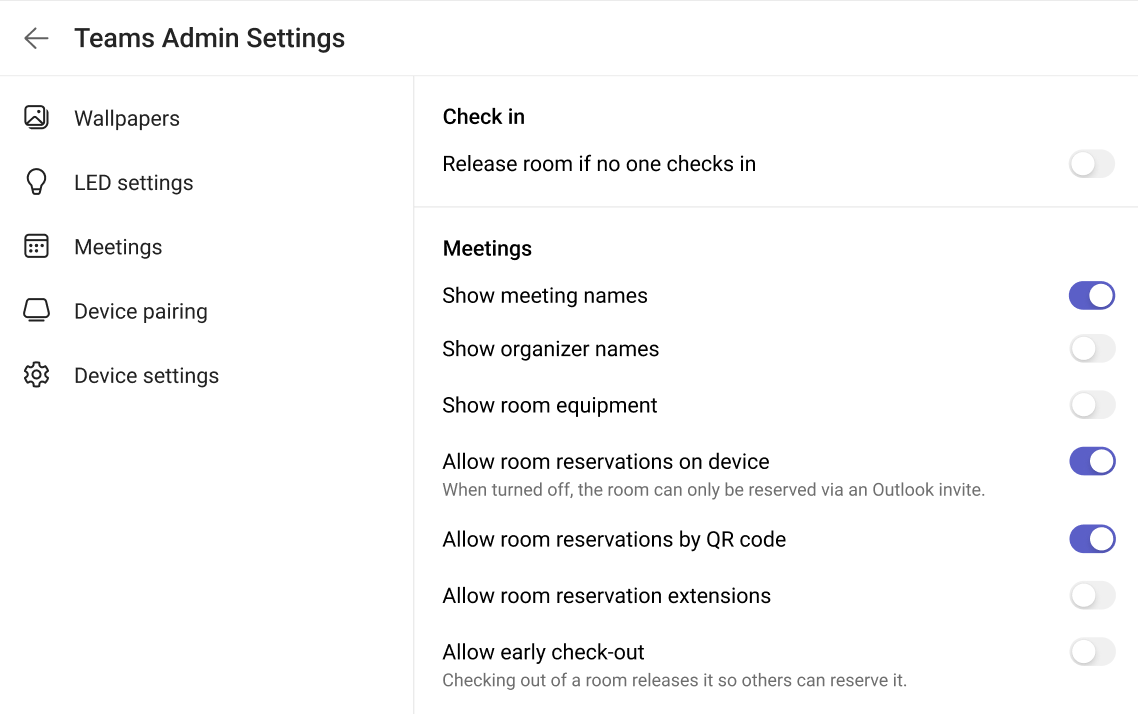
- Microsoft Teams Panels will add an admin setting to control whether organizer names appear in Calendar View on panel devices.
- Administrators can turn the Show organizer name setting on or off in the Teams Rooms Pro Management portal or directly on a Teams panel.
- The change affects Teams Panels users viewing meeting details and the admins who manage those devices.
- The feature is available for tenants with Teams Rooms Pro or Teams Shared Spaces licenses.
- By default, organizer names will continue to display unless an admin changes the setting.
What it means for you
What admins need to do
Review whether your organization wants organizer names visible on Teams Panels, then decide if the default behavior is acceptable. If you need to hide names, update the Show organizer name setting in the Teams Rooms Pro Management portal or on the relevant panel devices, and communicate the privacy/display choice to room device owners and helpdesk staff.
Impact on users
Users viewing meetings on Teams Panels will continue to see organizer names in Calendar View unless an administrator changes the setting. If IT hides organizer names, the Calendar View on the panel will no longer display the organizer name.
If you miss it
If this is missed, nothing breaks, but your Teams Panels will keep showing organizer names by default. Organizations that expected organizer names to be hidden for privacy or room display reasons may have unintended information exposure on shared panel devices, and helpdesk teams may need to explain why the display does not match policy.
- Admin controls available
- Yes
- Licences affected
- Teams Rooms Pro, Teams Shared Spaces
History
Recorded changes
No changes recorded since ChangePilot first saw this post.
Microsoft message
[What and why]
Microsoft Teams Panels will introduce a new administrator setting that allows administrators to choose whether organizer names are shown in Calendar View on Teams Panels.
Admins can toggle the Show organizer name setting ON or OFF in the Teams Rooms Pro Management portal or on the panel device. When organizer names are hidden, the organizer name is not shown in Calendar View on the panel device.
This feature is available with Teams Rooms Pro and Teams Shared Spaces licenses.
[Rollout schedule]
- General Availability (Worldwide): Beginning in early October 2026 and expected to complete by early October 2026
[Impact on your organization]
Who is affected
- Administrators who manage Microsoft Teams Panels
- Organizations using Teams Rooms Pro licenses
- Organizations using Teams Shared Spaces licenses
- Users who view meeting information on Teams panel devices
Platforms and services
- Microsoft Teams Panels
- Teams Rooms Pro Management portal
What will happen
- A new setting, Show organizer name, will be available for Teams panel devices.
- Administrators can choose whether organizer names are displayed in Calendar View.
- The setting can be configured from the Teams Rooms Pro Management portal or directly on a Teams panel device.
- By default, organizer names will continue to be displayed in Calendar View.
[Action required and recommendations]
No action is required if you want organizer names to continue appearing in Calendar View on Teams panel devices.
If you want to hide organizer names:
- Review your room privacy and display requirements.
- Update the Show organizer name setting in the Teams Rooms Pro Management portal or on individual Teams panel devices.
Learn more
[Compliance considerations]
| Question | Answer |
| Does the change include an admin control, and can it be controlled through Entra ID group membership? | Yes. Administrators can enable or disable the display of organizer names on Teams Panels. The available information does not indicate support for management through Entra ID group membership. |
More information
Details
In weekly changes
Platforms
- Android
- Teams Rooms
- Surface Hub
Services
- Admin
- Teams
Category
- Stay informed
Microsoft tags
- Admin Action
- New Feature
- User Adoption