MC1481318 Microsoft Defender XDR: Detection source support in alert tuning rules
Primary service: Defender XDR
ChangePilot summary
- Microsoft Defender XDR is adding detection source selection to alert tuning rules for more granular scoping.
- Alert tuning rules can now be limited to specific detection sources instead of applying broadly across a service source.
- Existing rules that are not updated will continue to apply to all detection sources under their selected service sources, including custom detections.
- Organizations using alert tuning rules should review current rules and decide whether to narrow detection source coverage.
- No compliance issues were identified for this change.
What it means for you
What admins need to do
Review existing alert tuning rules in Microsoft Defender XDR and determine whether any should be scoped to specific detection sources. Update rules that need narrower coverage so they do not apply broadly to all detection sources, including custom detections. If your organization is intentionally using broad coverage, verify that current configurations remain appropriate and document the intended behavior.
Impact on users
Most users will not notice a day-to-day change. Security administrators may see updated alert tuning behavior in Microsoft Defender XDR, but end-user workflows are not expected to change unless alerts are being tuned differently by the security team.
If you miss it
If the new detection source scoping is not reviewed, existing alert tuning rules may continue applying more broadly than intended. That could reduce the precision of alert suppression or filtering, potentially allowing unwanted alerts to continue or causing tuning to affect detections the team did not mean to include. The business impact is mainly on security operations efficiency and alert quality rather than direct end-user disruption.
- Admin controls available
- Yes
History
Recorded changes
No changes recorded since ChangePilot first saw this post.
Microsoft message
[What and why]
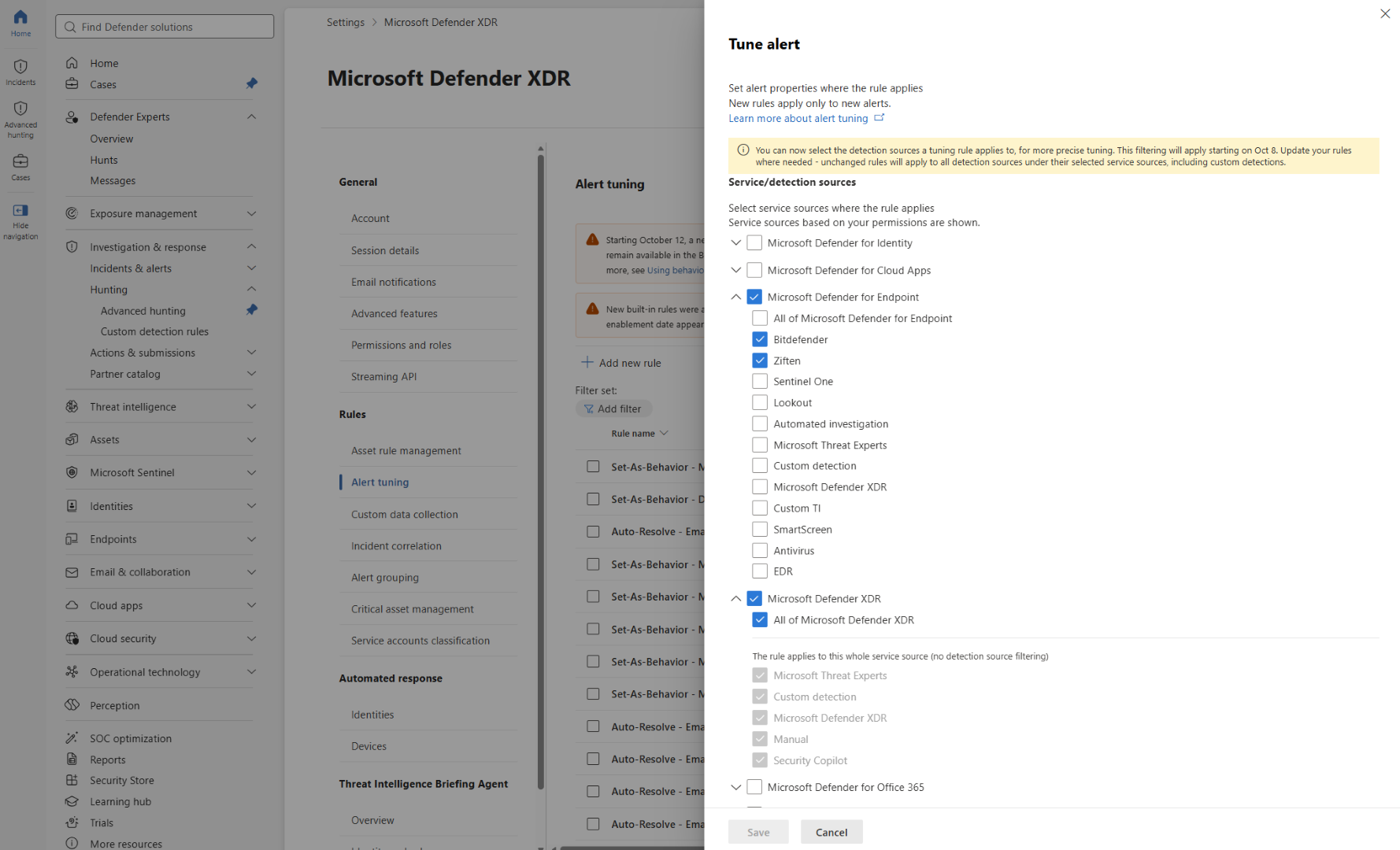
We are introducing detection source selection for alert tuning rules in Microsoft Defender XDR. This update enables alert tuning rules to be scoped to specific detection sources, providing more granular control over how alert tuning rules are applied.
As part of this update, alert tuning rules will apply to the detection sources selected for each rule. Existing rules that are not updated will apply to all detection sources under their selected service sources, including custom detections.
[Rollout schedule]
- Public Preview (Worldwide): Rollout begins in mid-October 2026 and is expected to complete in early November 2026.
- Note: Detection source selection will become available in mid-October 2026, and configured detection source selections will take effect in early November 2026.
- General Availability (Worldwide): Rollout begins in mid-November 2026 and is expected to complete in early December 2026.
- Note: Detection source selection will become available in mid-November 2026, and configured detection source selections will take effect in early December 2026.
[Impact on your organization]
Who is affected
- Organizations that use alert tuning rules in Microsoft Defender XDR.
Platforms and services
- Microsoft Defender XDR
What will happen
- Alert tuning rules will be configurable to apply to specific detection sources and apply only to the detection sources selected for each rule.
- If not updated, existing alert tuning rules will apply to all detection sources under their selected service sources, including custom detections.
Detection source selection
[Action required and recommendations]
No action is required if existing rules should apply to all detection sources under their selected service sources, including custom detections. Otherwise, we recommend that you review existing alert tuning rules and update the detection source selections as needed.
[Compliance considerations]
No compliance considerations identified. Review as appropriate for your organization.
Details
In weekly changes
Services
- Defender XDR
Category
- Stay informed
Microsoft tags
- Admin Action
- Feature Update
- New Feature