MC1478958 Select page canvas elements for Copilot-assisted editing
Primary service: SharePoint
ChangePilot summary
- SharePoint page authors with Microsoft 365 Copilot can now select specific page canvas elements before asking Copilot to edit content.
- The selected section or web part is used as the context for Copilot edits, which should improve precision when making page changes.
- If no canvas element is selected, Copilot will continue to choose the most appropriate area of the page based on the prompt.
- No admin configuration or user action is required before this feature is available.
- The change affects SharePoint Online and Microsoft 365 Copilot users who author pages.
Latest update: No material change.
What it means for you
What admins need to do
No configuration is needed. IT should update any SharePoint authoring guidance or helpdesk notes for Copilot-enabled page authors so they know they can select a section or web part before prompting Copilot. Consider briefing content owners and page authors on the improved editing workflow.
Impact on users
SharePoint page authors with Microsoft 365 Copilot will be able to click a page section or web part before asking Copilot to edit it. This should make Copilot edits more precise and reduce the need to rework changes, while other page authors will see no change.
If you miss it
If this is missed, there is no service risk or compliance issue, but Copilot-enabled page authors may be unaware of the new selection-based editing option and continue using the older prompt-only workflow. That can lead to less precise edits, more rework, and avoidable support questions about how to target specific page areas.
- Admin controls available
- No
- Licences affected
- Copilot
History
Recorded changes
No changes recorded since ChangePilot first saw this post.
Microsoft message
[What and why]
We have introduced an enhancement to Copilot in SharePoint page authoring that allows page authors to directly select specific page canvas elements before submitting a prompt to Copilot. This improvement helps authors provide more precise context for Copilot, making it easier to target edits to specific sections or web parts and improving the page editing experience.
[Rollout schedule]
- General Availability (Worldwide, GCC, GCC High, DoD): This feature is available now.
Who is affected
- SharePoint page authors with a Microsoft 365 Copilot license.
Platforms and services
- SharePoint Online
- Microsoft 365 Copilot
What will happen
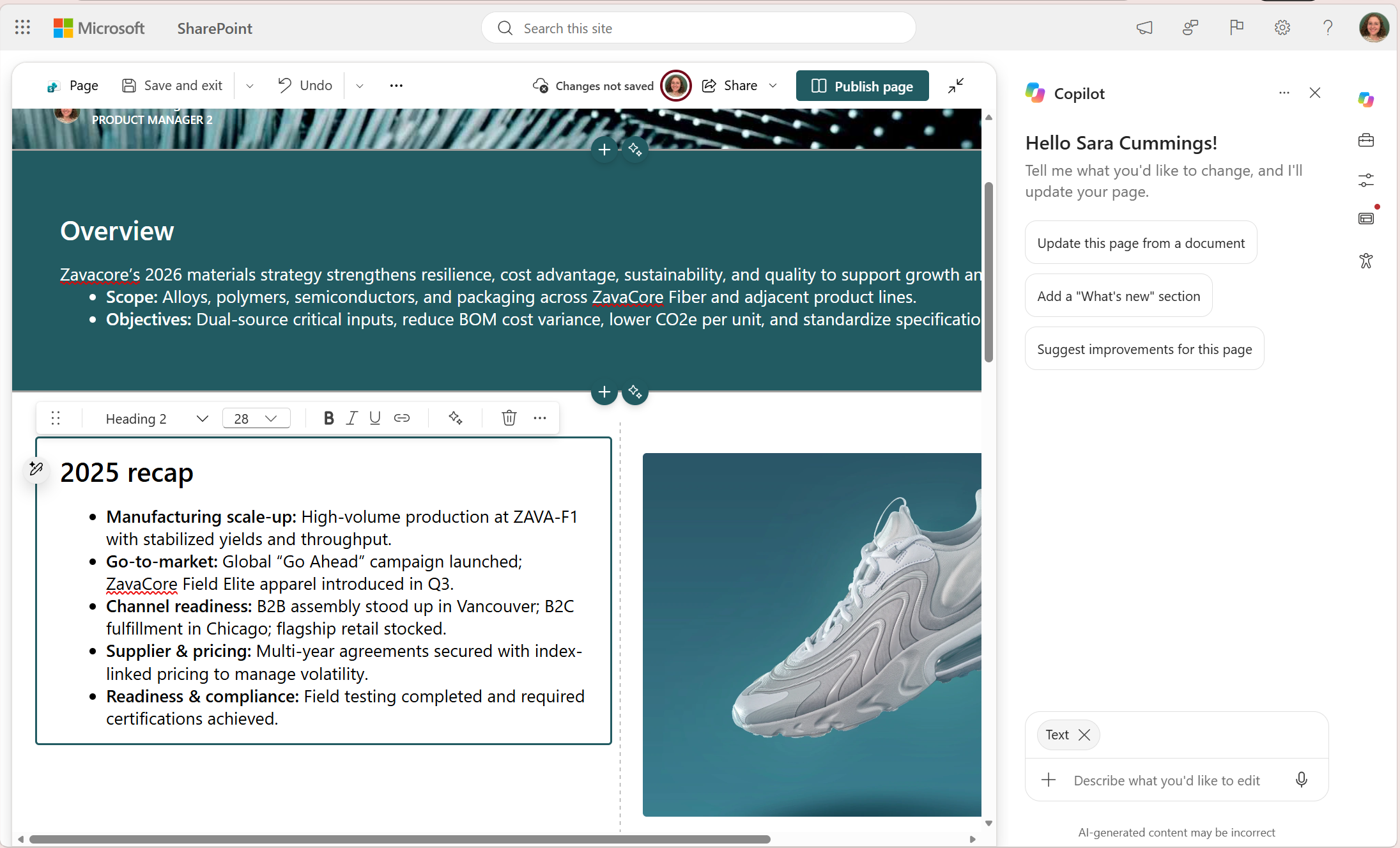
- Authors editing a SharePoint page with Copilot can directly select specific page canvas elements before submitting a prompt.
- Selected elements will appear as a selection indicator above the Copilot chat box.
- Authors can select entire sections or individual web parts for editing.
- Copilot will use the selected element(s) as the context for requested changes. If no canvas element is selected, Copilot will continue to determine the most appropriate area of the page to update based on the prompt.
Editing a page canvas element with Copilot:
[Action required and recommendations]
No action is required.
[Learn more]
[Compliance considerations]
No compliance considerations identified. Review as appropriate for your organization.
More information
Details
In weekly changes
Services
- M365 Copilot
- SharePoint
Category
- Plan for change
Microsoft tags
- Admin Action
- Feature Update
- New Feature
- User Adoption