MC1478463 Teams user reporting enabled by default
Primary service: Defender XDR
ChangePilot summary
- Microsoft Defender for Office 365 will enable Teams user reporting by default for eligible tenants unless admins opt out.
- Teams users will be able to report suspicious messages, calls, and meetings from Teams for security analysis.
- Reported content is routed to the organization’s configured submission destination, or to Microsoft for analysis if that is selected.
- Teams and security administrators should review the dedicated Teams user-reported settings page in the Defender portal and decide whether to keep or disable the default behavior.
- Existing tenant settings should carry over during the portal migration, but admins should verify configurations after the move.
Latest update: No material change.
What it means for you
What admins need to do
Review the Teams user-reported settings in the Microsoft Defender portal before the default change takes effect. Decide whether user-reported Teams content should be submitted to Microsoft or redirected to another destination, and opt out if your organization does not want the default behavior. Confirm that security operations and help desk teams understand the new reporting workflow and know where reported items will appear for investigation.
Impact on users
Users will see the ability to report suspicious Teams messages, calls, and meetings directly from Teams. If your organization keeps the default setting, reported items will be sent for security analysis using the configured destination, and users may be encouraged to report suspicious content more easily.
If you miss it
If IT does not review the setting, Teams user reporting will be enabled by default and may begin sending user-reported content to the configured destination without an intentional decision from the organization. That can create an unexpected change in security operations, confusion for help desk and SOC staff, and potential compliance or privacy concerns if reported content is routed to Microsoft when the tenant intended a different destination or to remain opted out.
- Admin controls available
- Yes
- Licences affected
- Defender for Office 365 Plan 1, Defender for Office 365 Plan 2, E5
History
Recorded changes
No changes recorded since ChangePilot first saw this post.
Microsoft message
[What and why]
To help organizations identify and respond to security threats in Microsoft Teams, Microsoft Defender for Office 365 will enable Teams user reporting by default. Users can report suspicious messages, calls, and meetings, helping organizations improve detection of phishing, spam, impersonation, malicious content, and other threats.
This capability is available for organizations licensed for Microsoft Defender for Office 365 Plan 1 or Plan 2, Microsoft 365 E5, or Office 365 E5.
[Rollout schedule]
- General Availability (Worldwide): Beginning in late October 2026 and expected to complete by late October 2026
[Impact on your organization]
Who is affected
- Organizations licensed for Microsoft Defender for Office 365 Plan 1 or Plan 2, Microsoft 365 E5, or Office 365 E5
- Microsoft Teams and security administrators
- Teams users in affected organizations
Platforms/Services
- Microsoft Teams
- Microsoft Defender portal
- Microsoft Defender for Office 365
What will happen
- Users can report suspicious messages, calls, and meetings directly from Teams. Reported content is submitted per your configured reported destination for security analysis.
- Security risk items can include phishing, spam, impersonation, malicious content, and phishing URLs.
- Beginning October 7, 2026, Teams user-reported settings will be managed on a dedicated page in the Microsoft Defender portal.
- If you have already configured Teams user-reported settings, your existing settings will be carried over. Changes made after migration may not be reflected until the week of October 15, 2026.
- If you have not already configured Teams user-reported settings, Teams user reporting will be enabled by default beginning October 25, 2026, unless you opt out.
Image 1 - Teams user reported settings view:
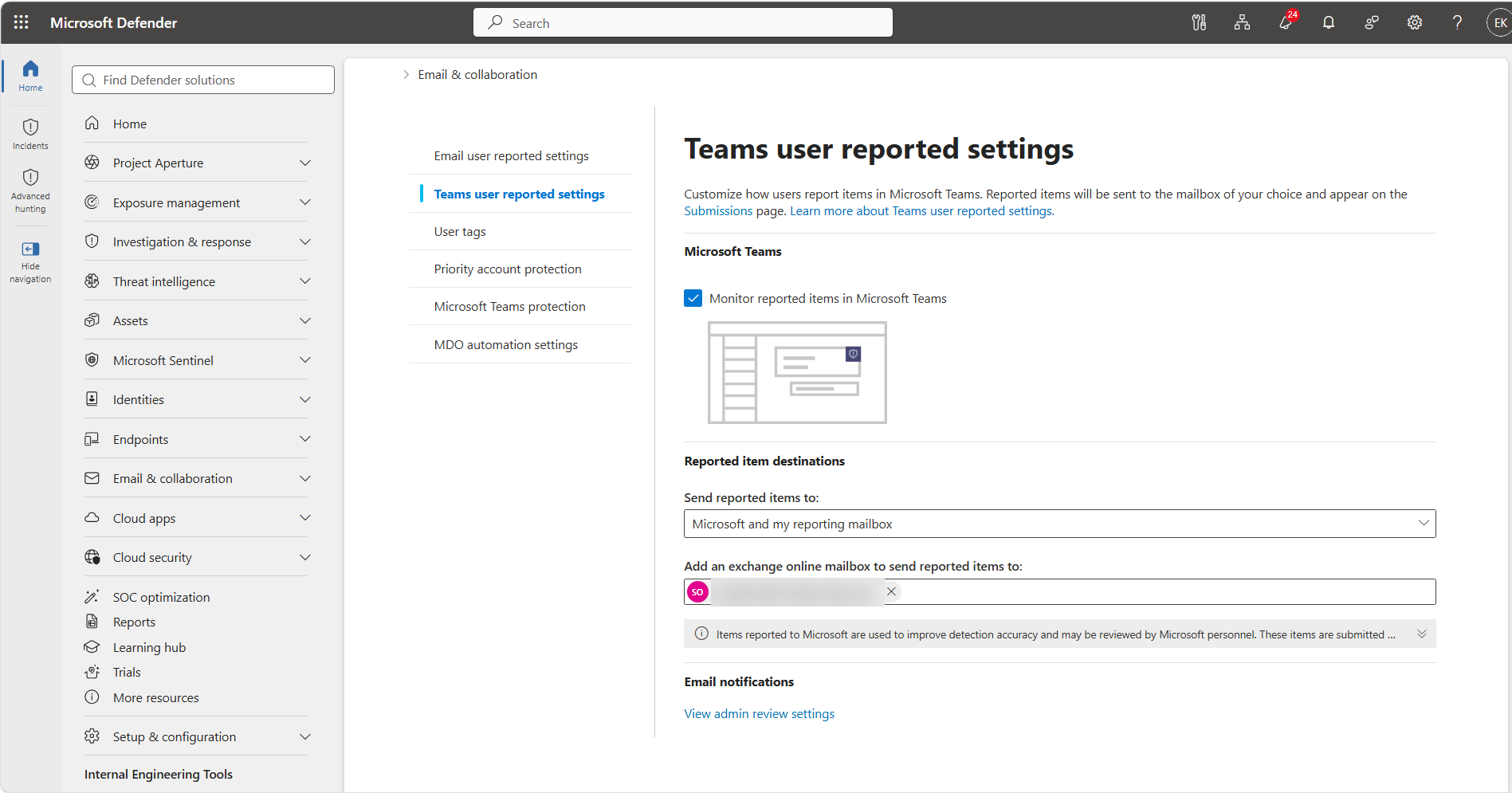
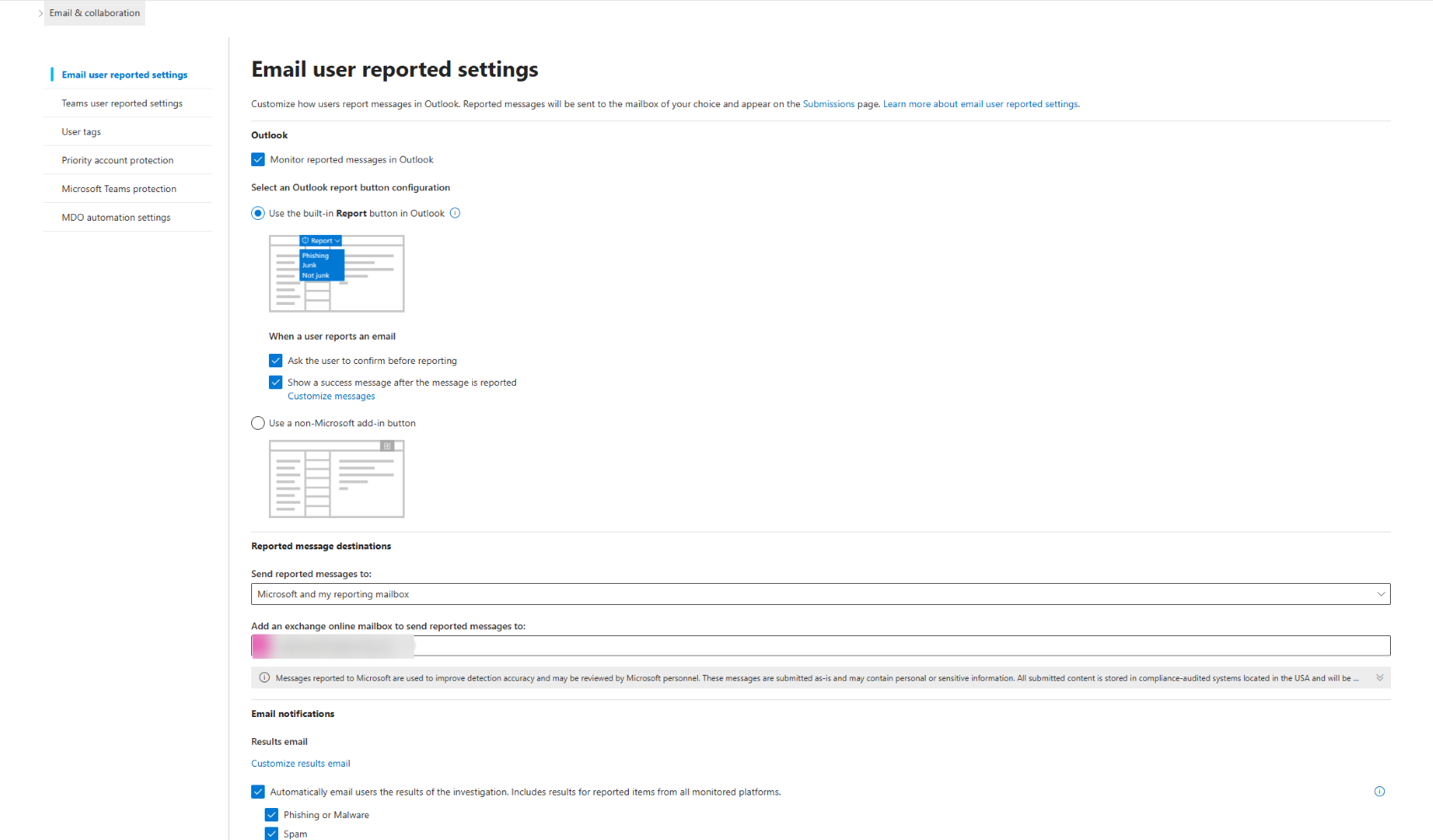
Image 2 - Email user reported settings view:
[Action required/Recommendations]
Review your Teams user-reported settings before October 25, 2026, if you do not want Teams user reporting enabled by default or want reported content sent to a destination other than Microsoft.
Recommended actions:
- Review Teams user-reported settings in the Microsoft Defender portal.
- Decide whether user-reported Teams content should be submitted to Microsoft for security analysis.
- Opt out before October 25, 2026, if desired.
- Inform security administrators and help desk staff about this change.
Learn More
- Email user-reported settings: security.microsoft.com/securitysettings/userSubmission
- Teams user-reported settings: security.microsoft.com/securitysettings/teamsUserSubmission
- User reported settings in Teams - Microsoft Defender for Office 365 | Microsoft Learn
[Compliance considerations]
| Question | Answer |
| Does the change alter how admins can monitor, report on, or demonstrate compliance activities? | Teams user-reported settings will move to a dedicated configuration page in the Defender portal. |
| Does the change include an admin control, and can it be controlled through Entra ID group membership? | Administrators can opt out by configuring Teams user-reported settings in the Defender portal. Group-based controls are not specified. |
More information
Details
In weekly changes
Platforms
- Teams
Services
- Defender XDR
- Security
- Teams
Category
- Plan for change
Microsoft tags
- Admin Action
- User Adoption