MC1474455 In-app browsing in Copilot app
Primary service: M365 Copilot
ChangePilot summary
- Microsoft Copilot app on Windows and Mac is gaining in-app browsing, allowing links shared in Copilot chat to open in a side pane inside the desktop app.
- The feature is currently available for opt-in testing on selected devices, with broader rollout planned later.
- Administrators can control early access by enabling the BrowsingEnabled policy through device management for chosen Windows and Mac endpoints.
- Microsoft notes that browsing history, cookies, and autofill data are stored locally on the device in the Copilot user profile.
- Users can still choose to open links in an external browser if needed.
Latest update: Removed from description - Broader rollout: Begins late November 2026.
What it means for you
What admins need to do
Review whether in-app browsing should be enabled for pilot devices, then configure the BrowsingEnabled policy in your device management platform for the selected Windows and Mac Copilot devices. Test link handling, side-pane behavior, and local data storage implications in your environment, and update help desk guidance and user communications before broader deployment.
Impact on users
If enabled by IT, users on Copilot for Windows or Mac will see shared links open inside the Copilot app in a side pane next to the chat, with support for multiple tabs and full-screen viewing. They can still choose to open links in an external browser when needed.
If you miss it
If IT does not test or communicate this change, users may encounter a new in-app browsing experience unexpectedly when broader rollout arrives, which could cause confusion or support calls. IT may also miss the chance to validate local data storage behavior and confirm whether the feature fits organizational policy before it becomes widely available.
- Admin controls available
- Yes
History
Recorded changes
- Removed from description - Broader rollout: Begins late November 2026.
Microsoft message
[What and why:]
We are adding support to the Microsoft Copilot app, in Windows and Mac, to allow websites that Copilot shares in chat to open inside of the desktop app side by side with the Copilot chat conversation. This is available now but not available by default; administrators can opt-in selected Windows and Mac devices to test this.
[Rollout schedule:]
- Opt-in availability: Available now.
[Impact on your organization:]
Administrators can manage early access by opting-in selected devices and deploying the updates via instructions linked below. This early access allows you to:
- Test in-app browsing at your organization before the broader rollout. This allows users to open links within the Copilot desktop app.
- Validate deployed and in-app browsing behavior in your organization's managed environment.
- Prepare support teams and users for the updated experience that applies to Copilot Windows and Mac endpoints.
What users will see
When a user clicks a link within the Copilot desktop app, the website opens in a side pane to the right of the Copilot chat. Users can open multiple links, each appearing as a separate tab within the side pane and can switch between tabs as needed. Once the websites are no longer needed, users can close the side pane.
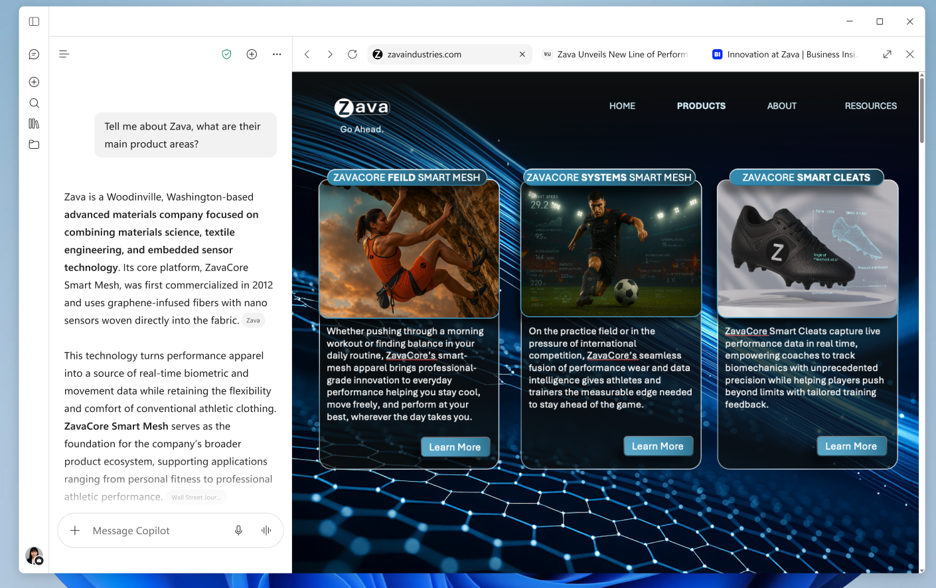
Users can adjust the in-app browser side pane to be smaller or larger. They can also enter full-screen mode to view the website in a full-screen experience and can toggle in and out of this mode using the button in the side pane header.
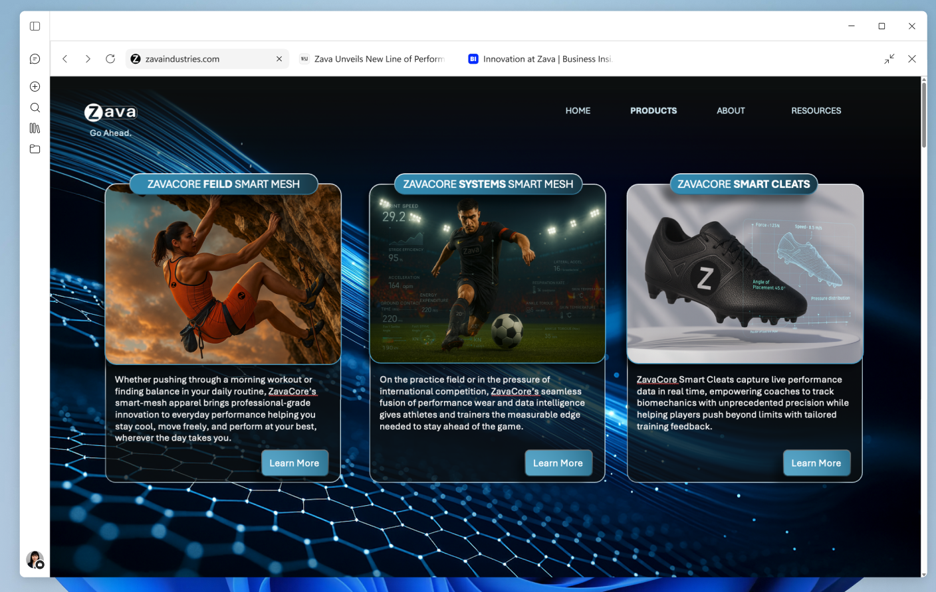
Users can still open a link in an external browser, by:
- Selecting the "External browser" option from the three-dot menu on the link within Copilot Chat
- OR Selecting “Copy the URL” and pasting it into an external browser
- OR Right clicking a tab in the side pane within the Copilot app and selecting "External browser" (coming 9/21)
[Action required / Recommendations:]
- To enable in-app browsing, you can turn on the 'BrowsingEnabled' policy through your device management system.
- Review the in-app browsing associated policies that can be adjusted and changed.
[Compliance Considerations:]
- Does the change store new customer data? Yes. Browsing history, cookies, autofill information are stored on the local device. This follows the same storage mechanisms as Microsoft Edge storing data in the user Data profile directory at “%localappdata%\Microsoft\Copilot\User Data”.
- Does the change provide end users with a new way of interacting with generative AI? This feature does not add any new way to create or steer generative AI, it only lets you view websites, whether those are website on the internet or html files created generatively with copilot via other features.
More information
Details
In weekly changes
Platforms
- Windows
- Mac
- Desktop
Services
- Edge
- M365
- M365 Copilot
- Mac
- Windows
Category
- Plan for change
Microsoft tags
- Admin Action
- New Feature
- User Adoption