MC1473153 New centralized experience for organizing important resources in chats and channels
Primary service: Teams
ChangePilot summary
- Microsoft Teams is adding a centralized experience for managing important resources in chats and channels.
- Users will be able to pin frequently used resources, pin multiple messages, and organize shared content into folders directly from the chat or channel header.
- The existing "In this chat" and "In this channel" panes will be removed, with existing resources moved into the new experience.
- The change affects Teams users on desktop, web, and mobile clients.
- No administrative configuration is required, but IT should notify users and update any training or support materials that reference the old panes.
Latest update: Standard start: early November 2026 (previously early October 2026). Standard end: mid-November 2026 (previously mid-October 2026).
What it means for you
What admins need to do
No configuration is needed. Prepare by informing Teams users about the new centralized resources experience, and update helpdesk scripts, user guidance, and any internal documentation that references the removed "In this chat" and "In this channel" panes.
Impact on users
Users will see a new way to access and organize shared content in Teams chats and channels. Important resources, pinned messages, and folders will be available from the chat or channel header, and the old "In this chat" and "In this channel" panes will no longer be available.
If you miss it
If IT does not communicate the change, users may be confused when the old panes disappear and may not realize their saved resources have moved to the new centralized experience. The practical business impact is low, but helpdesk volume could increase and support documentation may become outdated.
- Admin controls available
- No
History
Recorded changes
-
- Standard start: early November 2026 (previously early October 2026).
- Standard end: mid-November 2026 (previously mid-October 2026).
- Screenshot updated
Microsoft message
Updated October 19, 2026: We have updated the timeline. Thank you for your patience.
[What and why]
We are introducing a more consistent way for users to access and manage important resources in Microsoft Teams chats and channels. Users will be able to pin frequently used resources directly below the chat or channel header, pin multiple messages alongside other resources, and organize them into folders. On Microsoft Teams mobile, users will be able to access shared resources and folders by tapping the chat or channel header. This change will help users stay organized and provide them with a centralized location to quickly find, access, and manage important resources.
As part of this update, the In this chat and In this channel panes will be removed. Existing resources within these panes will be accessible through the new resource management experience.
[Rollout schedule]
- Targeted Release (Worldwide): Rollout begins in late September 2026 and is expected to complete by early October 2026.
- General Availability (Worldwide, GCC, GCC High, and DoD): Rollout begins in early November 2026 (previously early October) and is expected to complete by mid-November 2026 (previously mid-October).
[Impact on your organization]
Who is affected
- Users who access or manage resources in Microsoft Teams chats and channels.
Platforms and services
- Microsoft Teams
- Microsoft Teams mobile
What will happen
- Users will have a centralized location to find, access, and manage important resources.
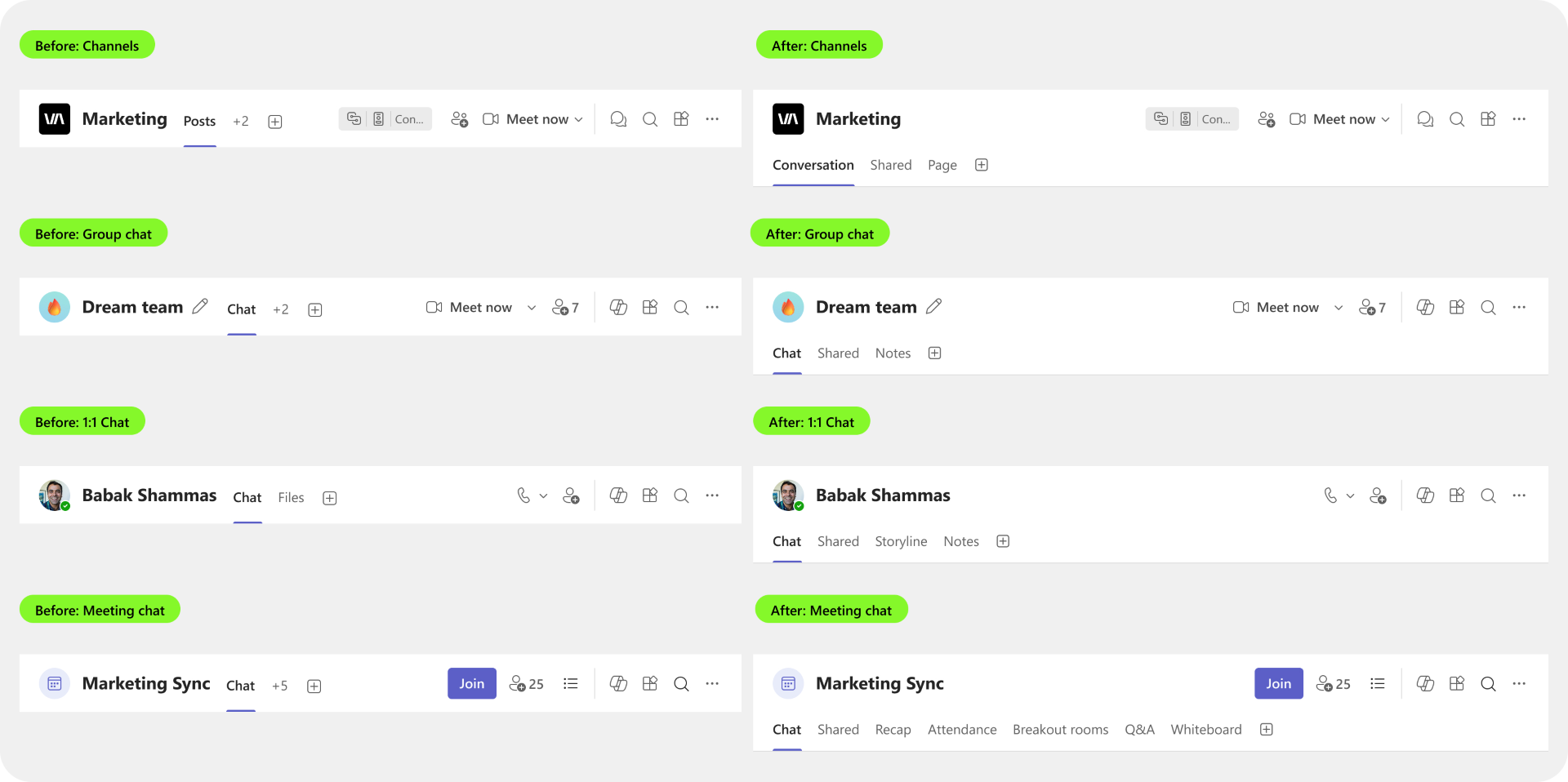
- Users will be able to pin frequently used resources directly below the chat or channel header, pin multiple messages alongside other resources, and organize them into folders.
- On mobile devices, users will be able to access shared resources and folders by tapping the chat or channel header.
- The In this chat and In this channel panes will be removed; existing resources within these panes will be accessed and managed through the updated experience.
Screenshot - Comparison before and after
[Action required and recommendations]
No administrative action is required. We recommend that you:
- Inform users about the updated resource pinning and management experience.
- Update any internal training or support documentation that references the In this chat and In this channel panes.
[Learn more]
We will update this post with new documentation.
[Compliance considerations]
No compliance considerations identified. Review as appropriate for your organization.
Details
In weekly changes
Platforms
- Android
- Desktop
- iOS
- Mac
- Web
Services
- Teams
Category
- Stay informed
Microsoft tags
- Feature Update
- New Feature
- Retirement
- User Adoption
- Highlighted