MC1472025 PowerShell support for brand fonts deletion
Primary service: SharePoint
ChangePilot summary
- SharePoint is adding a new PowerShell cmdlet, Remove-SPOFontFile, to delete approved brand font files from the SharePoint Brand Center.
- This is the supported way for admins to remove brand fonts that are no longer approved, licensed, or needed, including cleanup across primary and satellite geographies.
- Existing sites and pages that reference a deleted font will continue to render with Microsoft fallback fonts, so content should remain readable.
- Font packages that reference removed fonts are not deleted automatically; they remain available but will show a warning when required fonts are unavailable.
- Administrators should review the new documentation, confirm the required PowerShell module version after rollout, and coordinate deletions with brand owners and site owners.
What it means for you
What admins need to do
Review the new Remove-SPOFontFile documentation and update your SharePoint PowerShell module to the required version after rollout. Inventory current Brand Center fonts, identify any fonts that are no longer approved or licensed, and coordinate removals with brand managers and site owners before deleting anything that could affect site branding. Update internal runbooks and help desk guidance for font lifecycle management.
Impact on users
Most users should see no disruption. If a site or page uses a font that is deleted, SharePoint will automatically render the content with a Microsoft fallback font so it remains readable. Users may notice branding changes on affected pages, and some font packages may show warnings if required fonts are unavailable.
If you miss it
If IT does not review and control font deletions, outdated or unlicensed brand fonts may remain in use and continue to create governance and compliance risk. Admins may also miss the opportunity to clean up unwanted fonts across geographies, leading to inconsistent branding and more manual troubleshooting later. User impact is otherwise limited because SharePoint falls back to supported fonts when a deleted font is referenced.
- Admin controls available
- Yes
History
Recorded changes
No changes recorded since ChangePilot first saw this post.
Microsoft message
[What and why:]
Microsoft SharePoint is introducing PowerShell support for deleting brand font files from the Brand Fonts library used by the SharePoint Brand Center. With the new Remove-SPOFontFile cmdlet, SharePoint administrators can remove brand font files that are no longer approved, licensed, or needed across their organization in SharePoint.
This cmdlet is the supported deletion path for brand fonts for SharePoint. It is designed to help admins manage font lifecycle and avoid cross-geo inconsistencies by removing font copies across the primary geo and satellite geos.
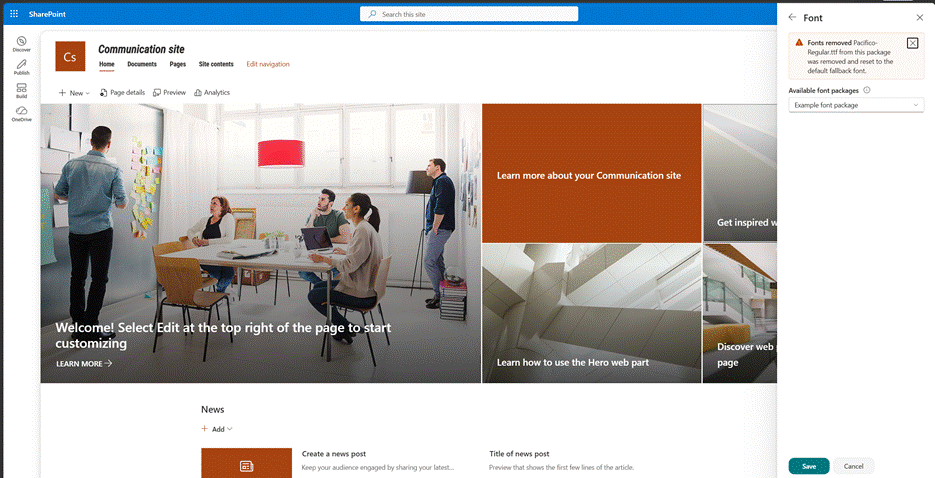
When a deleted font is referenced by existing SharePoint sites or pages, the content will continue to be rendered using a Microsoft-defined fallback font. Font packages that reference deleted fonts are not automatically deleted. They remain available for use, but a warning message is displayed when required fonts are unavailable.
[Rollout schedule:]
General Availability (Worldwide): We will begin rolling out on late September 2026 and expect to complete by mid-October 2026.
[Impact on your organization:]
Note: Brand font management in Brand Center currently depends on the SharePoint Public CDN and is available only to customers who have Public CDN enabled.
- SharePoint administrators can manage brand font deletion via PowerShell, helping organizations govern SharePoint brand fonts lifecycle, licensing, and compliance. The cmdlet removes font copies across the primary geo and satellite geos, helping avoid cross-geo inconsistencies.
- End-user content remains readable. If a deleted font is referenced by an existing site or page, SharePoint will use the Microsoft-defined fallback fonts.
- Font packages that reference deleted fonts remain available, with status shown to indicate unavailable font references.
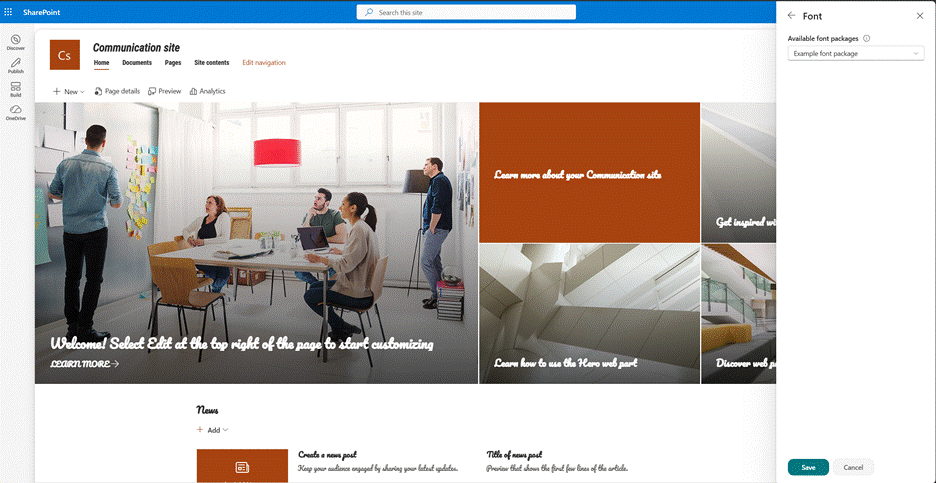
Example results of running the cmdlet

Before deleting the font
After deleting the font
[Action required / Recommendations:]
- Review the official documentation for PowerShell branding governance:
- After rollout is complete, upgrade your PowerShell module to the required version before using these new features.
- Review the current fonts in the Brand Center and identify fonts that are no longer approved, licensed, or needed.
- Coordinate with brand managers and SharePoint site owners before deleting fonts that may affect site branding.
- Update internal documentation and admin procedures for managing brand fonts with PowerShell.
More information
Details
In weekly changes
Services
- SharePoint
Category
- Stay informed
Microsoft tags
- Feature Update
- User Adoption