MC1472007 Manage who can upload advanced agents and plugins
Primary service: M365 Copilot
ChangePilot summary
- Microsoft is introducing a new admin control for advanced Copilot extensibility that lets organizations restrict who can upload advanced agents and plugins.
- Administrators can allow uploads for all users, selected users, specific Microsoft Entra ID groups, or block them entirely.
- The setting applies only to advanced-package uploads created after the control is available; basic package uploads are not affected.
- Microsoft states no action is required to keep current behavior, but admins should review and choose the desired governance setting.
- This change primarily affects Microsoft 365 admins and users who create or upload Copilot agents or plugins.
Latest update: The following points have been added to the description - An advanced agent is a package that has either a Declarative Agent with actions or with an MCP server. All other packages are considered basic. - This setting is only applicable to user uploaded packages and does not cover 1P or 3P built agents. - IT admins can view user uploaded packages as shared in MAC and the details page will show the components of the package.
What it means for you
What admins need to do
Review the new Copilot advanced-package upload control as soon as it appears in the Microsoft 365 admin center. Decide whether advanced agent and plugin uploads should be permitted for all users, only specific users, specific Entra ID groups, or no users, and configure the setting before the default behavior applies. Update help desk guidance and internal documentation so support teams understand who can upload advanced packages and how the governance control works.
Impact on users
If IT configures the control, only the approved users or groups will be able to upload advanced Copilot agents and plugins. Users who are not allowed will be blocked from uploading advanced packages, while basic package uploads continue to work normally.
If you miss it
If this change is missed, advanced package uploads may become available by default to more users than intended, reducing governance over Copilot extensibility content. That can create security, compliance, and support risks if unapproved users are able to upload advanced agents or plugins. IT may then need to react after users have already started using the capability.
- Admin controls available
- Yes
History
Recorded changes
-
- The following points have been added to the description
- - An advanced agent is a package that has either a Declarative Agent with actions or with an MCP server. All other packages are considered basic.
- - This setting is only applicable to user uploaded packages and does not cover 1P or 3P built agents.
- - IT admins can view user uploaded packages as shared in MAC and the details page will show the components of the package.
Microsoft message
Updated September 15, 2026: We have updated the content below with additional information.
[What and Why:]
To help organizations manage the deployment of advanced Copilot extensibility scenarios, we are introducing a new admin control that determines who can upload advanced agents and plugins. This enhancement strengthens enterprise governance and manageability by allowing administrators to limit advanced-package uploads to specific users or Microsoft Entra ID groups while maintaining flexibility for organizations that want broader access.
[Rollout Schedule:]
- General Availability (Worldwide): Rollout begins September 25th
- Expected completion by the end of October 2026.
[Impact on Your Organization:]
Who is affected:
- Microsoft 365 administrators responsible for managing Copilot agents and plugins.
- Organizations that allow users to upload advanced agents or plugins.
- Users who create or upload advanced agents and plugins after this feature becomes available.
Platforms/Services:
- Microsoft 365 Copilot and Cowork surfaces, ATK
- Copilot agents
- Copilot plugins
- Microsoft Entra ID
What will happen:
- On September 25th, the control will be visible in MAC under Copilot Settings and admins will have until October 25th to select their preference of all users, no users or specific users or groups (see Advanced package uploads screenshot).
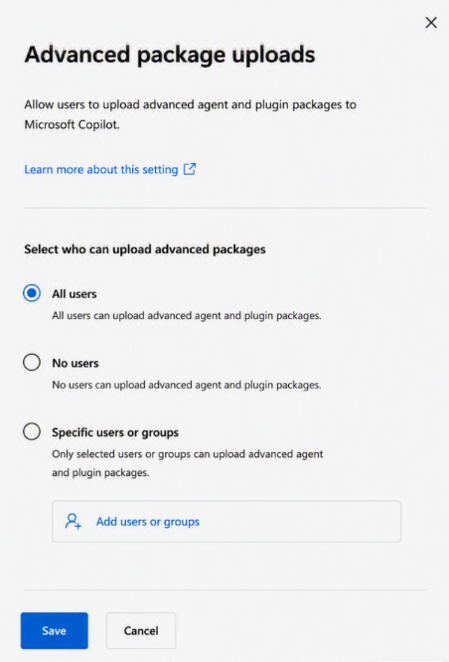
- Starting October 25th, Advanced-package uploads will be enabled by default unless the admin has selected no users or specific users or groups.
- Admins can configure uploads for all users, selected users, Entra ID groups, or no users.
- Basic package uploads remain allowed and are not impacted.
- An advanced agent is a package that has either a Declarative Agent with actions or with an MCP server. All other packages are considered basic.
- This setting is only applicable to user uploaded packages and does not cover 1P or 3P built agents.
- IT admins can view user uploaded packages as shared in MAC and the details page will show the components of the package.
- The setting applies only to advanced agents and plugins uploaded after the control becomes available.
- No action is required to maintain current behavior,
[Action Required/Recommendations:]
- Review the advanced-package upload setting when it becomes available on September 25th.
- Determine whether advanced-package uploads should be available to all users, selected users, groups, or no users prior to October 25th.
- Update internal administrator and help desk documentation as needed.
- Inform support teams of the new governance control.
- If no action is taken, advanced-package uploads remain allowed by default.
[Compliance Considerations:]
- The change introduces new administrative governance controls for advanced agents and plugins.
- The feature supports administration through Microsoft Entra ID group membership.
Details
In weekly changes
Services
- Admin
- Entra
- M365 Copilot
Category
- Plan for change
Microsoft tags
- Admin Action
- New Feature