MC1466751 Lobby visibility will align with the "Who can admit from lobby" meeting option
Primary service: Teams
ChangePilot summary
- Microsoft Teams is changing lobby visibility so it matches the existing "Who can admit from lobby" meeting setting.
- Only users who are allowed to admit people from the lobby will be able to see who is waiting there.
- This primarily affects meeting organizers, co-organizers, presenters, and attendees in Teams desktop and mobile apps.
- The change is enabled automatically and does not require tenant configuration.
- IT should brief meeting organizers if they currently rely on presenters to monitor the lobby during meetings.
Latest update: Standard & GCC end: early October 2026 (previously mid-September 2026).
What it means for you
What admins need to do
No configuration change is needed, but IT should notify meeting organizers and helpdesk staff about the new lobby-visibility behavior. Update internal guidance for teams that use presenters to watch the lobby, and review any meeting procedures or training materials that assume presenters can see lobby participants.
Impact on users
Meeting participants will see a privacy-related behavior change in Teams: only people who can admit attendees from the lobby will be able to view those waiting in the lobby. In meetings where presenters previously monitored the lobby, that visibility will no longer be available unless they also have admitting permissions.
If you miss it
If this change is missed, organizers and presenters may be surprised when lobby monitoring no longer works the way they expect. Meetings that rely on presenters to watch the lobby could have slower admissions or require a last-minute process change, creating confusion for users and extra support requests for IT. There is no major compliance or security risk beyond the intended privacy improvement.
- Admin controls available
- No
History
Recorded changes
- Standard & GCC end: early October 2026 (previously mid-September 2026).
Microsoft message
Updated September 9, 2026: We have updated the timeline. Thank you for your patience.
[What and why]
We're updating the Microsoft Teams meeting lobby experience to improve privacy and align lobby visibility with existing meeting controls.
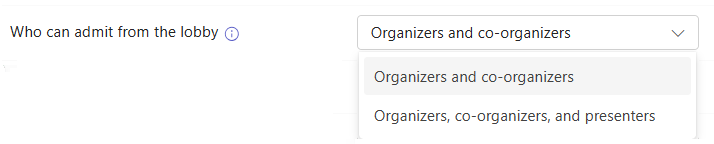
Today, the Who can admit from lobby option determines which meeting roles can admit people from the lobby, but it does not control who can see participants waiting in the lobby. As a result, some participants may be able to view the lobby even when they cannot admit attendees.
This change creates a more consistent and privacy-focused experience by aligning lobby visibility with lobby management permissions.
[Rollout schedule]
- General Availability (Worldwide, GCC): Beginning in early September 2026 and expected to complete by early October 2026 (previously mid-September)
[Impact on your organization]
Who is affected
- Microsoft Teams meeting organizers, co-organizers, presenters, and attendees
- Organizations that use the Who can admit from lobby option
Platforms and services
- Microsoft Teams desktop apps
- Microsoft Teams mobile apps
What will happen
- Lobby visibility will align with the Who can admit from lobby meeting option. Only users who are permitted to admit participants from the lobby will be able to see participants waiting in the lobby.
- For example, when Who can admit from lobby is set to Organizers and co-organizers only, presenters and attendees will no longer see participants waiting in the lobby. Only organizers and co-organizers will be able to view and manage lobby admissions.
- This change is enabled automatically and does not require configuration.
[Action required and recommendations]
No action is required.
We recommend informing meeting organizers about this change if they currently rely on presenters to monitor the lobby during meetings. Organizations should review any meeting workflows that depend on presenters having visibility into lobby participants.
[Compliance considerations]
No compliance considerations identified, review as appropriate for your organization.
Details
In weekly changes
Platforms
- Desktop
- Mobile
Services
- Teams
Category
- Stay informed
Microsoft tags
- Admin Action
- Feature Update
- User Adoption