MC1466296 Report security concerns in meetings
Primary service: Teams
ChangePilot summary
- Microsoft Teams meetings will add a new Report a concern option so participants can report suspicious or fraudulent behavior during or after meetings.
- Users can report phishing, impersonation, scams, social engineering, and other security concerns; they can also mark a previously reported participant as Not a concern.
- Reported meeting metadata and limited context will be collected for investigation and made available to administrators in the Microsoft Defender portal and Teams admin center.
- The feature is enabled by default and applies to Teams meetings on Windows, Mac, and web for users participating in meetings.
What it means for you
What admins need to do
Review and update your Teams and security incident-response processes before rollout. Confirm which administrators will monitor user-reported meeting submissions in the Teams admin center and, if licensed, the Microsoft Defender portal. Verify Defender user reporting settings and ensure investigators have the right permissions and access. Prepare user communications and helpdesk guidance explaining when to use Report a concern versus Not a concern, and update awareness training and internal documentation as needed.
Impact on users
Users attending Teams meetings will see a new option to report suspicious or fraudulent behavior directly from the meeting participant controls. They can submit a concern during or after a meeting and can also retract a prior report by marking a participant as Not a concern. If your organization is using the feature as intended, this provides an easier way to flag security issues without changing normal meeting participation.
If you miss it
If IT does not prepare, the feature will appear by default and users may not know when or how to use it, or may submit reports inconsistently. Security teams could miss or delay reviewing potentially important meeting-related threats, reducing the organization’s ability to investigate phishing, impersonation, scams, or social engineering attempts. There is no immediate service outage risk, but missed preparation could weaken security response and create confusion for users and helpdesk staff.
- Admin controls available
- Yes
- Licences affected
- Microsoft Defender for Office 365 Plan 1, Microsoft Defender for Office 365 Plan 2, Microsoft Defender XDR
History
Recorded changes
No changes recorded since ChangePilot first saw this post.
Microsoft message
[What and why]
We're introducing a new security reporting capability in Microsoft Teams meetings that allows meeting participants to report suspicious, malicious, or potentially fraudulent behavior during or after a meeting.
This capability helps organizations identify and investigate threats such as phishing attempts, impersonation, scams, social engineering, and other suspicious activity. Submitted reports provide additional security signals that can be reviewed by administrators in Microsoft security and administration tools to support investigation and response workflows.
This message is associated with Microsoft 365 Roadmap ID 569207.
[Rollout schedule]
- Targeted Release: Beginning in late September 2026 and expected to complete by late September 2026
- General Availability (Worldwide): Beginning in mid-October 2026 and expected to complete by late October 2026
[Impact on your organization]
Who is affected
- Users participating in Microsoft Teams meetings on Windows, Mac, and web
Platforms and services
- Microsoft Teams
- Microsoft Defender portal
- Teams admin center
What will happen
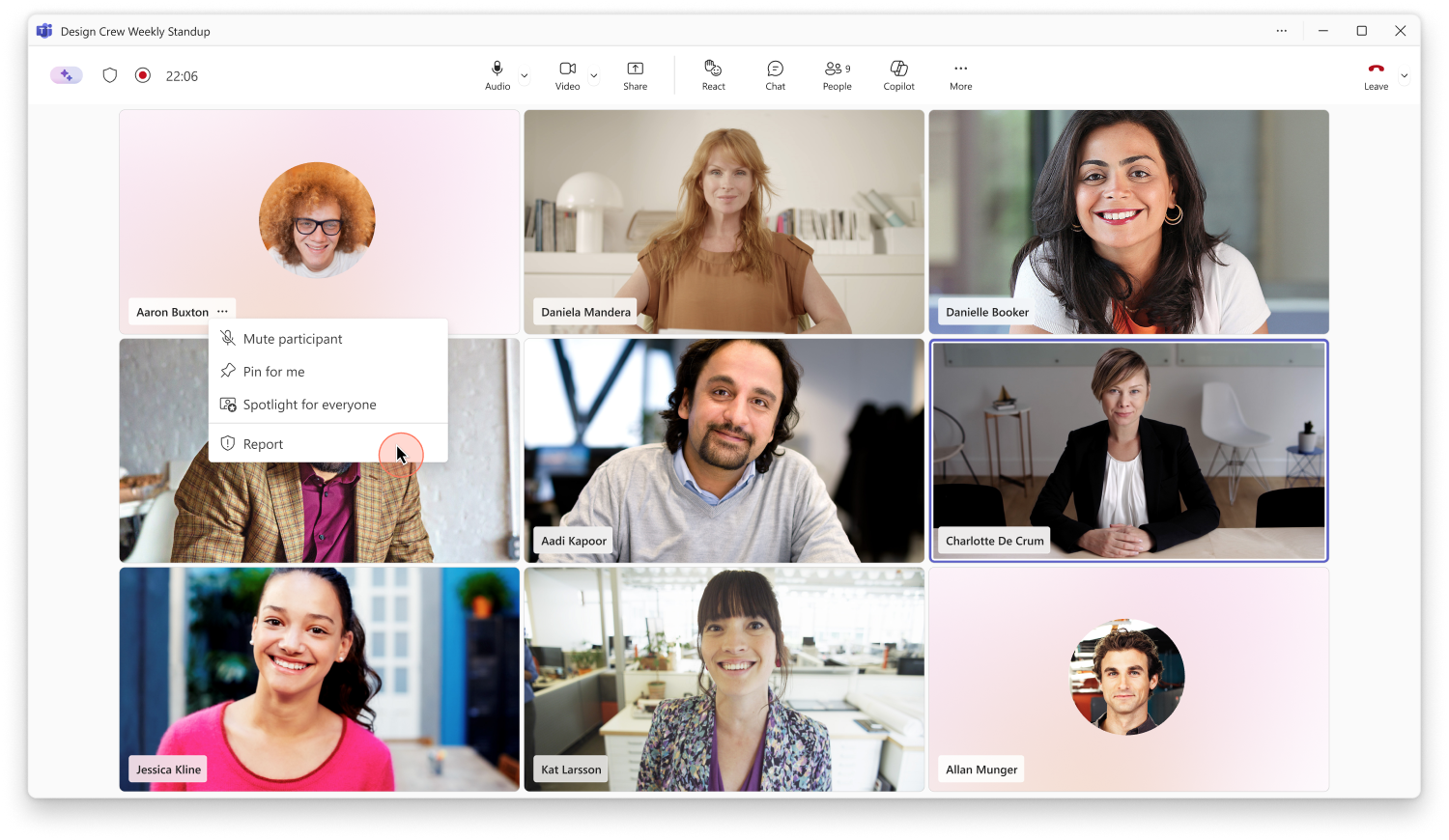
- Users will see a new Report a concern option in the participant tile and participant pane during Teams meetings:
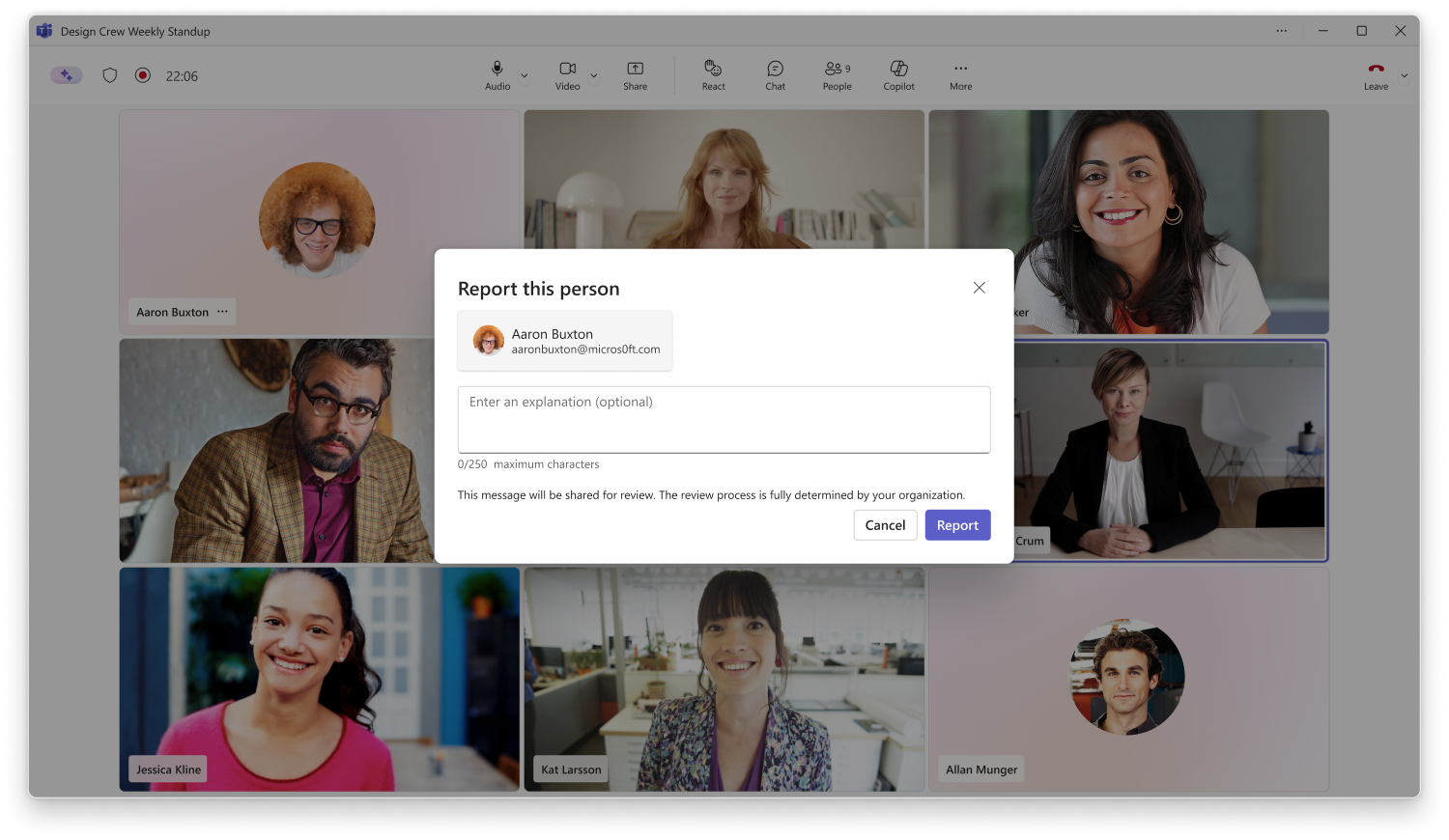
- Users will be able to report suspected phishing attempts, impersonation, scams, social engineering activity, and other security concerns directly from Teams meetings:
- Users will also be able to mark a previously reported participant as Not a concern.
- Relevant meeting metadata and limited contextual information will be collected to support security investigations and remediation activities.
- Information associated with reported meetings will be available for administrator review and investigation.
- Organizations with Microsoft Defender for Office 365 Plan 1, Microsoft Defender for Office 365 Plan 2, or Microsoft Defender XDR will be able to review detailed reported meeting submissions in the Microsoft Defender portal.
- Report information will also be available in the Teams admin center under Protection reports > User-reported security submissions.
- Administrators can investigate reported meetings and take actions according to their organization's security processes and policies.
- This capability will be enabled by default.
[Action required and recommendations]
Review your organization's security investigation and incident response processes before rollout.
Recommended actions:
- Review Microsoft Defender user reporting settings and ensure reporting workflows align with organizational requirements.
- If your organization uses Microsoft Defender for Office 365 or Microsoft Defender XDR, verify that Teams meeting reporting is configured appropriately so detailed submissions are available to security investigators.
- Inform users about the new Report a concern capability and when it should be used.
- Inform users about the Not a concern option and when it should be used.
- Update security awareness training, incident response documentation, and internal guidance as needed.
- Verify that security administrators responsible for reviewing reports have the appropriate access to the Microsoft Defender portal or Teams admin center.
[Compliance considerations]
| Question | Answer |
| Does this change provide a new way for users to communicate security concerns to their organization? | Yes. Users will be able to report suspected phishing attempts, impersonation, scams, social engineering activity, and other security concerns directly from Microsoft Teams meetings. |
| Does this change collect new customer or user data for investigation purposes? | Yes. Relevant meeting metadata and limited contextual information will be collected and made available to support security investigation and remediation activities. |
| Does this change alter how administrators monitor, investigate, or report on security-related activities? | Yes. Administrators will be able to review and investigate reported meetings through the Microsoft Defender portal and the Teams admin center. |
| Does this change introduce new reporting or compliance-related records that administrators can review? | Yes. User-submitted meeting security reports will be available in the Teams admin center under Protection reports > User-reported security submissions and, where licensed, in the Microsoft Defender portal. |
More information
Details
In weekly changes
Platforms
- Web
- Desktop
- Mac
Services
- Admin
- Defender
- Defender XDR
- Teams
Category
- Stay informed
Microsoft tags
- Admin Action
- New Feature
- User Adoption
Related changes
- 569207 Report a Security Concern in Meetings Roadmap · Teams · Launched