MC1462472 Draft Outlook emails directly in Copilot Chat on mobile
Primary service: M365 Copilot
ChangePilot summary
- Microsoft 365 Copilot Chat on mobile will now generate embedded Outlook email drafts when users ask Copilot to draft an email.
- Users can review the draft inside Copilot Chat and open it in Outlook Mobile to finish editing and send.
- The feature is enabled by default for eligible users.
- No admin configuration or required action is needed, but IT may want to notify users of the new workflow.
What it means for you
What admins need to do
No configuration is required. IT teams should update helpdesk guidance and user communications to explain that Copilot Chat on mobile can now produce Outlook email drafts inline and that users can open the draft in Outlook Mobile to edit and send. If you support adoption efforts, include this in Copilot enablement materials.
Impact on users
When users ask Copilot Chat on mobile to draft an email, they will see the draft directly in the chat experience instead of switching apps immediately. They can review the content there and then open it in Outlook Mobile to make final edits and send the message.
If you miss it
If IT does not communicate the change, users may be surprised to see Outlook draft creation appear inside Copilot Chat on mobile and may not realize they can open the draft in Outlook Mobile to continue working. The business impact is low, but support teams may see avoidable questions about the new workflow.
- Admin controls available
- No
History
Recorded changes
No changes recorded since ChangePilot first saw this post.
Microsoft message
[What and why]
We're improving the Microsoft 365 Copilot Chat experience by making it easier for users to draft emails directly from Copilot. When Copilot detects an email-writing intent, it will display an embedded Outlook draft within Copilot Chat. Users can review drafted content and open the draft directly in Outlook Mobile to edit and send. This update streamlines a common workflow within the Copilot Chat experience.
[Rollout schedule]
- General Availability (Worldwide): Beginning in mid-August 2026 and expected to complete by mid-September 2026
[Impact on your organization]
Who is affected
- Users who use Copilot Chat on mobile
Platforms and services
- Microsoft 365 Copilot mobile app
- Outlook Mobile
- Teams Mobile
- Exchange Online
What will happen
- When a user asks Copilot Chat to draft an email, Copilot will display an embedded Outlook compose experience directly within the chat.
- Users will be able to review the generated email draft without leaving Copilot Chat:
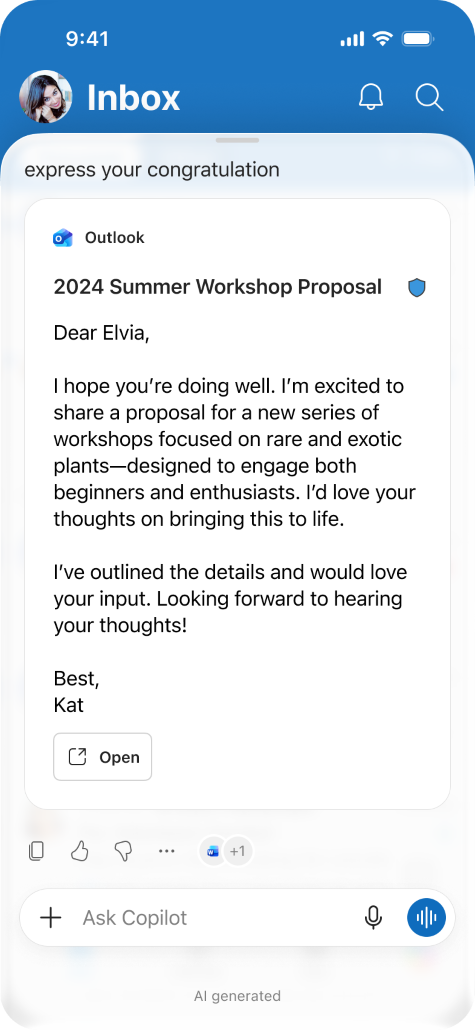
- Users can open the draft in Outlook Mobile to continue editing and send the email:
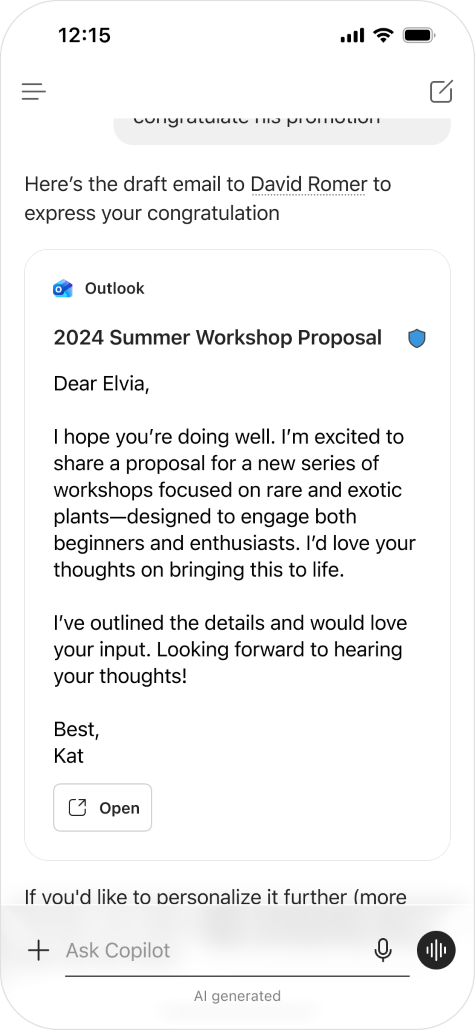
- The feature will be enabled by default for eligible users.
- No admin configuration is required.
[Action required and recommendations]
No action is required.
You may wish to inform users that email drafts generated in Copilot Chat on mobile can now be viewed directly within the Copilot experience before being opened in Outlook Mobile for editing and sending.
[Compliance considerations]
| Question | Answer |
| Does the change introduce or significantly modify AI/ML capabilities that interact with customer data? | Yes. The update introduces an embedded AI-assisted email drafting experience within Copilot Chat. |
| Does the change provide end users a new way of interacting with generative AI? | Yes. Users can generate and review Outlook email drafts directly within Copilot Chat on mobile. |
Details
Platforms
- Mobile
- iOS
- Android
Services
- Exchange
- M365 Apps
- M365 Copilot
- Outlook
Category
- Stay informed
Microsoft tags
- Admin Action
- Feature Update
- User Adoption
- Highlighted