MC1462463 Teams Admin Center - Single pane for monitoring
Primary service: Teams
ChangePilot summary
- Teams admin center is getting a new org-wide Meetings & Calls experience for monitoring and troubleshooting meetings and calls from one place.
- Admins will be able to view in-progress and completed meetings, review completed calls, search and filter results, and open detailed diagnostics for troubleshooting.
- The new view includes issue details, export options, and Microsoft 365 Copilot for Admins support to help investigate meetings and trends.
- The experience is intended for Teams administrators responsible for meeting and call quality oversight.
- No admin action is required; the updated experience will appear automatically after rollout.
What it means for you
What admins need to do
Review the new Teams admin center Meetings & Calls experience after it appears in your tenant, update internal runbooks and troubleshooting guidance, and brief helpdesk or Teams support staff on the new location and capabilities. If your admins use Copilot for Admins, confirm they understand how it can be used within the updated troubleshooting workflow.
Impact on users
End users should not see a major workflow change. The update is primarily for Teams administrators, though users may benefit indirectly from faster investigation and resolution of meeting or call issues.
If you miss it
If IT misses this announcement, the new admin experience will still roll out automatically, but support teams may be unfamiliar with where to find meetings and calls troubleshooting tools. That could slow investigations of meeting or call quality issues until documentation and internal guidance are updated.
- Admin controls available
- No
- Licences affected
- Copilot
History
Recorded changes
No changes recorded since ChangePilot first saw this post.
Microsoft message
[What and Why:]
We're excited to introduce an org-wide single pane for monitoring and troubleshooting meetings and calls in the Teams admin center. IT administrators will be able to find all the meetings and calls in one place, get quick insights, and get started with troubleshooting right away.
The new experience helps administrators:
- View in-progress and completed meetings across the organization from a single location.
- Quickly identify meetings that may require attention.
- Search for meetings using meeting identifiers and other filters.
[Rollout Schedule:]
- General Availability (Worldwide): Rollout will begin in late September 2026 and is expected to complete by mid October 2026.
- General Availability (GCC): Rollout will begin in late September 2026 and is expected to complete by mid October 2026.
[Impact on Your Organization:]
Who is affected
- Teams administrators responsible for monitoring and troubleshooting meeting and call quality across their organization.
Platforms and services
- Microsoft Teams
- Teams admin center
What will happen
After rollout, administrators will see a new Meetings experience in the Teams admin center under Meetings & Calls.
- Navigate to Teams admin center > Meetings & Calls > Meetings or Calls to access the updated troubleshooting experience.
- View and monitor meetings across the organization from a centralized Meetings experience.
- Review both in-progress and completed meetings, search for specific meetings, apply filters, and open meeting details for troubleshooting.
- Review completed calls across the organization to identify and troubleshoot call quality issues.
Available capabilities include:
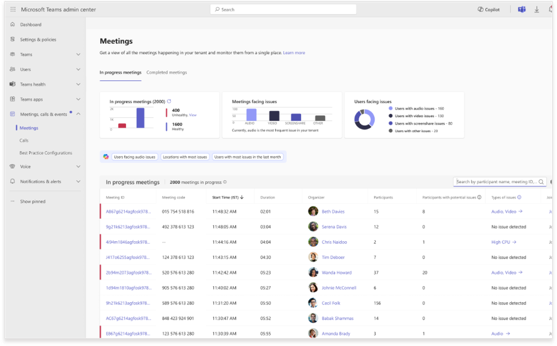
- In-progress meetings: View meetings, town halls, and webinars currently occurring in the organization when at least one participant has a Teams Premium license or Teams Rooms Pro license.
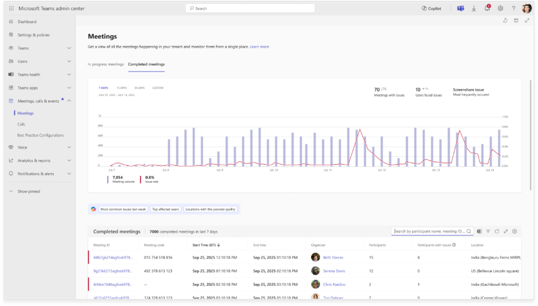
- Completed meetings: View meetings that occurred across the organization during the previous 30 days.
- Completed calls: Review completed calls across the organization to investigate call quality issues.
- Issue details: Quickly identify issues experienced by participants and access additional details.
- Detailed diagnostics: Drill down into telemetry and diagnostic information to support root cause analysis and troubleshooting.
- Microsoft 365 Copilot for Admins: Use Copilot to investigate individual meetings or analyze trends across the organization.
- Filtering and search: Refine results using filters such as:
- Time range (last 7 days, 15 days, 30 days, or a custom date range)
- Meetings with issues
- Organizer
- Meeting type
- Additional meeting and participant attributes
- Export: Export meeting and call data for offline analysis, reporting, and investigation.
[Action Required / Recommendations:]
No action is required. The updated experience will be available automatically after rollout. Once available, administrators can begin using the new capabilities to monitor and troubleshoot meetings and calls across their organization.
[Compliance Considerations:]
No compliance considerations identified, review as appropriate for your organization.
Details
Platforms
- Web
Services
- Teams
Category
- Plan for change
Microsoft tags
- Admin Action
- New Feature