MC1454378 The Next Generation of File & Folder Sharing
Primary service: SharePoint
ChangePilot summary
- Microsoft is introducing a new third-generation Microsoft 365 file and folder sharing experience centered on a single "hero link" that controls access to content.
- The change affects SharePoint Online, OneDrive, and Microsoft 365 file-sharing experiences across desktop, web, mobile, and Mac clients.
- Sharing behavior changes so the same primary link can be updated after it has been shared, while existing links continue to work under "Other links."
- Administrators can set the default hero link audience at the site collection or OneDrive level using SharePoint PowerShell, but there is no tenant-wide setting.
- No immediate action is required before rollout, but IT should update documentation and communicate the new sharing model to users.
Latest update: No material change
What it means for you
What admins need to do
Review and update any internal guidance for file sharing in SharePoint and OneDrive so helpdesk and end users understand the new hero link behavior. Check site-level or OneDrive default sharing scope settings via SharePoint PowerShell where your organization needs a different default audience, and validate that sharing policies still align with your governance model. Prepare user communications and support materials to explain that existing links remain valid and that access can now be broadened on the same link.
Impact on users
Users will see a new sharing dialog and a single primary "hero link" for files and folders. By default, that link only works for people already added to the item, but users can broaden access if their organization allows it. Existing links will still work, and users can update the same link instead of creating a new one when sharing needs change.
If you miss it
If IT does not prepare users and support teams, people may be confused by the new sharing dialog and the default behavior of the hero link, especially when a previously shared file is not accessible. The business impact is mainly operational: more helpdesk questions, inconsistent sharing guidance, and potential collaboration friction if users do not understand how to adjust access on the same link. There is no indication of a compliance or service outage risk from missing this notice, but governance expectations may be misapplied if documentation is not updated.
- Admin controls available
- Yes
History
Recorded changes
- Standard end: late November 2026 (previously late October 2026).
-
- Standard start: early October 2026 (previously mid-September 2026).
- GCC start: early October 2026 (previously mid-September 2026).
- GCC High start: early October 2026 (previously mid-September 2026).
- DoD start: early October 2026 (previously mid-September 2026).
- Standard, GCC GCC high and DoD start: mid-September 2026 (previously late August 2026).
Microsoft message
Updated October 7, 2026: We have updated the timeline. Thank you for your patience.
[What and why:]
We're introducing the third-generation Microsoft 365 sharing experience to make collaboration simpler, smarter, and more secure by default. At the center of this update is a new hero link—a single sharing link that controls access to a file or folder.
Users will see one consistent sharing experience whether they copy a link, share through email, or use the browser URL. The hero link consolidates sharing controls into a single link that can be updated after it has been shared, reducing the need to create and resend new links when access requirements change.
[Rollout schedule:]
- General Availability (Worldwide, GCC, GCC High, DoD): Rolling out early October 2026 (previously mid-September) through end of November 2026 (previously late October)
[Impact on your organization:]
Who is affected: All users who share or manage files and folders in Microsoft 365.
Platforms and services: SharePoint, OneDrive, and Microsoft 365 file-sharing experiences.
What will happen:
- Every file and folder will have a single primary sharing link, called the hero link, displayed in the sharing dialog.
- The hero link settings determine who can access the item beyond people who are explicitly granted access.
- Adding people directly to a file or folder remains unchanged and continues to be the simplest way to share content.
Screenshot - Add people screen when sharing
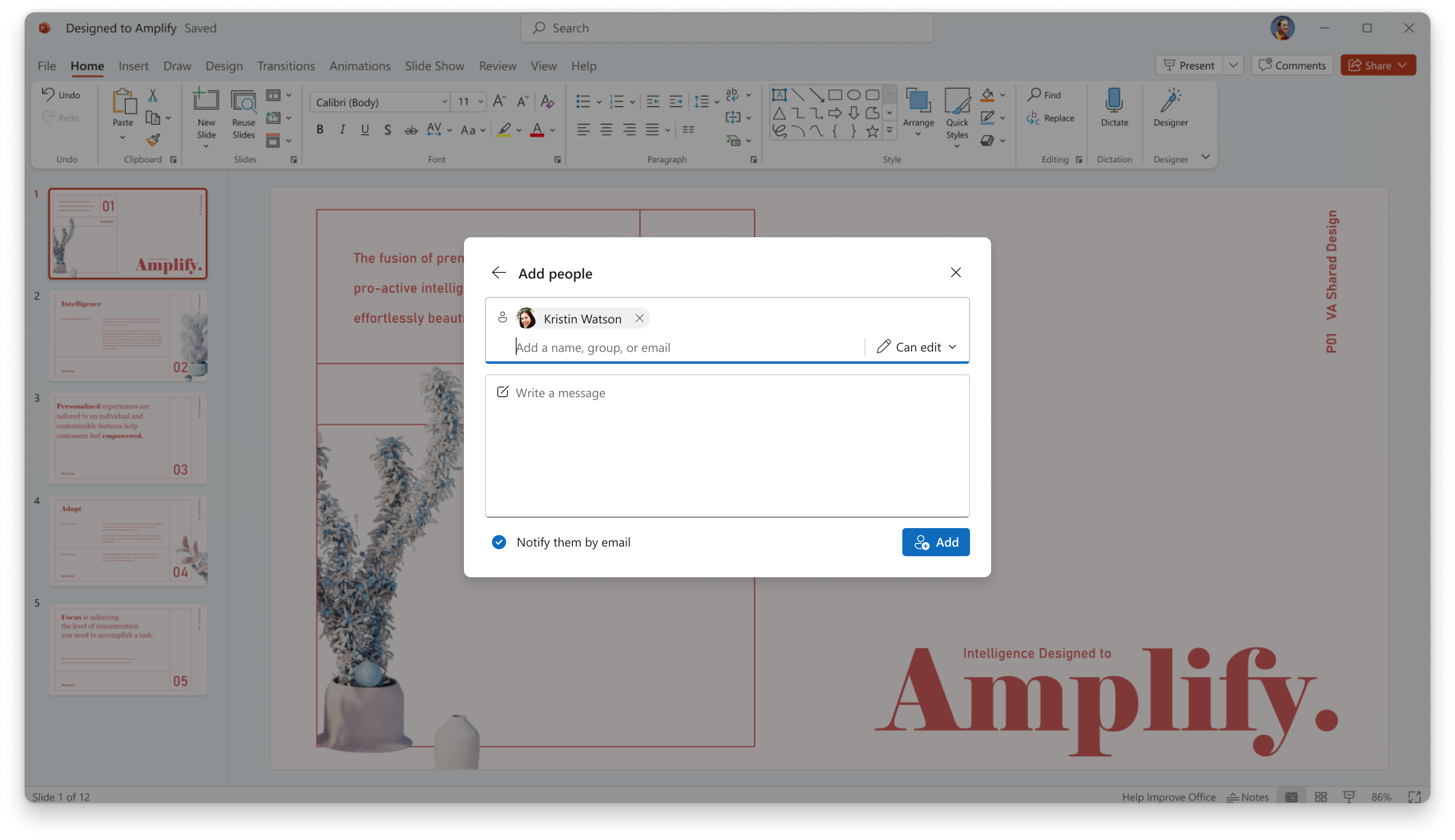
- By default, the hero link is set to Only people added to the file, meaning the link itself does not grant access to anyone.
Screenshot - Share file view with hero link
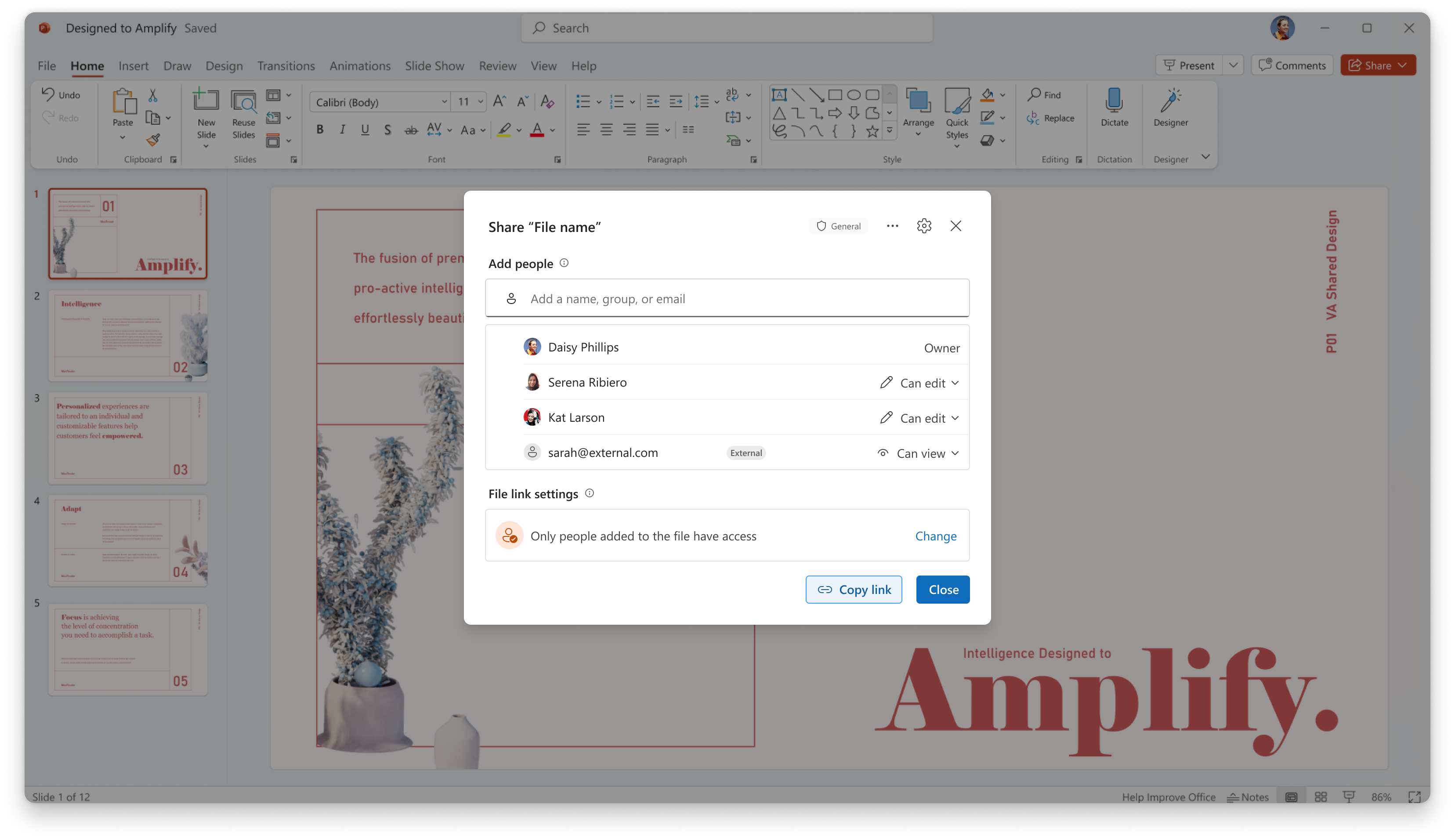
- Users can broaden access to people in the organization with the link or, where permitted by organizational policy, to anyone with the link.
- Users can choose whether recipients can view, edit, or view without downloading, depending on available permissions.
- Changing the audience for the hero link updates the existing link rather than creating a new one.
- If recipients cannot open a previously shared file, the sender can expand access on the same hero link without redistributing a new URL.
- Existing sharing links will continue to function and will appear under Other links in the sharing dialog.
- Effective access remains the most permissive combination of direct permissions, inherited permissions, group-based permissions, and link-based permissions.
- Users will see a tutorial experience upon opening the new share dialog for the first time.
[Action required/Recommendations:]
No action is required before rollout.
Organizations should consider the following preparation activities:
- Review internal sharing guidance and end-user documentation to reflect the new single-link sharing model.
- Communicate the updated sharing experience to users who regularly collaborate across teams and organizations.
- Evaluate site-level default sharing settings where different sharing behaviors are required.
Learn more:
- Walkthrough Video: https://www.youtube.com/watch?v=3RpE0KrQmcA&t=4s
- Announcement Blog: https://techcommunity.microsoft.com/blog/onedriveblog/simple-smart-and-secure-the-next-step-in-sharing-files-in-microsoft-365/4411655
Admin controls
- Administrators can configure the default audience for the hero link at the SharePoint site collection or OneDrive level by using the DefaultMainLinkScope parameter in SharePoint PowerShell.
- Supported values are:
- OnlyPeopleAdded (default)
- Organization
- There is currently no tenant-wide equivalent setting for the hero link audience.
- DefaultMainLinkScope controls only the default audience and does not prevent users from broadening access when allowed by policy.
- Hero links start with view permissions by default.
- Existing default sharing link settings and link expiration policies continue to apply to legacy links and do not govern hero links.
[Compliance considerations:]
No compliance considerations identified, review as appropriate for your organization.
More information
Details
In weekly changes
Platforms
- Android
- Desktop
- iOS
- Mac
- Web
Services
- M365
- M365 Apps
- OneDrive
- SharePoint
Category
- Plan for change
Microsoft tags
- Admin Action
- New Feature
- User Adoption