MC1447682 Enhanced live captions settings and right-side panel view
Primary service: Teams
ChangePilot summary
- Microsoft Teams is updating the live captions experience with a new right-side panel layout and a consolidated captions settings menu.
- The change applies to Teams meeting participants using live captions or translated captions in calls, meetings, and events.
- Existing admin policies and controls for live captions, translated captions, and Interpreter are not changing.
- The feature will be enabled automatically as it rolls out, so IT should brief support teams, update documentation, and review user guidance.
- Users will also get a new option to automatically turn on live captions for future meetings, plus shared translation language behavior across captions and Interpreter.
Latest update: Standard end: late November 2026 (previously late October 2026). GCC end: late November 2026 (previously late October 2026). DoD end: late November 2026 (previously late October 2026).
What it means for you
What admins need to do
Notify help desk and support teams about the updated captions pane and settings consolidation so they can answer user questions. Update internal user guidance for live captions, translated captions, Interpreter, and the new auto-enable preference. Review meeting policies to confirm your current captions and translation settings still align with organizational requirements, and communicate that translation language selections are now shared across Interpreter and translated captions.
Impact on users
Users who use live captions in Teams meetings will see a new right-side captions panel and a simplified settings menu. They can keep using the existing caption layouts, choose spoken and translation languages, adjust display and profanity settings, and optionally set live captions to turn on automatically for future meetings. The translation language selection will be shared across Interpreter and translated captions.
If you miss it
If IT does nothing, the feature will still roll out automatically and users may encounter the new captions UI without preparation. The main impact is user confusion and help desk questions about the changed layout, consolidated settings, and the new auto-enable behavior. There is no expected service disruption or compliance impact, and existing policies remain in place.
- Admin controls available
- Yes
History
Recorded changes
-
- Standard end: late November 2026 (previously late October 2026).
- GCC end: late November 2026 (previously late October 2026).
- DoD end: late November 2026 (previously late October 2026).
-
- Standard start: mid-September 2026 (previously mid-September 2026).
- Standard end: late October 2026 (previously mid-September 2026).
- GCC start: mid-September 2026 (previously mid-September 2026).
- GCC end: late October 2026 (previously late September 2026).
- DoD start: mid-September 2026 (previously mid-September 2026).
- DoD end: late October 2026 (previously late September 2026).
Microsoft message
Updated November 3, 2026: We have updated the timeline. thank you for your patience.
[What and why]
We're improving the live captions experience in Microsoft Teams to give users more flexibility when viewing captions and to simplify caption configuration during meetings. This update introduces a new right-side panel layout for live captions and consolidates caption settings into a single menu.
This message is associated with Microsoft 365 Roadmap ID 567462.
[Rollout schedule]
- Targeted Release: Beginning mid-August 2026 and expected to complete by late August 2026
- General Availability (Worldwide): Beginning mid-September 2026 and expected to complete by end of November 2026 (previously end of October)
- General Availability (GCC, GCC High, DoD): Beginning mid-September 2026 and expected to complete by end of November 2026 (previously end of October)
[Impact on your organization]
Who is affected
- Teams meeting participants who use live captions, translated captions
- Organizations that have live captions, translated captions enabled through existing Teams policies and licensing
Platforms and services
- Microsoft Teams calls, meetings, and events
- Windows, Mac, and web clients where live captions are supported
What will happen
After rollout, users will be able to:
- Display live captions in a new right-side panel:
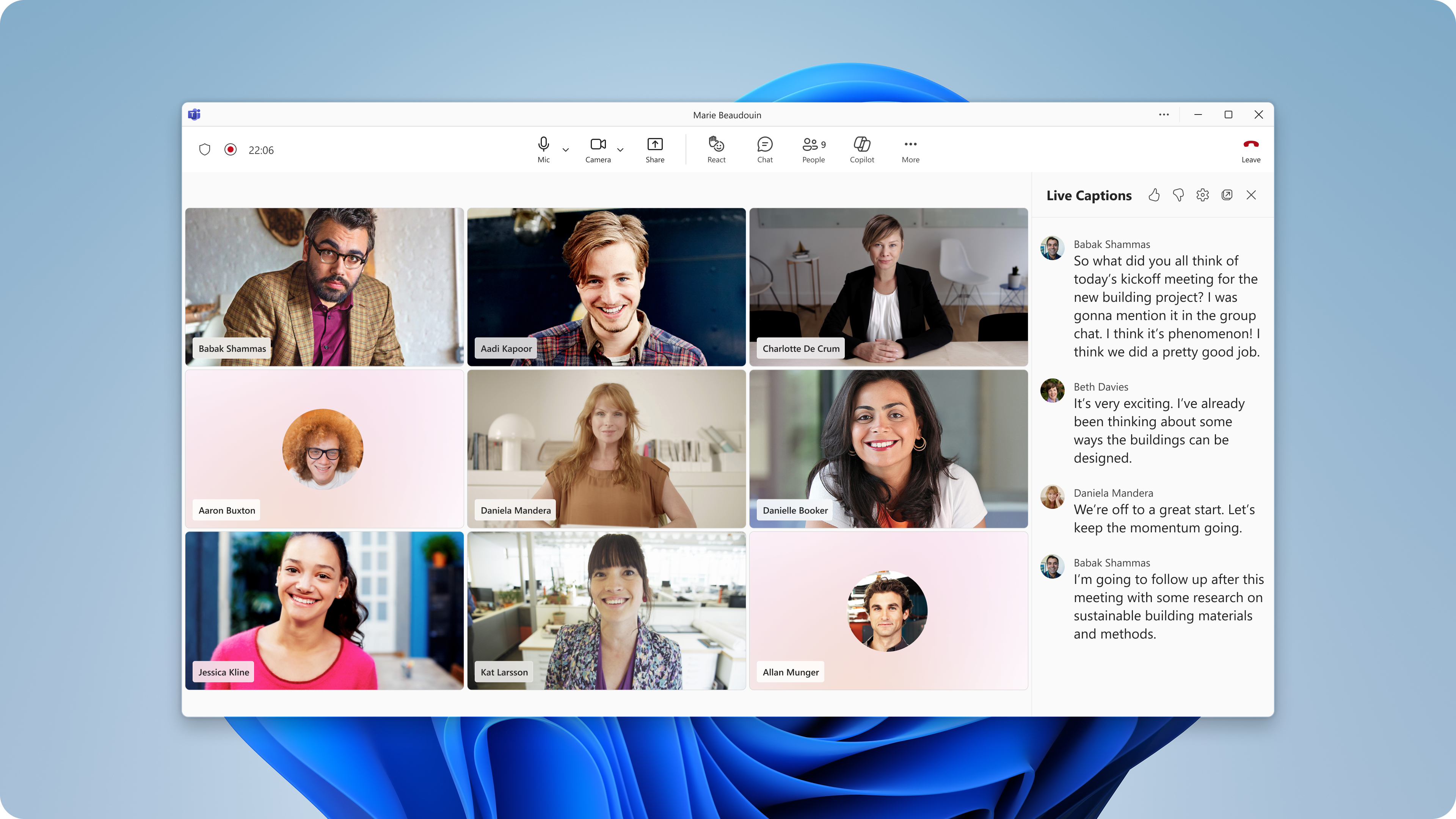
- Continue using existing top, bottom, and pop-out caption layouts.
- Manage caption settings from a consolidated settings menu within the captions pane:
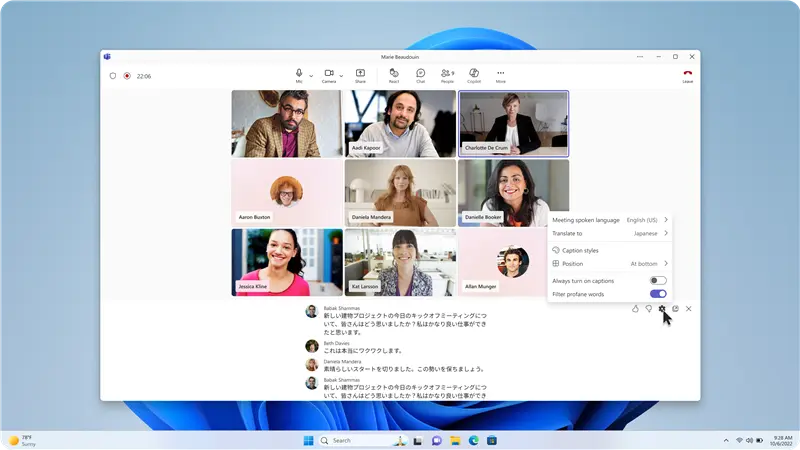
- Configure live captions to turn on automatically when they join meetings.
- Submit feedback on the live captions experience using thumbs-up and thumbs-down controls.
The consolidated settings menu will include:
- Spoken language
- Translation language
- Caption display styles
- Profanity filtering
- Automatically turn on live captions
The right-side panel provides an additional way to keep captions visible without overlapping meeting video or shared content.
The synchronized translation language setting reduces the need for users to configure Interpreter and translated captions separately.
The option to automatically turn on live captions is a user-level preference. When enabled, live captions will start automatically for that user in future meetings, subject to the meeting policies and feature availability configured by their organization.
This update does not change existing administrator controls or policies for live captions, translated captions, or Interpreter. Users will only be able to access features permitted by their organization's licensing, service availability, and Teams policy configuration.
[Action required and recommendations]
No administrative action is required.
We recommend that administrators:
- Notify support and help desk teams about the updated captions experience.
- Update internal documentation related to Teams meetings, accessibility features, and multilingual meetings.
- Review existing Teams meeting policies for live captions, translated captions, and Interpreter.
- Inform users that translation language selections will be shared across Interpreter and translated captions.
- Update support guidance for users who choose to automatically enable live captions for future meetings.
The feature will be enabled automatically as rollout reaches your organization.
Learn more
[Compliance considerations]
No compliance considerations identified. Review as appropriate for your organization.
More information
Details
In weekly changes
Platforms
- Desktop
- Mac
- Web
- Windows
Services
- Teams
Category
- Plan for change
Microsoft tags
- Admin Action
- New Feature
- User Adoption
Related changes
- 567462 Enhanced live captions settings and right-side panel view Roadmap · Teams · Rolling out