MC1446848 Action required to connect Teams Android devices to Teams Rooms Pro Management portal
Primary service: Teams
ChangePilot summary
- Microsoft is retiring Teams Android device management in the Teams admin center; management will move to the Teams Rooms Pro Management portal (PMP).
- Some Android-based Teams devices in the tenant are not yet connected to PMP through IoT Hub and will not be manageable there until connected.
- Affected organizations need to verify device connectivity, allowlist required network endpoints, and complete the migration for any disconnected devices.
- If the migration is not completed, management capability for affected Android devices may be lost.
What it means for you
What admins need to do
Review all Microsoft Teams Android devices in your tenant and confirm they are connected to the Teams Rooms Pro Management portal through IoT Hub. Allowlist the required network URLs and endpoints, then use PMP Rooms and Phones views to verify device status. For any devices not yet connected, follow Microsoft’s migration guidance to complete the transition before Teams admin center device management is retired. Escalate to Microsoft Support if devices still do not appear manageable after migration.
Impact on users
If IT completes the migration on time, end users should see little to no change. If devices are not migrated, users may lose reliable management coverage for Android Teams devices used in meeting rooms or on phones, which can lead to device issues going unresolved.
If you miss it
If this is missed, affected Android Teams devices may become unmanaged once Teams admin center support is retired. That can prevent IT from monitoring, configuring, or troubleshooting those devices through the supported portal, increasing the risk of service disruption for rooms and phone endpoints and creating operational overhead to recover management access.
- Admin controls available
- No
History
Recorded changes
No changes recorded since ChangePilot first saw this post.
Microsoft message
[What and why]
We identified that one or more Microsoft Teams Android devices in your organization are not connected to the Teams Rooms Pro Management portal (PMP) through IoT Hub. Devices that are not connected through IoT Hub cannot be managed through the Teams Rooms Pro Management portal.
This communication is related to the retirement of Teams Android device management in the Teams admin center (TAC). After this retirement, PMP will be the supported management experience for Teams Android devices. We previously announced this retirement in MC1227622.
This message is associated with Roadmap ID 555235.
[Rollout schedule]
- Worldwide: Beginning in early August 2026 and expected to complete by late September 2026
[Impact on your organization]
Who is affected
- Organizations with Microsoft Teams Android devices that are not connected to the Teams Rooms Pro Management portal through IoT Hub
Platforms and services
- Microsoft Teams
- Teams admin center
- Teams Rooms Pro Management portal
- Android-based Teams devices
What will happen
- Teams Android device management in the Teams admin center will be retired after August 2026.
- Android devices that are not connected to PMP through IoT Hub will not be manageable in the Teams Rooms Pro Management portal.
- Organizations that do not complete the required migration steps may lose management capabilities for affected Android devices.
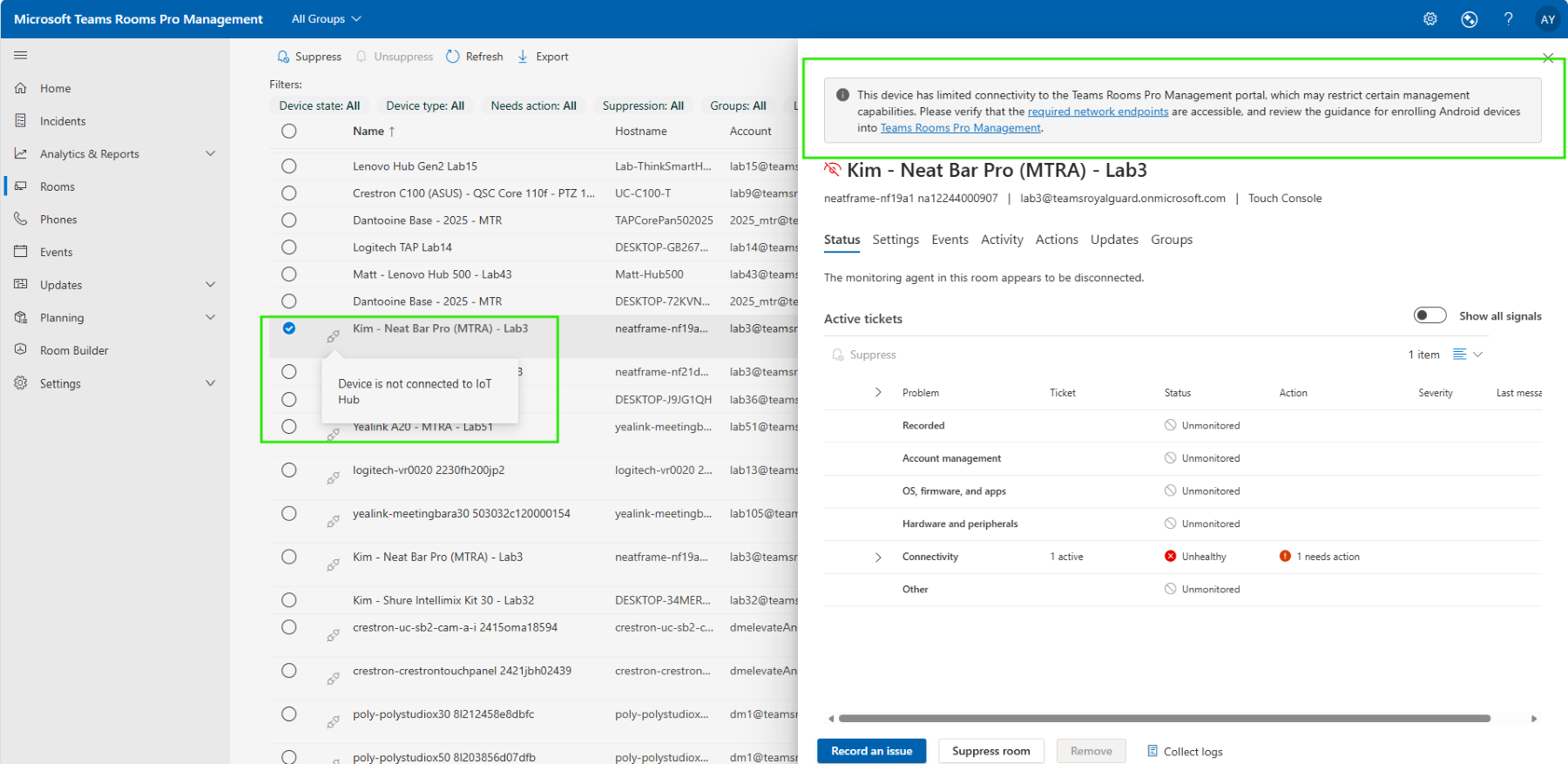
Screenshot - PMP Rooms and Phones view with examples of connected versus disconnected IoT Hub status indicators:
[Action required and recommendations]
Required by: August 31, 2026.
Complete the following steps as soon as possible:
- Make sure your Teams devices are signed-in.
- Allowlist the required network URLs and endpoints so devices can connect to the Teams Rooms Pro Management portal.
- Sign in to the Teams Rooms Pro Management portal and verify that your Android devices are connected through IoT Hub and can be managed. Check the Rooms and Phones views for device connection status.
- Review any devices that are not connected and follow the migration guidance to establish PMP connectivity.
- If devices remain unavailable in PMP after completing the migration steps, review the migration guidance and contact Microsoft Support if additional assistance is needed.
Learn more
[Compliance considerations]
No compliance considerations identified. Review as appropriate for your organization.
More information
Details
Platforms
- Android
- Desktop
- Teams Rooms
Services
- Admin
- Teams
Category
- Plan for change
Microsoft tags
- Admin Action
- User Adoption
Related changes
- MC1227622 Transitioning Teams Android Device Management from Teams admin Center to the Teams Rooms Pro Management portal Message Center · M365 · Admin High
- 555235 One-stop admin portal for Teams devices with Teams Rooms Pro Management Roadmap · Teams · Launched