MC1446799 Multilingual meeting recaps support personalized recap translation
Primary service: Teams
ChangePilot summary
- Microsoft Teams meeting recaps will personalize the initial recap language to match the language each participant selected during the meeting via translated captions or Teams Interpreter.
- Different attendees in the same meeting may see the recap in different languages based on their own in-meeting language selection.
- Users can manually switch the recap to another supported language after it is generated; this only changes the display language for that user.
- No admin configuration is required; the feature will be enabled automatically as it rolls out.
- IT should inform help desk and users, update documentation, and verify eligible users have the required Teams recap licensing and related policies reviewed.
Latest update: Standard start: early August 2026 (previously mid-August 2026). Standard end: early October 2026 (previously early September 2026).
What it means for you
What admins need to do
Review your help desk guidance and internal documentation for Teams meeting recaps, translated captions, and Teams Interpreter so support staff can explain the new default behavior. Notify relevant users that recaps may open in the language they selected during the meeting and that they can switch to another supported language after the recap is generated. Verify that eligible users have the required Teams meeting recap licenses and that any transcription, recording, and caption policies remain aligned with your organization’s requirements.
Impact on users
Users who participate in multilingual meetings and use translated captions or Teams Interpreter will see meeting recaps initially in the language they chose during the meeting. They can change the recap to another supported language after it is created. The transcript, recording, and original meeting content are not changed.
If you miss it
If IT does not prepare support teams and users, people may be surprised when recaps appear in different languages for different attendees, leading to confusion and extra help desk questions. There is no expected service disruption, but users may not realize they can switch the recap language or understand why the default language changed. Any license or policy gaps could also leave some users unable to access recap features as expected.
- Admin controls available
- No
History
Recorded changes
-
- Standard end: early October 2026 (previously early September 2026).
- GCC end: early October 2026 (previously early September 2026).
- GCC High end: early October 2026 (previously early September 2026).
- Standard, GCC, GCC High end: early September 2026 (previously late August 2026).
Microsoft message
Updated September 15, 2026: We have updated the timeline. Thank you for your patience.
[What and why]
We are improving the multilingual meeting experience in Microsoft Teams by personalizing meeting recaps based on the language each participant selected during the meeting through translated captions or Teams Interpreter.
After a meeting ends, users will initially see the meeting recap in the translation or interpretation language they selected during the meeting. They can also choose a different supported language after the recap is generated.
This update helps participants review meeting content in the language they used during the meeting, improving accessibility and continuity for multilingual collaboration.
This message is associated with Microsoft 365 Roadmap ID 567458.
[Rollout schedule]
- Targeted Release: Beginning in early August 2026 and expected to complete by mid-August 2026
- General Availability (Worldwide, GCC, GCC High): Beginning in mid-August 2026 and expected to complete by early October 2026 (previously early September)
[Impact on your organization]
Who is affected
Users who:
- Access meeting recaps in Microsoft Teams
- Use translated captions during meetings
- Use Teams Interpreter during meetings
- Have the required licenses and access to Teams meeting recap features
Platforms and services
- Microsoft Teams for Windows and Mac desktop
- Microsoft Teams on the web
- Microsoft Teams for iOS
- Microsoft Teams for Android
- Teams meeting recap
What will happen
After rollout:
- Meeting recaps will initially be displayed in the translation or interpretation language selected by each participant during the meeting.
- Different participants in the same meeting may see the recap in different languages based on their own language selections.
- Users can change the recap language after it is generated by selecting another supported language:
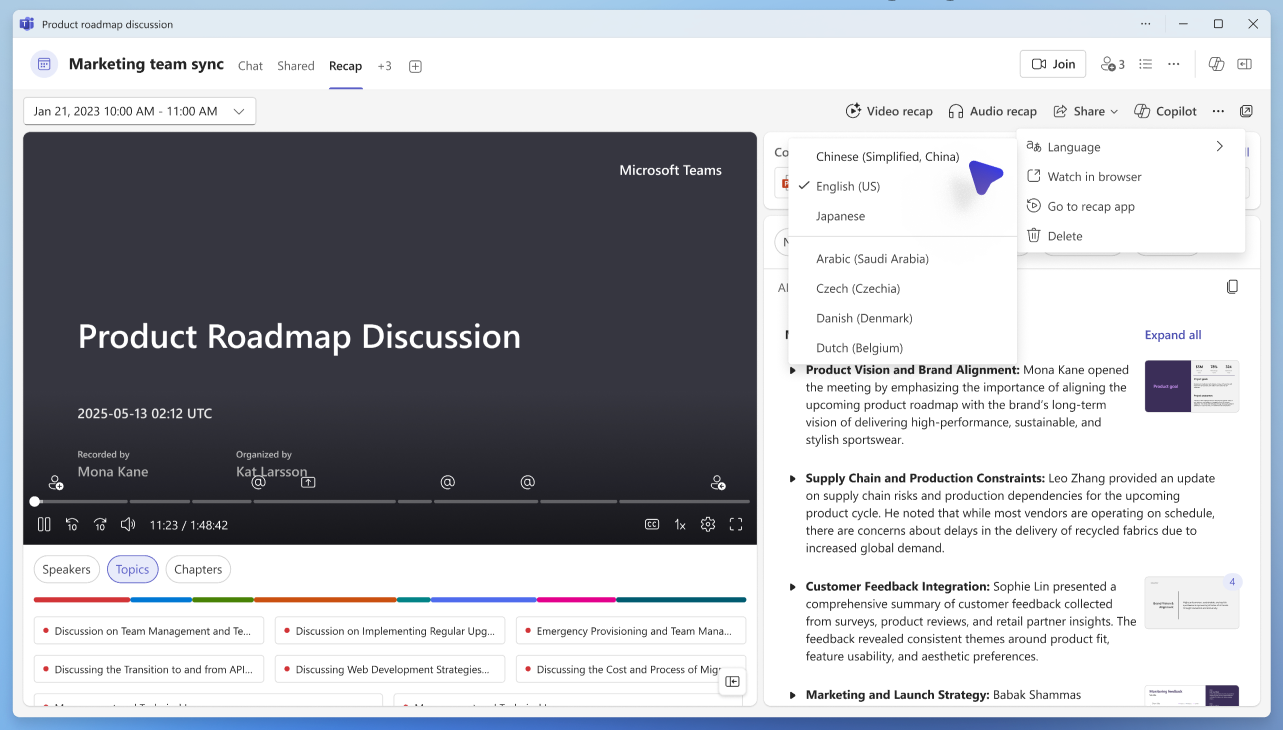
- Changing the recap language affects only how the recap is displayed for that user. It does not modify the original transcript, recording, or source meeting content.
For example, if a participant selects Japanese as their translation or interpretation language during an English-language meeting, their meeting recap will initially be displayed in Japanese.
Availability depends on supported languages and meeting configuration.
[Action required and recommendations]
No administrative action is required.
We recommend that you:
- Inform help desk and support teams about this updated multilingual recap experience.
- Update internal documentation for translated captions, Teams Interpreter, and meeting recap experiences.
- Verify that eligible users have the licenses required to access Teams meeting recap features.
- Review organizational policies related to transcription, recording, captions, Teams Interpreter, and meeting recap experiences, as applicable.
- Inform users that meeting recaps may initially appear in the language they selected during the meeting and that they can choose a different supported language from the recap experience.
The feature will be enabled automatically as rollout reaches your organization.
Learn more
[Compliance considerations]
No compliance considerations identified. Review as appropriate for your organization.
More information
Details
In weekly changes
Platforms
- Desktop
- Mac
- Web
- iOS
- Android
Services
- M365 Copilot
- Mac
- Teams
Category
- Plan for change
Microsoft tags
- Admin Action
- New Feature
- User Adoption
- Highlighted
Related changes
- 567458 Multilingual recap available with translation button Roadmap · M365 Copilot · Rolling out