MC1446797 Modernized Gallery view in Teams Rooms on Android
Primary service: MTR
ChangePilot summary
- Microsoft Teams Rooms on Android will get a modernized Gallery view that more closely matches the Teams Rooms on Windows experience.
- The update improves participant visibility and layout consistency, and reduces tile movement when active speakers are promoted.
- Meeting participants gain controls to hide the room self-preview video and to stop prioritizing video participants in the gallery.
- Admins can set default Gallery behavior through local device settings and the Teams Rooms Pro Management portal.
- No action is required before rollout, but organizations should communicate the visual changes to Teams Rooms users if they provide training or adoption materials.
Latest update: Standard end: late October 2026 (previously mid-August 2026).
What it means for you
What admins need to do
Review your Teams Rooms on Android device settings and the Teams Rooms Pro Management portal so you understand the available Gallery view defaults and can align them with your room standards. Update any internal help content or room-user guidance to reflect the new Gallery behavior, especially the ability to prioritize video participants and hide the room self-preview. Brief the service desk and room support teams so they can answer questions after rollout.
Impact on users
Users joining meetings from Teams Rooms on Android will see a more modern Gallery layout that looks more like Teams Rooms on Windows. Video participants may be shown more prominently, tiles will appear more consistent, and meetings may feel more stable with less tile movement. Users can also choose to hide the room self-preview or change how audio and video participants are prioritized.
If you miss it
If this change is not communicated, room users may notice the updated Gallery layout and new participant display behavior without warning, which could cause brief confusion or support calls. IT will still be able to manage defaults after rollout, but teams may need extra time to explain the new controls and update training materials. Business impact is otherwise limited because this is a visual and usability update rather than a service disruption.
- Admin controls available
- Yes
History
Recorded changes
- Standard end: late October 2026 (previously mid-August 2026).
- GCC High end: late September 2026 (previously early September).
Microsoft message
Updated October 5, 2026: We have updated the timeline. Thank you for your patience.
[What and why]
We're introducing a modernized Gallery view experience for Microsoft Teams Rooms on Android. This update aligns the experience more closely with Teams Rooms on Windows by improving participant visibility, creating more consistent layouts, and providing additional meeting display controls for users and administrators.
This message is associated with Microsoft 365 Roadmap ID 567468.
[Rollout schedule]
- General Availability (Worldwide, GCC): Beginning in mid-August 2026 and is expected to complete by late October 2026 (previously mid-August)
- General Availability (GCC High and DoD): Beginning in early September 2026 and expected to complete in late October 2026 (previously late September)
[Impact on your organization]
Who is affected
- Organizations using Microsoft Teams Rooms on Android devices.
Platforms and services
- Microsoft Teams
- Teams Rooms on Android
What will happen
Today, Teams Rooms on Android devices may display participants using a mix of aspect ratios and provide a different gallery experience than Teams Rooms on Windows.
After this rollout:
- Gallery view will prioritize video participants on the meeting stage by default:
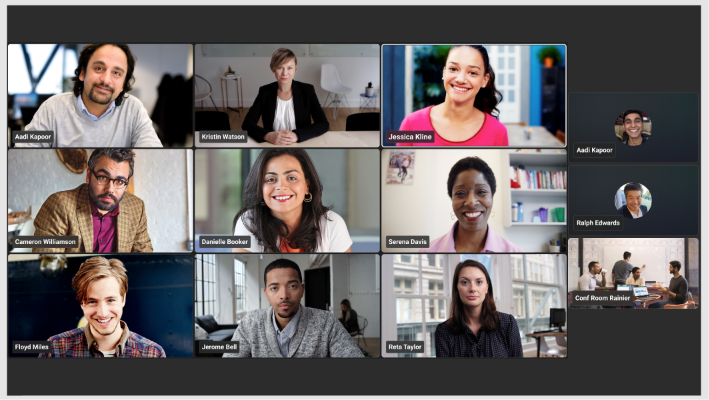
- Participant tiles will be displayed using more consistent aspect ratios, including 16:9, 4:3, and 1:1 layouts.
- Audio participants will be deprioritized when video participant prioritization is enabled, helping display more video participants on screen.
- Meeting participants will be able to:
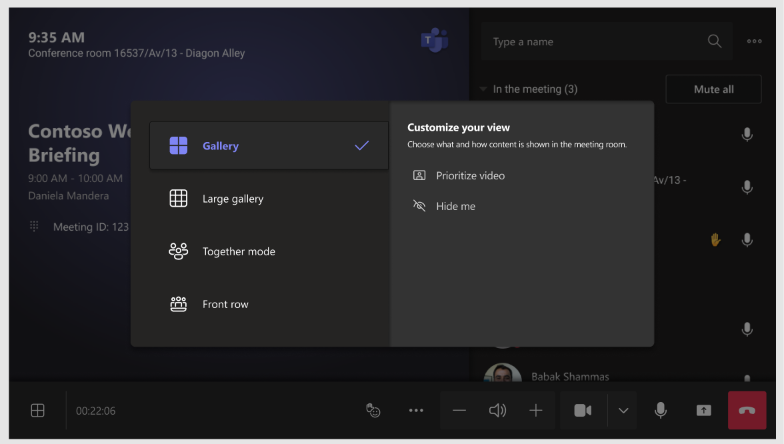 Hide the room self-preview video for a meeting.
- Display audio and video participants equally instead of prioritizing video participants.
- Gallery updates will be more stable, with reduced tile movement when active speakers are promoted to the meeting stage.
- Admin controls will be available through device settings and the Pro Management portal.
[Action required and recommendations]
No action is required before the rollout.
Administrators can configure the default Gallery view behavior through local device settings and the Teams Rooms Pro Management portal.
Communicate these visual changes to Teams Rooms users if your organization provides end-user training or adoption materials.
Learn more
[Compliance considerations]
No compliance considerations identified.
More information
Details
In weekly changes
Platforms
- Android
- Teams Rooms
Services
- MTR
- Teams
Category
- Stay informed
Microsoft tags
- Admin Action
- Feature Update
- User Adoption
Related changes
- 567468 Modernized Gallery view in Teams Rooms on Android Roadmap · Teams · Rolling out