MC1444376 New Teams Client Health monitoring dashboard for VDI in the Teams admin center
Primary service: Teams
ChangePilot summary
- Microsoft is adding a new Teams Client Health page in the Teams admin center for monitoring and troubleshooting Microsoft Teams VDI issues.
- The dashboard surfaces VDI optimization failure errors, descriptions, and recommended remediation guidance to help admins resolve issues faster.
- Administrators managing Teams in VDI environments such as Citrix, Azure Virtual Desktop, Omnissa, and Amazon WorkSpaces are the primary audience.
- Microsoft states no action is required before rollout, but admins should review the dashboard and use the provided guidance to address reported issues.
What it means for you
What admins need to do
Review the new Teams Client Health page in the Teams admin center after it appears, and incorporate it into your VDI support workflow. Use the Issues tab to investigate optimization failures, follow the remediation guidance for common configuration problems, and brief your helpdesk or Teams support staff on where to find the dashboard and how to interpret the error details.
Impact on users
End users should not see a direct UI change in Teams from this update. If administrators use the dashboard to identify and fix VDI optimization issues, users may experience fewer Teams performance problems and fewer connection or media-fallback issues in VDI sessions.
If you miss it
If this dashboard is not used, VDI optimization failures may be harder to diagnose, leaving Teams performance issues unresolved for longer. That can increase helpdesk tickets, user frustration, and time spent troubleshooting Citrix, AVD, Omnissa, or Amazon WorkSpaces Teams deployments. There is no indication of a service outage or mandatory cutover, so the business impact is mainly reduced troubleshooting efficiency.
- Admin controls available
- Yes
History
Recorded changes
No changes recorded since ChangePilot first saw this post.
Microsoft message
[What and why]
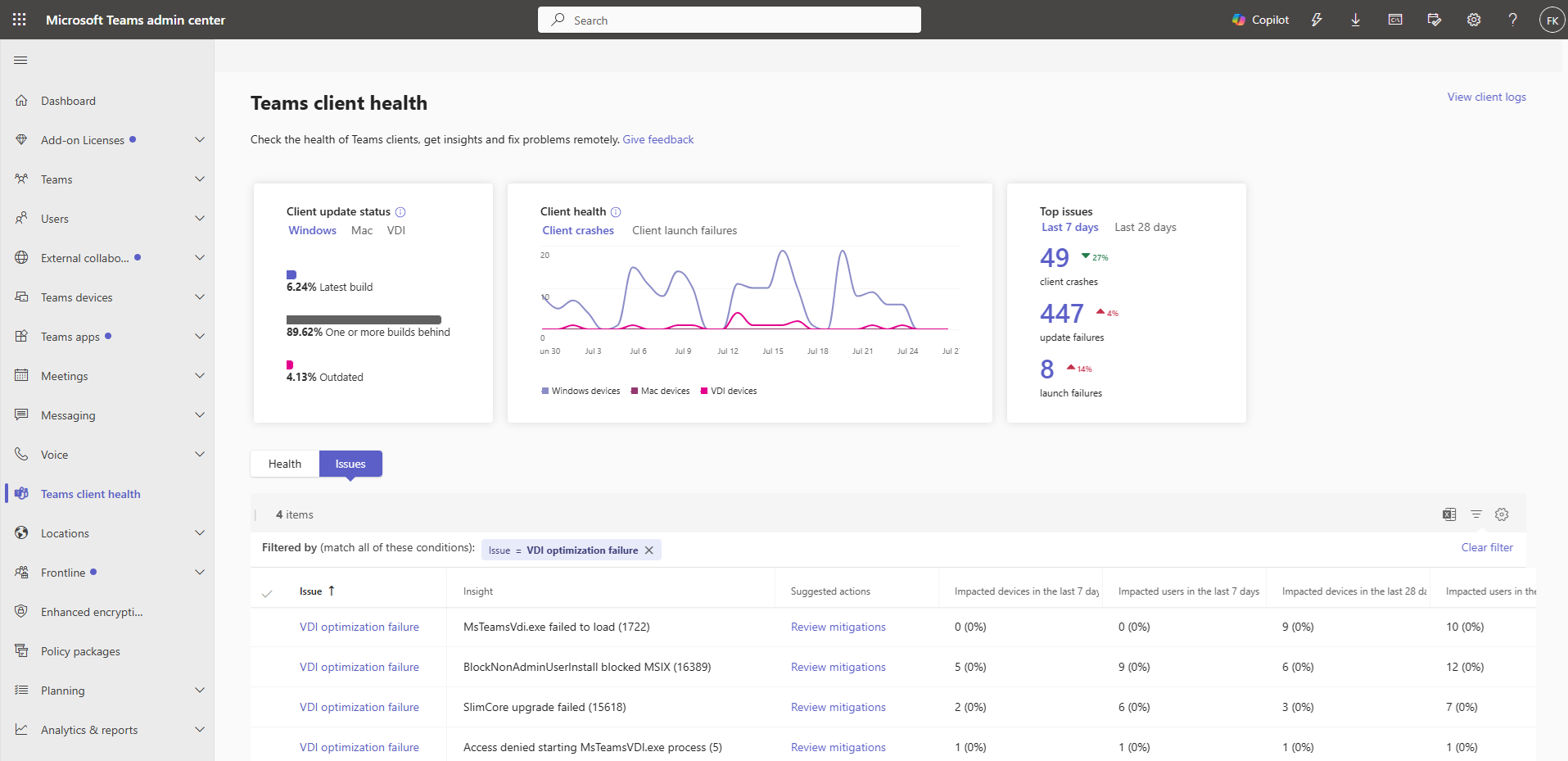
Microsoft is introducing a new Teams Client Health page in the Teams admin center that provides data, insights, and troubleshooting tools to help administrators identify and resolve Microsoft Teams Virtual Desktop Infrastructure (VDI) issues.
The Issues tab enables administrators to identify VDI optimization failure errors, review error descriptions, and follow recommended remediation guidance. Common issues may relate to Group Policy settings, network configurations, AppX and MSIX deployment issues, missing plugin or SlimCore configurations, and Citrix Virtual Channel Allow List settings.
This dashboard helps administrators detect and resolve VDI issues before they affect user productivity or result in support escalations.
[Rollout schedule]
- General Availability (Worldwide): Beginning in late July 2026 and expected to complete by early August 2026
[Impact on your organization]
Who is affected
- Administrators managing Microsoft Teams in VDI environments
Platforms and services
- Microsoft Teams
- Teams admin center
What will happen
Administrators will gain visibility into Teams VDI deployments and be able to monitor optimization failures that occur when SlimCore-based optimization fails.
The dashboard surfaces optimization failures and provides error details and remediation guidance to help administrators troubleshoot and resolve issues:
When SlimCore-based optimization fails:
- Citrix users may fall back to WebRTC-based optimization ("Citrix HDX Media optimized").
- Azure Virtual Desktop (AVD) users may fall back to "AVD Media Optimized" mode.
- Omnissa users may fall back to "Omnissa Media Optimized" mode.
- Amazon WorkSpaces users may operate in fallback mode (also known as server side rendering).
[Action required and recommendations]
No action is required before rollout.
Microsoft recommends that administrators review the Teams Client Health dashboard in the Teams admin center and monitor VDI environments for reported issues. Administrators should take corrective actions based on the specific error codes and remediation guidance provided within the dashboard.
Learn more
[Compliance considerations]
No compliance considerations identified, review as appropriate for your organization.
More information
Details
Services
- Admin
- Teams
- VDI
Category
- Stay informed
Microsoft tags
- Admin Action
- New Feature
- User Adoption
- Highlighted