MC1443523 Planner capabilities in Copilot chat
Primary service: M365 Copilot
ChangePilot summary
- Microsoft 365 Copilot Chat is gaining Planner integration so users can create, update, and query Planner tasks and plans using natural language.
- The change affects users of Microsoft 365 Copilot Chat and Microsoft Planner on desktop and web.
- Existing Planner permissions and access controls remain in place; no data storage or permission model changes are expected.
- Microsoft says no admin action is required, but recommends updating training/adoption materials and briefing help desk/support staff.
Latest update: Service change
What it means for you
What admins need to do
Update internal Copilot and Planner training materials to explain that users can manage Planner work directly in Copilot Chat. Brief the service desk on the new natural-language create/update/query scenarios and expected permissions behavior so they can answer questions and troubleshoot access issues. Share the change with relevant user groups if you want to encourage adoption.
Impact on users
Users with access to Microsoft 365 Copilot Chat and Planner will be able to create and manage Planner tasks and plans from chat without switching apps. They will see Planner information returned in text form in Copilot Chat and can use natural language prompts to work with tasks and plans.
If you miss it
If IT does not prepare users and support staff, the new Copilot Chat Planner experience may appear without context, leading to confusion about what can be done in chat and how permissions work. The business impact is mainly reduced adoption and more help desk questions rather than service disruption or compliance risk, since Microsoft states no configuration is required and existing access controls remain unchanged.
- Admin controls available
- No
History
Recorded changes
No changes recorded since ChangePilot first saw this post.
Microsoft message
[What and why]
We are introducing Planner capabilities in Microsoft 365 Copilot Chat. Users will be able to create, update, QnA Planner tasks and plans using natural language within Copilot Chat, helping them manage work without switching between applications.
This message is associated with Microsoft 365 Roadmap ID 516577.
[Rollout schedule]
- General Availability (Worldwide): Beginning in early September 2026
[Impact on your organization]
Who is affected
- Users of Microsoft 365 Copilot Chat
- Users of Microsoft Planner
Platforms/Services
- Desktop, Web
What will happen
Users will be able to:
- Create Planner tasks and plans from Microsoft 365 Copilot Chat using natural language prompts.
- View Planner task and plan details directly in Microsoft 365 Copilot Chat: (this version is text-only, the next version will have interactive task card as shown below)
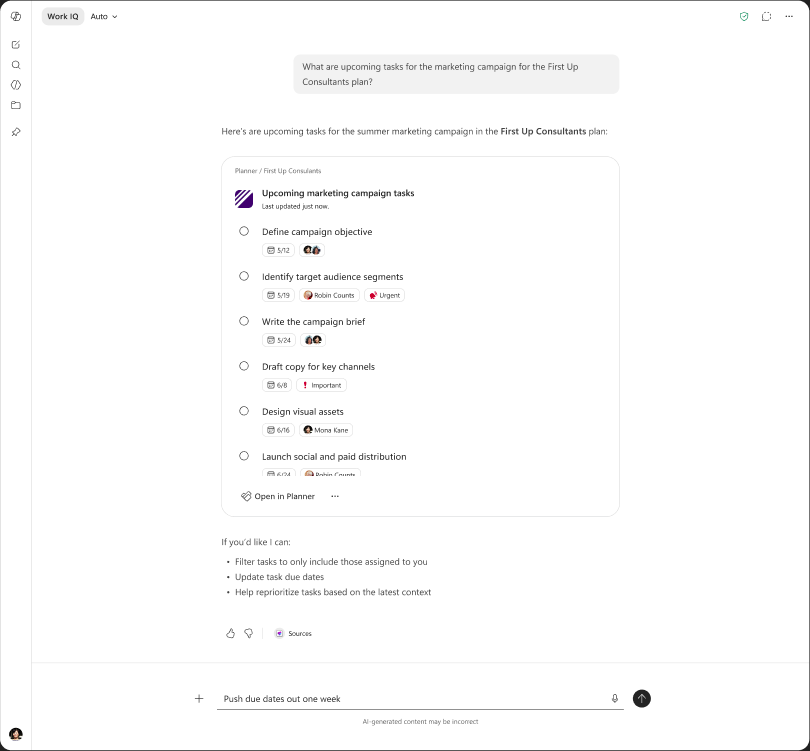
- Manage and update Planner tasks and plans across Copilot and Planner without switching between applications.
Existing Planner permissions and access controls continue to apply.
No changes to existing Planner data storage or permissions are expected.
The feature will become available through standard service rollout for eligible users.
[Action required/recommendations]
No action is required.
We recommend that you:
- Review and update internal training and adoption materials for Microsoft 365 Copilot and Microsoft Planner.
- Notify help desk and support teams about the new Planner task management capabilities available in Microsoft 365 Copilot Chat.
[Compliance considerations]
| Question | Answer |
| Does the change introduce or significantly modify AI/ML or agent capabilities that interact with or provide access to customer data? | Yes. Microsoft 365 Copilot Chat will use natural language interactions to create and retrieve Planner task information that users already have permission to access. |
| Does the change provide users a new way of interacting with generative AI? | Yes. Users can create, manage, and retrieve Planner task information through conversational prompts in Microsoft 365 Copilot Chat. |
More information
Details
Platforms
- Desktop
- Web
Services
- M365 Copilot
- Planner
Category
- Stay informed
Microsoft tags
- Admin Action
- New Feature
- User Adoption
Related changes
- 516577 Planner capabilities in Copilot chat (M365 Copilot) Roadmap · M365 Copilot · Rolling out