MC1443514 Planner Agent chat in basic plans
Primary service: Planner
ChangePilot summary
- Planner Agent chat is being added to Microsoft Planner basic plans, giving eligible users a conversational AI experience inside Planner.
- Users with an active Microsoft 365 Copilot license can ask questions about plan status, priorities, deadlines, and tasks, and can create or manage plans using Microsoft 365 content they already have access to.
- Administrators should review Planner Agent availability settings in the Microsoft 365 admin center and confirm licensing for users who should have access.
- If Planner Agent is blocked at the tenant level, users will not be able to use this capability.
Latest update: Standard end: late October 2026 (previously late September 2026).
What it means for you
What admins need to do
Review Planner Agent settings in the Microsoft 365 admin center and decide whether to allow or block access for your tenant. Confirm which users have active Microsoft 365 Copilot licenses and update licensing assignments if needed. Prepare helpdesk notes and internal guidance so support teams can answer questions about availability, permissions, and what the AI assistant can access.
Impact on users
Eligible users will see Planner Agent chat inside Planner and can use natural language to ask about plan status, priorities, upcoming work, and tasks. They can also generate insights, use AI-assisted filtering, and create or manage plans without leaving Planner. Users who are not licensed for Microsoft 365 Copilot, or whose tenant blocks Planner Agent, will not see the feature.
If you miss it
If IT does not review the setting before rollout, Planner Agent may become available to eligible users without prior communication, which could create confusion about what the AI can do and what content it can use. If the organization intended to restrict access, users may gain a new conversational AI entry point in Planner unexpectedly. If licensing is not in place for intended users, they may be unable to use the feature until licenses are corrected.
- Admin controls available
- Yes
- Licences affected
- Copilot
History
Recorded changes
- Standard end: late October 2026 (previously late September 2026).
Microsoft message
Updated October 15, 2026: We have updated the timeline. Thank you for your patience.
[What and why]
Planner Agent chat is coming to Microsoft Planner basic plans. This feature brings Planner Agent directly into the Planner experience, allowing users to ask questions about their plans, understand priorities, and take action without leaving Planner.
Planner Agent chat helps users stay organized by providing quick access to plan status, work that requires attention, and actionable insights. It can also help users create and manage plans using information from Microsoft 365 resources.
This message is associated with Microsoft 365 Roadmap ID 567671.
[Rollout schedule]
- Targeted Release: Beginning in early September 2026 (previously late August) and expected to complete by mid-September 2026 (previously early September)
- General Availability (Worldwide): Beginning in mid-September 2026 (previously late August) and expected to complete by end of October 2026 (previously late September)
[Impact on your organization]
Who is affected
- Users with an active Microsoft 365 Copilot license
- Organizations that allow access to Planner Agent
Platforms and services
- Microsoft Planner
- Microsoft 365 Copilot
- Web
What will happen
Eligible users will be able to access Planner Agent chat directly within Planner while working in basic plans.
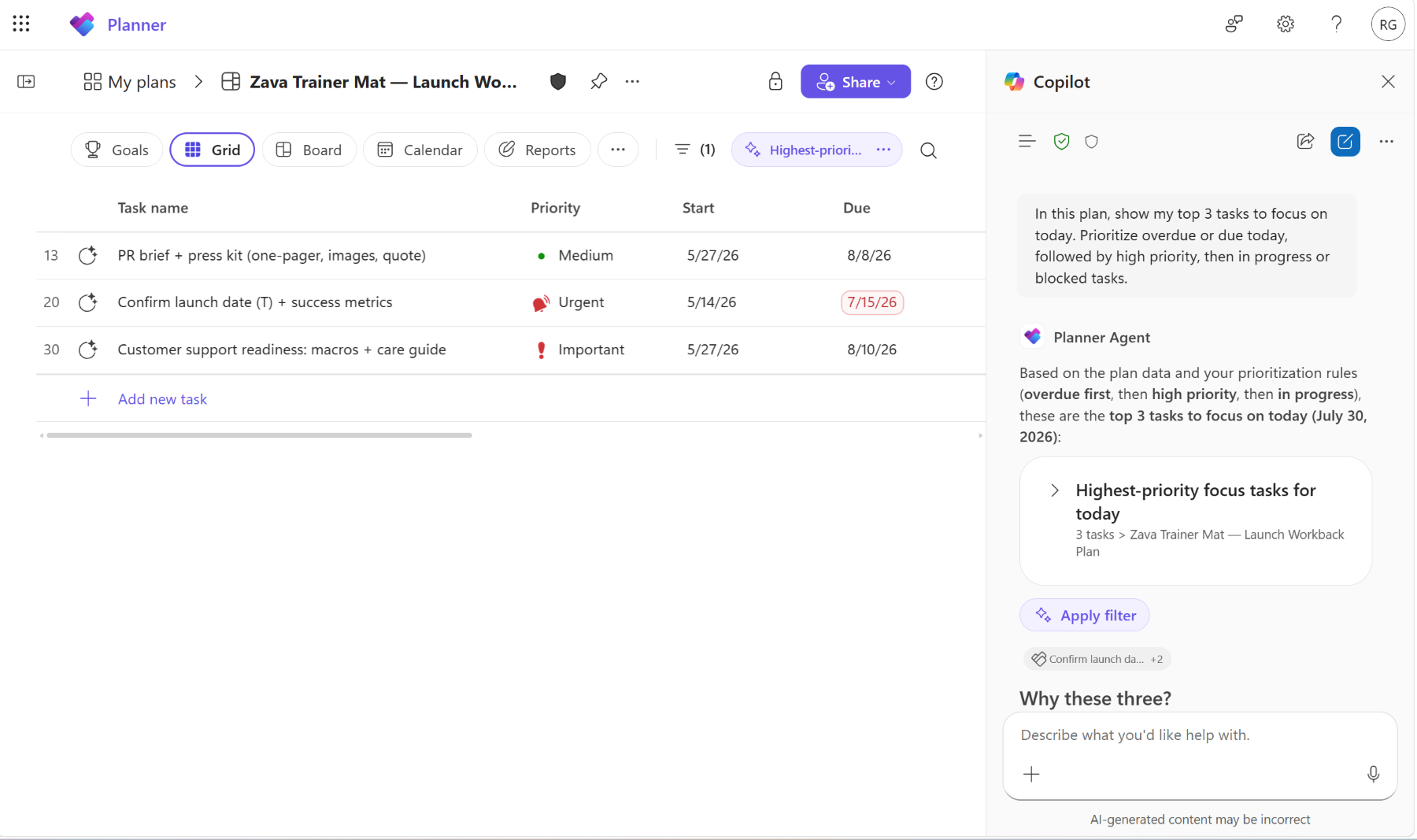
Users will be able to:
- Ask questions about plan status, priorities, and upcoming work.
- Apply AI-generated filters to identify important work more quickly.
- Use interactive task cards to draft updates, review tasks, and track progress.
- Receive insights about high-priority work, upcoming deadlines, and at-risk tasks.
- Create new Planner plans organized by goals and buckets.
- Use information from Microsoft 365 resources such as emails, meetings, and files when working with Planner Agent.
- Use natural language prompts such as: "Show me my recent high-priority tasks and what is due this week."
[Action required and recommendations]
Review whether your organization wants users to have access to Planner Agent.
Confirm that users who should use this feature have an active Microsoft 365 Copilot license.
- Review Planner Agent settings in the Microsoft 365 admin center.
- If Planner Agent is blocked, users will not have access to this capability.
- Update internal documentation and user guidance as appropriate.
No additional action is required before rollout.
Learn more
- Chat with Planner Agent in basic plans | Microsoft Support
- Manage agents in the Microsoft 365 admin center | Microsoft 365 admin center | Microsoft 365 | Microsoft Learn
[Compliance considerations]
| Question | Answer |
| Does this change introduce or significantly modify AI, machine learning, or agent capabilities that interact with customer data? | Yes. This feature introduces Planner Agent chat, an AI-powered experience that interacts with Planner data and can use existing Microsoft 365 resources, including emails, meetings, and files, to provide insights, answer questions, and help users take action. |
| Does this change provide end users with a new way to interact with generative AI? | Yes. Users can interact with Planner Agent chat using natural language prompts to analyze plans, identify priorities, create plans, manage tasks, and receive AI-generated insights directly within Planner. |
| Does this change alter how existing customer data is accessed or processed? | Yes. Planner Agent chat can access and process existing Planner data and Microsoft 365 content that users already have permission to access in order to generate responses, recommendations, and insights. |
| Is there an administrative control available for this feature? | Yes. Administrators can control access to this capability through agent settings. Blocking the Planner Agent removes access to the feature. |
| Can this feature be enabled or disabled by administrators? | Yes. Administrators can manage availability of the feature through Planner Agent configuration and access controls. |
| Does this change affect how users access information within Microsoft 365? | Yes. Users gain a new conversational interface that enables them to access and interact with Planner information and related Microsoft 365 content through natural language requests. |
More information
Details
In weekly changes
Platforms
- Web
- Desktop
Services
- M365 Copilot
- Planner
Category
- Stay informed
Microsoft tags
- Admin Action
- New Feature
- User Adoption
- Highlighted
Related changes
- 567671 Planner Agent chat in Basic Plans Roadmap · M365 Copilot · Launched