MC1442612 Microsoft PowerPoint: Access your organization's brand templates in PowerPoint
Primary service: PowerPoint
ChangePilot summary
- PowerPoint for Windows will surface organizational brand templates directly from Backstage, making them easier for users to find and use.
- The feature applies to users with a Microsoft 365 Copilot (Premium) license and organizations that use Brand kits or Organizational Asset Libraries (OAL).
- Brand templates from official and personal Brand kits will be available in PowerPoint, while existing OAL templates remain available through the Organization tab.
- Administrators can manage official Brand kit publishing through the Enterprise Brand Manager policy and a mail-enabled security group.
- No action is required to receive the feature, but IT should review Brand kit configuration and communicate the change to presentation authors.
Latest update: Standard start: late August 2026 (previously early August 2026). Standard end: mid-September 2026 (previously late August 2026).
What it means for you
What admins need to do
Review your Brand kit setup and confirm the PowerPoint templates you want exposed to users are included in official Brand kits. Verify the Enterprise Brand Manager policy is configured correctly and that approved brand managers are assigned through the required mail-enabled security group. Update internal guidance and helpdesk notes so support teams know where users will find templates in PowerPoint and how official versus personal Brand kits are governed.
Impact on users
Eligible users with Microsoft 365 Copilot (Premium) on PowerPoint for Windows will see organizational brand templates directly in Backstage, making it easier to start presentations with approved branding. Users with access to personal Brand kits can also use those templates. Existing OAL templates will still be available from the Organization tab.
If you miss it
If IT does not prepare Brand kits and policy settings, users may not see the intended official templates or may continue relying on less discoverable OAL content. That can reduce adoption of approved branding, create confusion about where templates are located, and increase helpdesk questions from presenters expecting the new experience. No existing content is removed, so the business impact is primarily reduced usability and missed branding consistency rather than service disruption.
- Admin controls available
- Yes
- Licences affected
- Copilot
History
Recorded changes
-
- Standard start: late August 2026 (previously early August 2026).
- Standard end: mid-September 2026 (previously late August 2026).
-
- Standard start: late August 2026 (previously early August 2026).
- Standard end: mid-September 2026 (previously late August 2026).
Microsoft message
Updated July 31, 2026: We have updated the timeline. Thank you for your patience.
[What and why]
To help users create presentations that are consistent with organizational branding, Microsoft is introducing access to brand templates directly from PowerPoint Backstage on Windows. This update enables users to discover and use brand templates more easily, reducing time spent searching for templates and helping organizations maintain brand consistency across presentations. Organizations that use Brand kits can make approved templates readily available to users through PowerPoint.
[Rollout schedule]
- General Availability (Worldwide): Beginning in late August 2026 (previously early August) and expected to complete by mid-September 2026 (previously late August)
[Impact on your organization]
Who is affected
- Users with a Microsoft 365 Copilot (Premium) license who use PowerPoint for Windows
- Organizations that have configured Brand kits
- Organizations currently using Organizational Asset Libraries (OAL)
Platforms and services
- PowerPoint for Windows
- Microsoft 365 Copilot
- Brand kits
- Organizational Asset Libraries (OAL)
What will happen
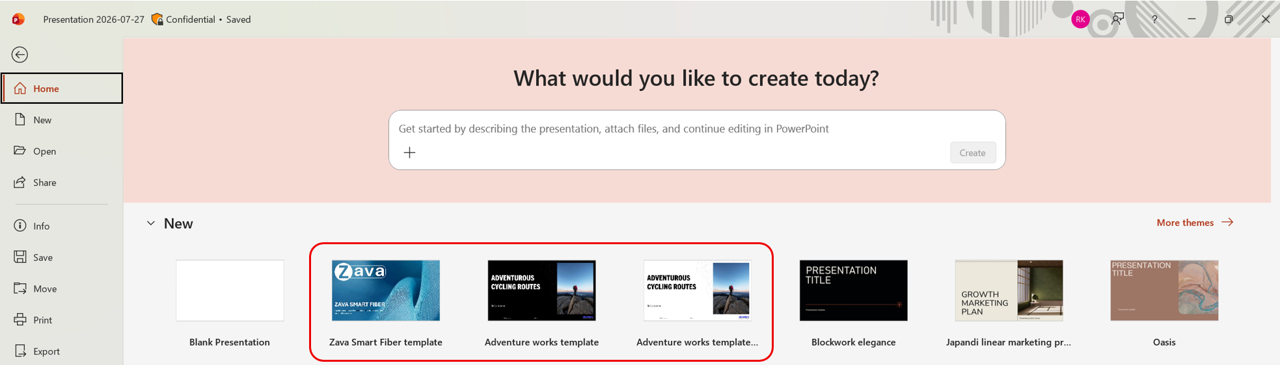
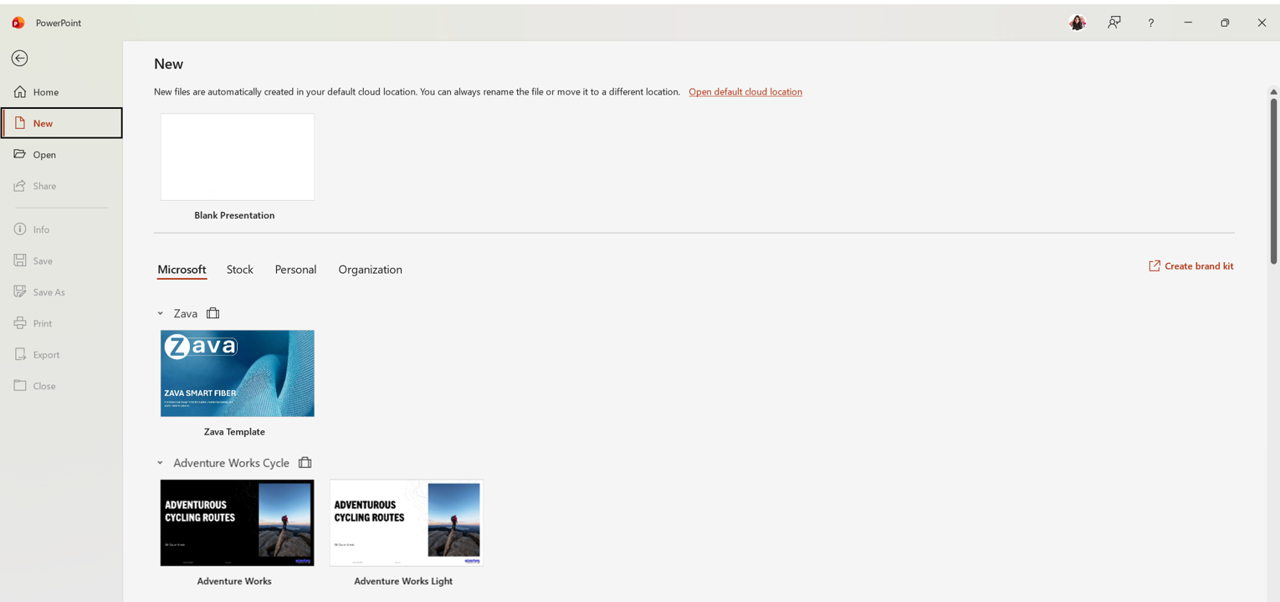
- Eligible users will be able to access brand templates directly from PowerPoint Backstage on Windows.
- Brand templates from users' available Brand kits, including official and personal Brand kits, will be available in PowerPoint.
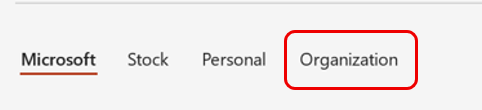
- Existing Organizational Asset Library (OAL) templates will continue to be available through the Organization tab (screenshot 1):
- The feature is available to users with a Microsoft 365 Copilot (Premium) license.
- No existing OAL templates or assets will be removed as part of this change.
Brand templates in the Backstage Home tab view (screenshot 2):
Brand templates in the Backstage New tab view (screenshot 3):
[Action required and recommendations]
No action is required to receive this feature.
To make organizational brand templates available to your users:
- Review your organization's Brand kit configuration.
- Create and publish official Brand kits that include PowerPoint templates.
- Configure the Enterprise Brand Manager policy and designate approved brand managers through a mail-enabled security group.
- Communicate this change to users who create presentations and rely on organizational branding.
Learn more
- Create and manage official Brand kits in the Microsoft 365 Copilot app | Microsoft Support
- Enterprise brand manager policy setup | Microsoft 365 Copilot | Microsoft 365 | Microsoft Learn
[Compliance considerations]
| Question | Answer |
| Does the change include an admin control? | Yes. Administrators can configure the Enterprise Brand Manager policy and assign designated brand managers through a mail-enabled security group. |
| Can the feature be controlled through Entra ID group membership? | Yes. Access to publishing and managing official Brand kits is controlled through membership in the configured mail-enabled security group. |
| Does the change allow a user to enable and disable the feature themselves? | Yes. Users can create and manage personal Brand kits for their own use. Official Brand kit management remains restricted to designated brand managers |
More information
Details
Platforms
- Windows
Services
- M365 Apps
- M365 Copilot
- PowerPoint
Category
- Stay informed
Microsoft tags
- Admin Action
- New Feature
- User Adoption