MC1441781 Add and upload your custom skills to OneDrive from within PowerPoint Copilot (Mac)
Primary service: PowerPoint
ChangePilot summary
- PowerPoint Copilot on Mac will let eligible users upload existing custom skills or create new custom skills directly within the Copilot experience.
- Custom skills are personal to the user and are stored in that user’s OneDrive for use in PowerPoint Copilot only.
- The change is enabled by default for users licensed for Microsoft 365 Copilot in PowerPoint; there is no immediate admin action required.
- IT teams should review governance, documentation, and support readiness for user-created Copilot skills.
Latest update: Standard end: mid-August 2026 (previously early August 2026).
What it means for you
What admins need to do
Update internal guidance for Copilot users on how custom skills are created, uploaded, and stored in OneDrive. Brief helpdesk/support teams on the new Manage skills experience and expected user questions. Review any governance, privacy, or content-review processes for user-created Copilot skills and confirm whether additional internal controls or training are needed.
Impact on users
Eligible Microsoft 365 Copilot users in PowerPoint on Mac will see a new Manage skills experience and can upload or create personal custom skills directly in Copilot. Those skills are saved to the user’s own OneDrive and are only available to that user in PowerPoint Copilot.
If you miss it
If IT does not prepare guidance and support teams, users may create or upload custom skills without understanding where they are stored or how they should be governed, leading to confusion, inconsistent usage, and possible internal compliance concerns. There is no expected service outage, but helpdesk volume and governance risk could increase if the change appears unexpectedly to Copilot-licensed users.
- Admin controls available
- Yes
- Licences affected
- Copilot
History
Recorded changes
No changes recorded since ChangePilot first saw this post.
Microsoft message
Updated August 5, 2026: We have updated the timeline. Thank you for your patience.
[What and Why:]
PowerPoint Copilot users can now upload custom skills directly from the Copilot experience and create new custom skills within PowerPoint. Custom skills are user-created instructions that extend and tailor Copilot behavior for specific tasks and workflows. Uploaded and added skills are saved to the user's personal OneDrive and are available for that user's personal use in PowerPoint Copilot. This enhancement streamlines skill creation and management by allowing users to customize Copilot directly within their workflow.
[Rollout Schedule:]
- General Availability (Worldwide): Rollout begins in late July 2026 and is expected to complete by mid-August 2026 (previously early August).
[Impact on Your Organization:]
Who is affected:
- Users licensed for Microsoft 365 Copilot in PowerPoint.
- Users who create or use personal custom skills.
- Microsoft 365 administrators supporting Copilot deployments.
Platforms/Services:
- PowerPoint
- Microsoft 365 Copilot
- OneDrive
- Mac
What will happen:
- Users can access a new Manage skills experience to view and manage their personal custom skills.
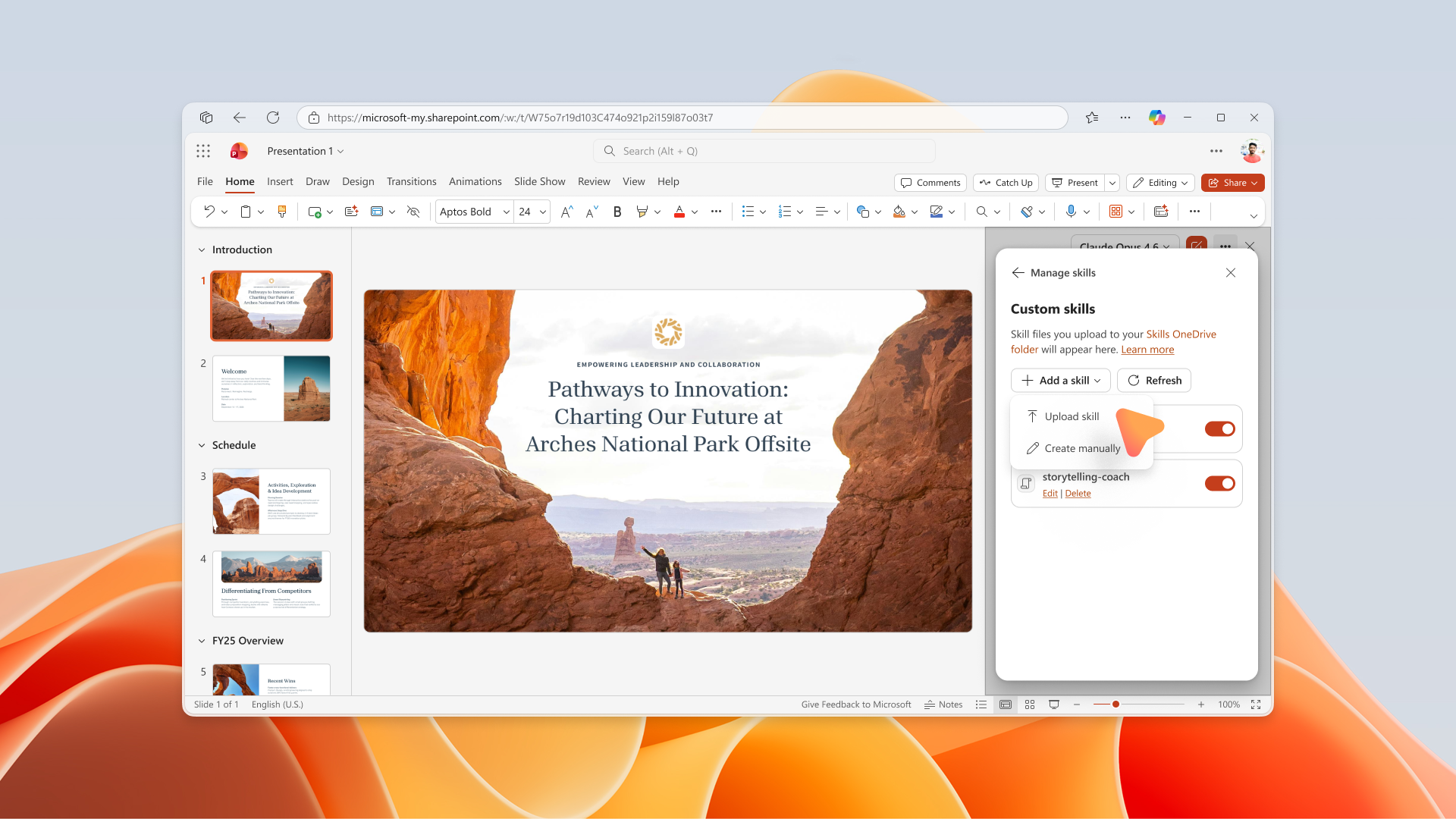
- Users will be able to upload custom skills directly from the PowerPoint Copilot experience.
- Users will be able to create custom skills directly within PowerPoint Copilot.
- Uploaded and added skills will be stored in the user's personal OneDrive.
- Custom skills are personal and available only to the user who creates or uploads them.
- Created and uploaded skills will be available for use within PowerPoint Copilot.
- The feature is available by default for eligible users when rollout reaches the tenant.
Screenshot: Users can upload existing custom skill files from the Upload skill experience. Uploaded skills are stored in the user's personal OneDrive:
[Action Required/Recommendations:]
No immediate administrator action is required.
We recommend that you:
- Review any internal governance processes related to user-created Copilot skills.
- Update internal documentation and training materials as appropriate.
- Inform helpdesk and support teams about the new skill upload and creation experiences.
Learn more: Use custom skills with Copilot in PowerPoint | Microsoft Support (will be updated before rollout)
[Compliance considerations:]
| Compliance area | Explanation |
| Stores new customer data | Custom skills created or uploaded by users are stored in the user's personal OneDrive. |
| Changes data processing or access | Users can create and upload custom skills that are used by PowerPoint Copilot during Copilot interactions. |
| Introduces AI/ML capabilities | Custom skills extend how Microsoft 365 Copilot responds and interacts within PowerPoint. |
| New generative AI interaction | Users can create and upload custom skills to tailor their PowerPoint Copilot experience. |
| Admin or user controls | Users can create, upload, and manage their own personal custom skills. |
More information
Details
Platforms
- Mac
Services
- M365 Apps
- M365 Copilot
- Mac
- OneDrive
Category
- Stay informed
Microsoft tags
- New Feature
- User Adoption