MC1441773 Microsoft Purview | Data Loss Prevention: Unified data access messages in Microsoft 365 Copilot
Primary service: Purview
ChangePilot summary
- Microsoft 365 Copilot and Copilot Chat will show a standardized message when Microsoft Purview DLP blocks Copilot from accessing, processing, or returning content.
- The change applies to DLP scenarios including grounding DLP, prompt DLP, and external email DLP.
- Affected experiences include Microsoft 365 Copilot, Teams Copilot, Outlook on the web Copilot, Edge Copilot, and other Copilot chat experiences using Microsoft 365 Chat orchestration.
- No configuration change is required, but admins should review DLP policies and update help desk/user guidance so users understand the message indicates policy enforcement.
Latest update: Microsoft Copilot (Microsoft 365) added to the affected services list.
What it means for you
What admins need to do
Review the DLP policies that apply to Microsoft 365 Copilot and Copilot Chat to confirm they align with your data protection requirements. Update internal support articles and help desk scripts so support teams can explain that the new message means content was blocked by organizational policy, not that Copilot is malfunctioning. If needed, brief users who rely on Copilot so they understand why some prompts, files, or emails may not be accessible.
Impact on users
When a DLP policy blocks Copilot from using certain content, users will see a consistent message that some content was restricted by organizational policy. Their Copilot experience otherwise remains the same, and the message is intended to clarify why the content is unavailable.
If you miss it
If IT does not prepare users and support teams, users may interpret the standardized message as a Copilot error or service outage, increasing help desk volume and confusion. There is no functional outage, but without guidance the organization may spend time troubleshooting expected DLP enforcement and users may not understand why Copilot could not access certain prompts, files, or emails.
- Admin controls available
- Yes
History
Recorded changes
No changes recorded since ChangePilot first saw this post.
Microsoft message
[What and why]
We're introducing a consistent user message in Microsoft 365 Copilot when a Microsoft Purview Data Loss Prevention (DLP) policy prevents Copilot from accessing, processing, or returning content.
Previously, users could receive different messages depending on the policy scenario, which could make it difficult to understand why content was unavailable. With this update, users receive a standardized message indicating that content was restricted by an organizational policy. This helps improve transparency, reduces confusion, and reinforces that Copilot is enforcing your organization's configured data protection policies.
This experience applies to Microsoft Purview DLP protections for Microsoft 365 Copilot and Copilot Chat, including:
- Grounding DLP
- Prompt DLP
- External Email DLP
[Rollout schedule]
General Availability
- Worldwide: Available as of July 15, 2026
- GCC: Available as of July 20, 2026
- GCC High and DoD: Available as of July 23, 2026
[Impact on your organization]
Who is affected
- Organizations using Microsoft Purview DLP policies with Microsoft 365 Copilot or Copilot Chat
- Users who encounter content restricted by applicable DLP policies
Platforms and services
The unified message may appear in Microsoft 365 Copilot experiences powered by Microsoft 365 Chat orchestration, including:
- Microsoft 365 Copilot
- Microsoft 365 Copilot Chat
- Microsoft Teams Copilot experiences
- Outlook on the web Copilot experiences
- Microsoft Edge Copilot experiences
- Other Microsoft 365 Copilot chat experiences that use Microsoft 365 Chat orchestration
What will happen
When a configured Microsoft Purview DLP policy restricts Copilot from using content, users will see a consistent message indicating that access to some content was restricted by an organizational policy:
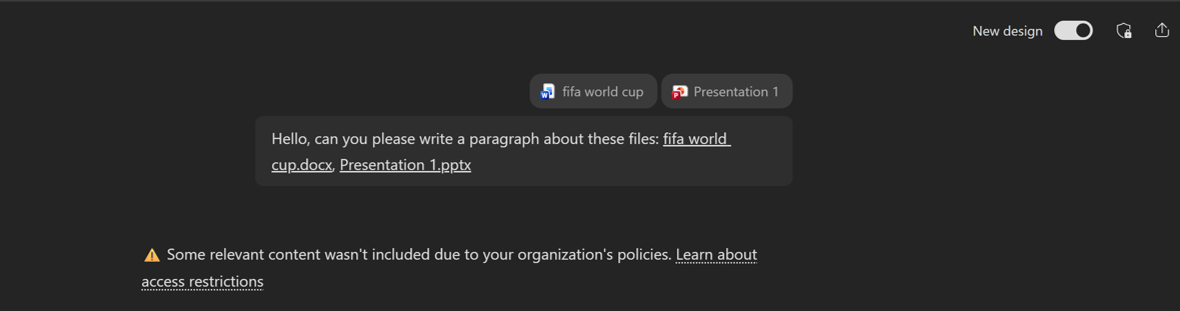
Examples include:
- Prompts containing sensitive information that DLP policies block from processing
- Prompts where DLP policies prevent external web search
- Files or emails excluded because of sensitivity label-based DLP policies
- External emails excluded from Copilot grounding by DLP policies
The message is displayed automatically and requires no additional configuration.
If applicable, users may also see a link that provides additional information about the policy restriction.
This change provides a more predictable user experience and helps users understand that content restrictions result from organizational policy enforcement rather than a Copilot service issue.
[Action required and recommendations]
No action is required.
We recommend that administrators:
- Review Microsoft Purview DLP policies that apply to Microsoft 365 Copilot.
- Update internal help desk guidance and user documentation so users understand that the message indicates policy enforcement rather than a Copilot service issue.
- Inform support teams that users may see this new standardized message when DLP policies restrict content.
Learn more
[Compliance considerations]
| Question | Answer |
| Does this change alter how existing customer data is processed, stored, or accessed? | Yes. When applicable Microsoft Purview DLP policies are configured, Microsoft 365 Copilot may be prevented from processing certain prompts, files, emails, or external email content. The change also introduces a standardized user message indicating that content was restricted by an organizational policy. |
| Does this change introduce or significantly modify AI, ML, or agent capabilities that interact with or provide access to customer data? | Yes. This update changes how Microsoft 365 Copilot communicates policy-enforced content restrictions within AI experiences. Users will receive a consistent message when DLP policies prevent Copilot from accessing or processing content. |
| Does this change modify Purview-related capabilities, including DLP? | Yes. The update affects the user experience associated with Microsoft Purview Data Loss Prevention enforcement in Microsoft 365 Copilot. Existing DLP protections remain unchanged, but users will now see a standardized message when DLP policies restrict content. |
| Does this change provide end users a new way to interact with generative AI? | Yes. Users will experience a new, standardized notification within Microsoft 365 Copilot chat experiences when DLP policies limit Copilot's ability to process or return content. |
More information
Details
Platforms
- Web
Services
- DLP
- Edge
- M365
- M365 Copilot
- Outlook
- Purview
- Teams
Category
- Plan for change
Microsoft tags
- Admin Action
- User Adoption