MC1440701 MDO Encrypted email attachment protection
Primary service: Defender
ChangePilot summary
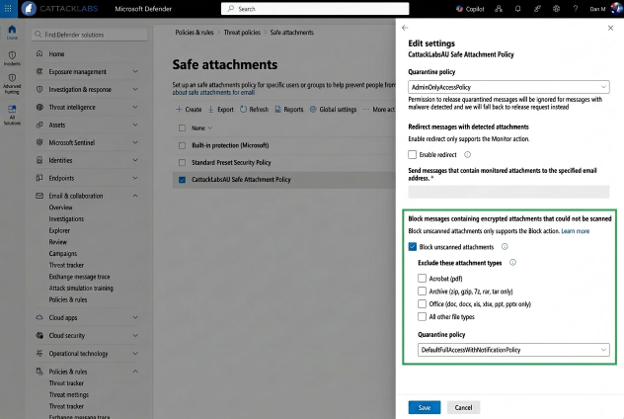
- Microsoft Defender for Office 365 is adding an opt-in Safe Attachments policy setting to quarantine email messages that contain password-protected attachments when content cannot be scanned or detonated.
- The feature is off by default, so administrators must explicitly enable and configure it if they want to use the new protection.
- Security teams can use quarantine release workflows and Advanced Hunting to identify protected attachments and manage affected messages.
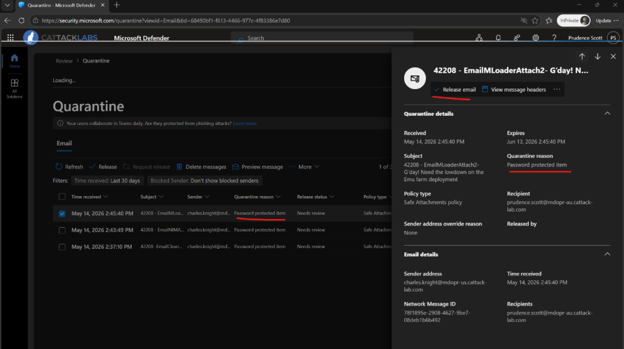
- Users may be able to self-release eligible quarantined messages by entering the attachment password; security admins can also release messages without the password.
- Supported protected file types include common archive, document, and PDF formats, and selected file categories can be excluded from protection.
What it means for you
What admins need to do
Review Safe Attachments policy design and decide whether to opt in to the new quarantine behavior. If enabling it, pilot with a scoped policy first, validate quarantine release workflows, confirm SecOps can identify these items in Advanced Hunting, and update helpdesk/user guidance for releasing protected messages. Make sure support teams know the difference between attachment passwords and account credentials.
Impact on users
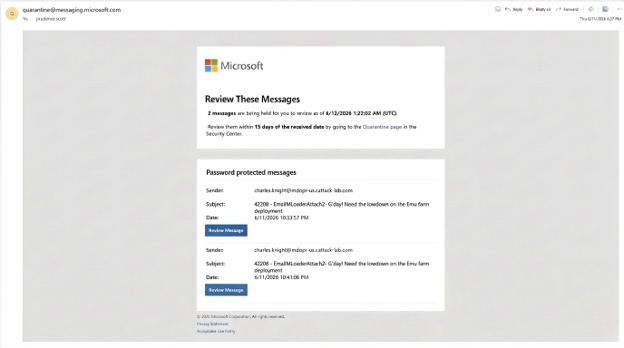
If your organization enables this setting, some messages with password-protected attachments may be quarantined when Microsoft cannot fully scan them. Users may then need to release eligible messages by entering only the attachment password, while security admins can release messages without the password. If the feature is not enabled, there is no change for users.
If you miss it
If IT does nothing, the feature remains off and your tenant will not gain the added quarantine control for unscanned password-protected attachments. That means risky encrypted content may continue to reach users without this extra protection. If the feature is intended for your security posture but is not configured, the organization may miss an opportunity to reduce exposure to malicious attachments and to standardize quarantine handling for SecOps and helpdesk teams.
- Admin controls available
- Yes
History
Recorded changes
No changes recorded since ChangePilot first saw this post.
Microsoft message
What and Why:
Organizations commonly use encrypted or password-protected attachments to securely share sensitive information through email. However, when Microsoft Defender for Office 365 cannot obtain the attachment password during scanning or detonation, the content cannot be fully analyzed for threats.
To help organizations reduce risk from unscanned content, Microsoft is introducing a new opt-in setting in Safe Attachments policies. This setting allows administrators to automatically quarantine email messages that contain password-protected attachments when Microsoft Defender for Office 365 cannot complete scanning or detonation. This enhancement provides administrators with greater control over potentially risky content while preserving business workflows through controlled release options.
Rollout Schedule:
- Worldwide: Early August 2026 through Late August 2026
- GCC: Late August 2026 through Late September 2026
- GCC High: Late August 2026 through Late October 2026
- DoD: Late August 2026 through Late October 2026
Impact on Your Organization:
Who is affected:
- Administrators managing Safe Attachments policies.
- Security operations teams responsible for quarantine management.
- Users who receive password-protected email attachments.
Platforms/Services:
- Microsoft Defender for Office 365
- Safe Attachments
- Quarantine
- Advanced Hunting
- Exchange Online
What will happen:
- This feature is off by default and requires administrator opt-in.
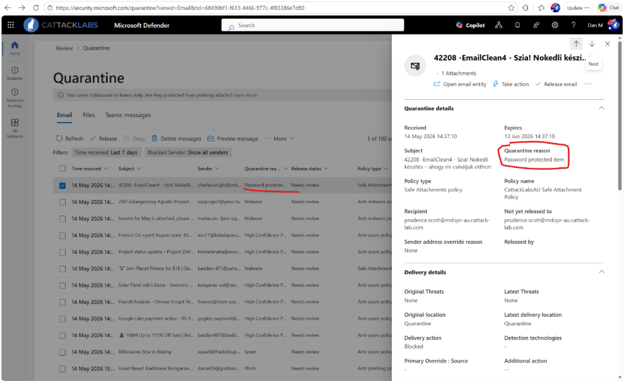
- Administrators can configure Safe Attachments policies to quarantine messages when password-protected content cannot be scanned or detonated.
- Organizations can pilot the feature using a separate scoped Safe Attachments policy.
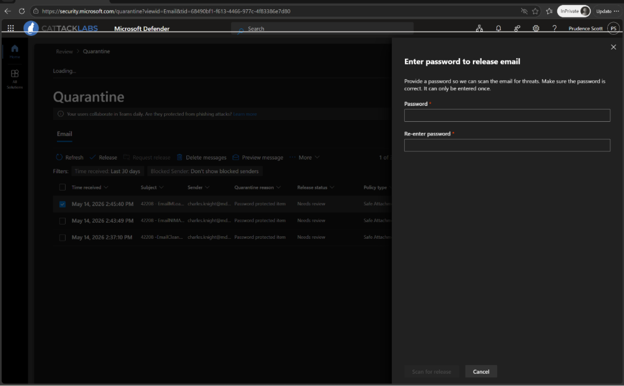
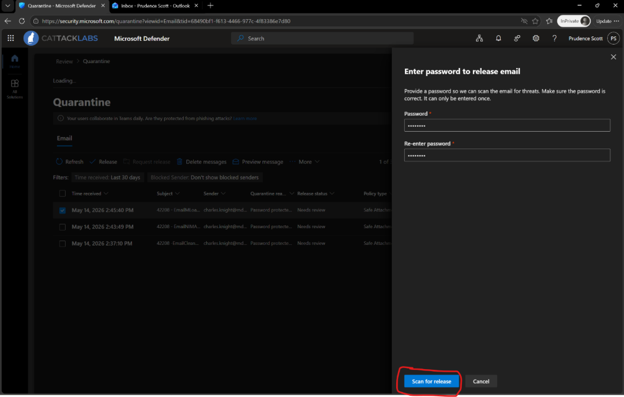
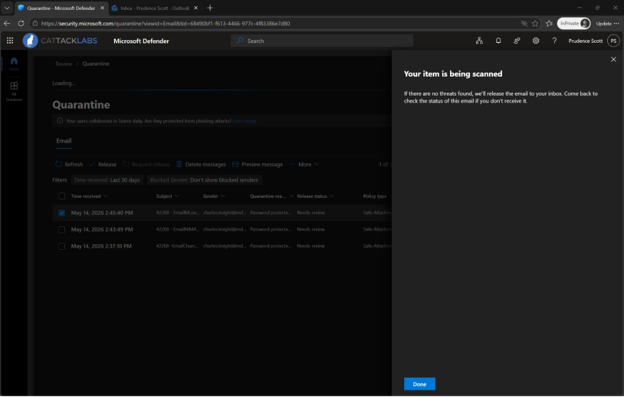
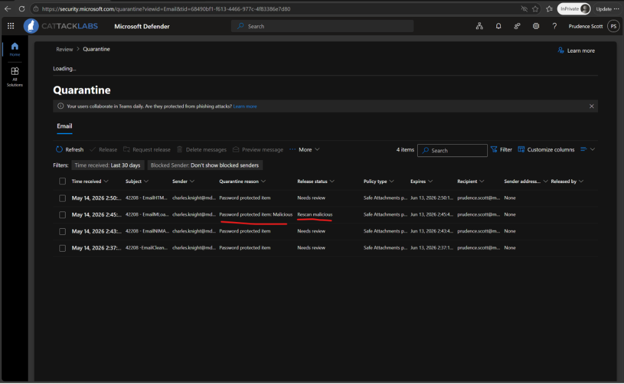
- Users can self-release eligible messages by providing the attachment password. A just-in-time detonation is performed before release.
- Security administrators can release quarantined messages without requiring the attachment password.
- Supported file categories include ZIP, GZIP, 7z, RAR, PDF, and Microsoft Office file formats.
- Selected file categories can be excluded from protection.
Important:
- Users should only enter the attachment password.
- Users should never enter account credentials, banking passwords, or unrelated passwords.
- Users should only release expected messages from validated senders.
- Unexpected protected email messages should be escalated to SecOps.
SecOps teams:
EmailAttachmentInfo
| where AdditionalFields contains "IsPasswordProtectedItem"
Action Required/Recommendations:
No action is required unless you want to use this capability.
- Review Safe Attachments policies.
- Consider a pilot deployment.
- Review quarantine release procedures.
- Update internal documentation.
- Communicate the change to support and helpdesk teams.
- Educate users on appropriate use of attachment passwords during message release.
- Review Microsoft Defender for Office 365 documentation.
- Microsoft Defender for Office 365 overview | Microsoft Learn
- Safe Attachments - Microsoft Defender for Office 365 | Microsoft Learn
- Set up Safe Attachments policies in Microsoft Defender for Office 365 - Microsoft Defender for Office 365 | Microsoft Learn
- Manage quarantined messages and files as an admin | Microsoft Defender for Office 365 | Microsoft Learn
Compliance considerations:
The change modifies how password-protected email attachments may be processed and accessed when organizations enable the feature. Administrators gain new controls through Safe Attachments policies and can identify affected content using Advanced Hunting. No other compliance considerations were identified.
More information
Details
Services
- Defender
- Defender XDR
- Exchange
Category
- Plan for change
Microsoft tags
- Admin Action
- New Feature