MC1437668 Microsoft Outlook for iOS and Android: Insert signature images from OneDrive
Primary service: Outlook
ChangePilot summary
- Outlook for iOS and Android will let users insert signature images directly from OneDrive in the signature editor.
- The new image picker also continues to support selecting images from the device photo library.
- This change only affects users who create or edit email signatures in Outlook mobile; it does not change the OneDrive app experience.
- The feature is enabled by default and does not require administrator configuration.
- Microsoft recommends informing the helpdesk and updating any internal training or screenshots that reference the signature editing workflow.
Latest update: Standard, GCC, GCC High and DoD start: late September 2026 (previously late August 2026). Standard, GCC, GCC High and DoD end: late October 2026 (previously late September 2026).
What it means for you
What admins need to do
No configuration is needed, but IT should brief the helpdesk and support teams so they can answer questions about the new signature image picker in Outlook mobile. Update any internal user guides or screenshots that show the old signature editor flow, and remind users that OneDrive availability in the picker is governed by existing cross-account data-sharing policies.
Impact on users
Users editing email signatures in Outlook on iPhone or Android will see a new option to insert images from OneDrive as well as from the device photo library. The selected image will be embedded into the signature, and existing signatures will not change.
If you miss it
If this is missed, the feature will still roll out and users may be confused when the signature editor looks different or when they notice OneDrive as a new source for signature images. The main business impact is support overhead and outdated training material; there is no expected service disruption or compliance impact.
- Admin controls available
- No
History
Recorded changes
-
- Standard, GCC, GCC High and DoD start: late September 2026 (previously late August 2026).
- Standard, GCC, GCC High and DoD end: late October 2026 (previously late September 2026).
Microsoft message
Updated August 28, 2026: We have updated the timeline. Thank you for your patience.
[What and why]
Microsoft is enhancing the signature editing experience in Outlook for iOS and Android by allowing users to insert images into email signatures directly from OneDrive, in addition to selecting images from their device photo library. This improvement makes it easier for users to access and use signature images stored in OneDrive while maintaining existing organizational data-sharing policies.
[Rollout schedule]
General Availability (Worldwide, GCC, GCC High, and DoD): Beginning in late September 2026 (previously late August) and expected to complete by late October 2026 (previously late September)
[Impact on your organization]
Who is affected
- Users of Outlook for iOS and Android who create or edit email signatures
Platforms and services
- Outlook for iOS
- Outlook for Android
What will happen
- Users will see a new option when inserting an image into an email signature:
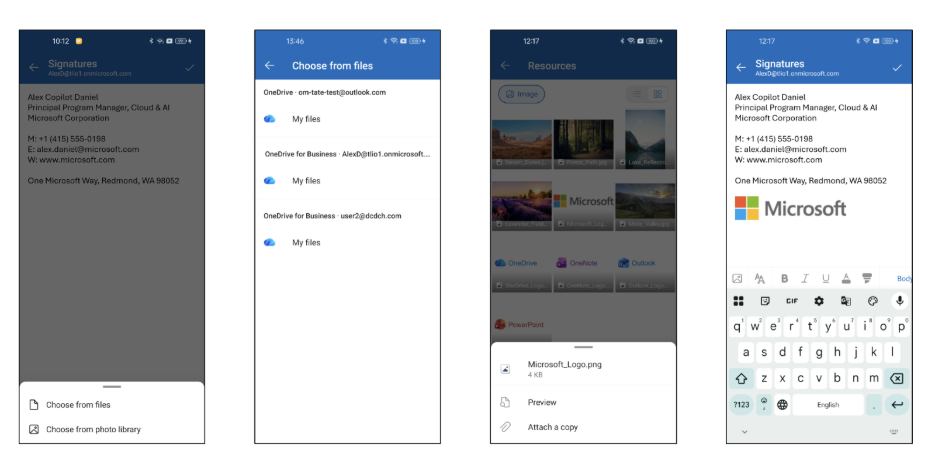
- Selecting Insert image in the signature editor will present:
- Choose from files to browse and select image files that are stored in OneDrive.
- Choose from photo library to select an image from the device, which remains the existing behavior.
- This change is only visible in Outlook for iOS and Android when editing email signatures. Users can select images stored in OneDrive, but there are no changes to the OneDrive application experience.
- Available OneDrive accounts are determined by your organization's existing cross-account data-sharing policies.
- The file picker displays only image files.
- Users can switch between grid and list views while browsing images.
- Selected images are downloaded and embedded into the signature, consistent with the current behavior for locally stored images.
- Existing signatures are not modified.
- The feature is enabled by default and does not require administrator configuration.
[Action required and recommendations]
No action is required. The update is enabled automatically.
We recommend that you:
- Inform helpdesk and support staff about the updated signature image selection experience.
- Update internal training materials or screenshots if they reference the signature editor workflow.
[Compliance considerations]
No compliance considerations identified. Review as appropriate for your organization.
Details
In weekly changes
Platforms
- iOS
- Android
- Mobile
Services
- Exchange
- OneDrive
- Outlook
Category
- Stay informed
Microsoft tags
- Admin Action
- New Feature
- User Adoption