MC1434583 Configure organization policy link for blocked Copilot Chat users
Primary service: M365 Copilot
ChangePilot summary
- Microsoft 365 Copilot Chat will support an optional organization-specific policy link for users who are blocked from Chat.
- Restricted users will still see the Chat entry point, but attempts to open Chat will show an unavailable message and can include a “View info from your organization” link.
- Admins can configure the link in the Microsoft 365 admin center under Copilot settings; the feature is off by default and does not change existing Integrated Apps access policies.
- Organizations should decide whether to publish internal guidance for blocked users and prepare support teams for the updated experience.
What it means for you
What admins need to do
Review your Copilot access and support guidance for users who are blocked from Chat. If you want to use the new experience, configure the organization policy URL in the Microsoft 365 admin center under Copilot settings, and point it to an internal help page or policy page with clear next steps. Brief the helpdesk so they can explain the new blocked-user message and know where the link sends users.
Impact on users
Users who are blocked from Copilot Chat will still see the Chat entry point, but when they try to open it they’ll get a message that Chat is unavailable. If your organization configures the link, they can click through to your internal guidance page for help or next steps.
If you miss it
If IT does nothing, blocked users will simply see Microsoft’s default blocked-access message with no organization-specific guidance. This is unlikely to cause service disruption, but it may increase confusion, drive helpdesk contacts, and make it harder to direct users to the correct policy or support path.
- Admin controls available
- Yes
History
Recorded changes
No changes recorded since ChangePilot first saw this post.
Microsoft message
[What and Why]
We are introducing a new capability for organizations to provide a link to company policy or internal guidance for users who are blocked from accessing Copilot Chat in the Microsoft 365 Copilot app. When restricted users attempt to access Chat, they can be directed to organization-specific information through a policy link. This helps organizations provide clearer guidance, reduce user confusion, and direct users to appropriate next steps.
[Rollout Schedule]
General Availability (Worldwide): Beginning in July 2026 and expected to complete in August 2026
[Impact on your organization]
Who is affected
- Organizations using the Microsoft 365 Copilot app
- Admins managing Copilot access using Integrated Apps policies
- Users who are blocked from Copilot Chat via admin policy
Platforms/services
- Microsoft 365 Copilot app
What will happen
- Users who are restricted by policy will continue to see the Chat entry point in the Microsoft 365 Copilot app navigation.
- When restricted users select Chat or access Chat directly by URL, they will see a message indicating that Copilot Chat is unavailable:
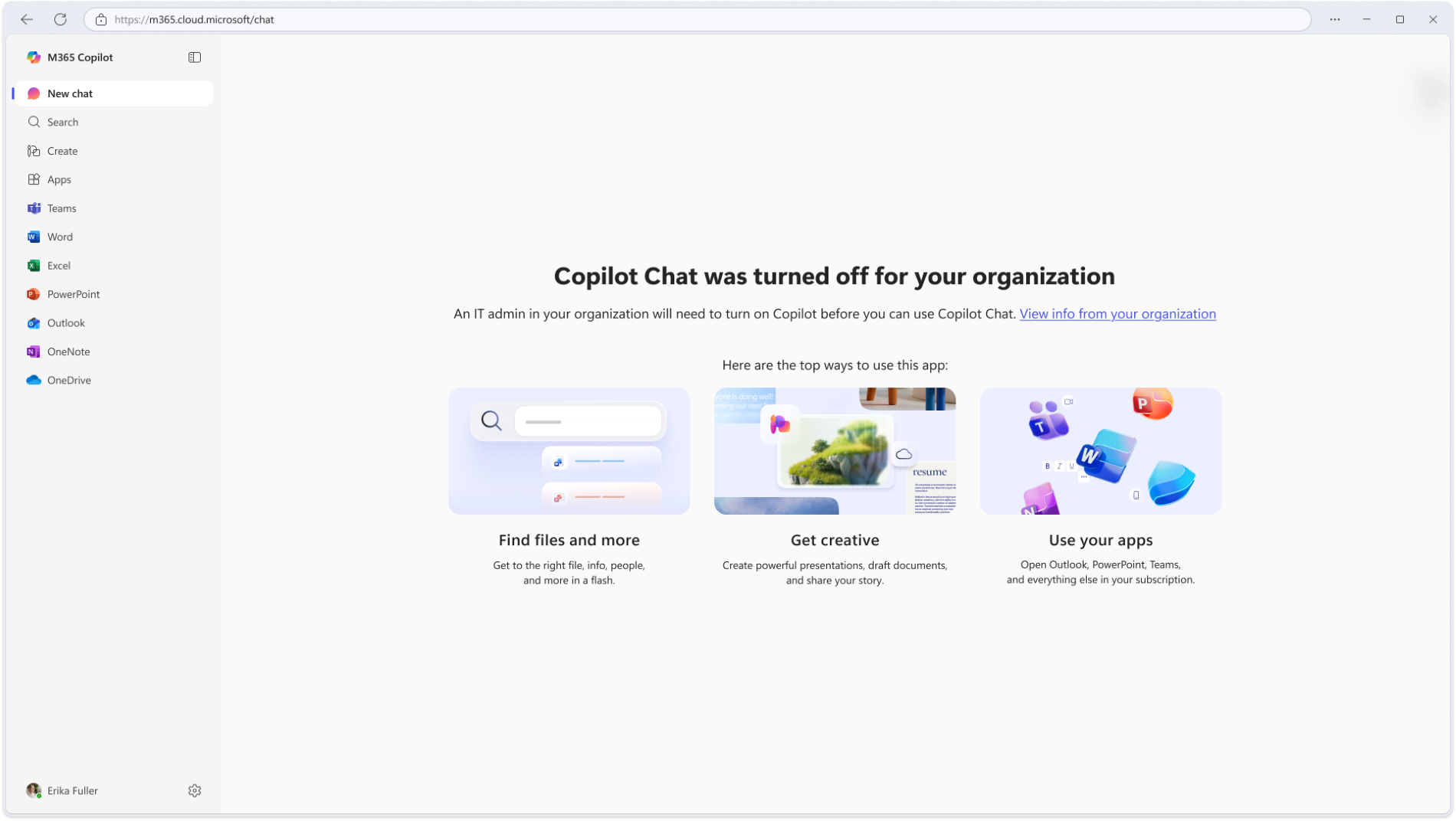
- By default, users will see a standard Microsoft message when access is blocked.
- Admins can optionally add a URL to provide guidance or next steps.
- The optional support link will display as “View info from your organization.”
- This feature is available for admins to configure and is not enabled by default.
- Existing Integrated Apps policies continue to control access and are not changed by this feature.
[Action required/Recommendations]
No action is required.
If you want to customize the experience for restricted users:
- Review Copilot access policies in Integrated Apps.
- Decide whether to provide guidance or support resources for restricted users.
- Configure a URL in the Microsoft 365 admin center under Copilot settings
- Prepare your helpdesk or support teams for this updated user experience.
- Review upcoming Microsoft Learn documentation for detailed configuration guidance.
Learn more: [To be updated closer to GA launch.] Manage harmful content protection settings for Microsoft 365 Copilot Chat | Microsoft 365 Copilot | Microsoft 365 | Microsoft Learn.
[Compliance considerations]
| Question | Answer |
| Does the change include an admin control and can it be controlled through Entra ID group membership? | Yes. Admins can configure the URL through Copilot settings in the Microsoft 365 admin center. |
More information
Details
Services
- M365 Copilot
Category
- Stay informed
Microsoft tags
- Admin Action
- New Feature
- User Adoption