MC1434580 Use OneDrive stored user defined custom skills in PowerPoint Copilot (web)
Primary service: PowerPoint
ChangePilot summary
- PowerPoint Copilot for the web will support personal custom skills stored in OneDrive, letting eligible users upload skill folders with a required SKILL.md file.
- Eligible skills will appear in the Copilot Skills menu, and users can manage them directly from a new Manage Skills experience in the Copilot pane.
- Only the user who uploads a skill can see and use it; skill availability follows the user's enable/disable selections.
- No administrator deployment or tenant configuration is required for the feature to appear, but admins should review governance, training, and support readiness.
Latest update: Standard start: early August 2026 (previously late July 2026). Standard end: early August 2026 (previously late July 2026).
What it means for you
What admins need to do
Review any governance or data handling guidance for user-created Copilot skills, define where pilot users should place approved SKILL.md-based skill folders in OneDrive, and update helpdesk scripts and end-user training so support teams can explain how to manage skills in PowerPoint Copilot for the web. If you want to validate the experience, prepare sample skills and test with a small pilot group after rollout.
Impact on users
Eligible users will be able to store personal custom skills in OneDrive, see them in the PowerPoint Copilot Skills menu on the web, and turn individual skills on or off from Manage Skills. The skills are personal to each user and only visible to the person who uploads them.
If you miss it
If IT does not prepare guidance and governance, users may begin creating and using personal Copilot skills without clear expectations for content standards, storage, or support. That can lead to inconsistent adoption, helpdesk confusion, and potential governance concerns, but there is no indication of a service outage or mandatory admin configuration being missed.
- Admin controls available
- Yes
- Licences affected
- Copilot
History
Recorded changes
-
- Standard start: early August 2026 (previously late July 2026).
- Standard end: early August 2026 (previously late July 2026).
-
- Standard start: early August 2026 (previously late July 2026).
- Standard end: early August 2026 (previously late July 2026).
Microsoft message
Updated August 3, 2026: We have updated the timeline. Thank you for your patience.
[What and Why:]
PowerPoint Copilot on the web is introducing support for personal, user-defined custom skills stored in OneDrive. Users can upload skill folders containing a SKILL.md file to a designated OneDrive location, and those skills will automatically appear in the Copilot Skills menu within PowerPoint for the web. A new Manage Skills experience will also allow users to enable or disable individual skills directly from the Copilot pane. This enhancement supports personal productivity by enabling users to tailor Copilot to their specific workflows and presentation needs while maintaining control over which skills are available during Copilot interactions.
[Rollout Schedule:]
- General Availability (Worldwide): Rollout begins in late July 2026 and is expected to complete by early August 2026 (previously late July).
[Impact on Your Organization:]
Who is affected:
- Users licensed to use Microsoft Copilot in PowerPoint for the web.
- Users who create or use personal custom skills.
- Microsoft 365 administrators supporting Copilot deployments.
Platforms/Services:
- PowerPoint for the web
- Microsoft 365 Copilot
- OneDrive
What will happen:
- Users can upload skill folders containing a required SKILL.md file to a designated OneDrive location.
- Uploaded skills are personal and visible only to the user who uploads them.
- Eligible skills automatically appear in the Skills menu within PowerPoint Copilot on the web.
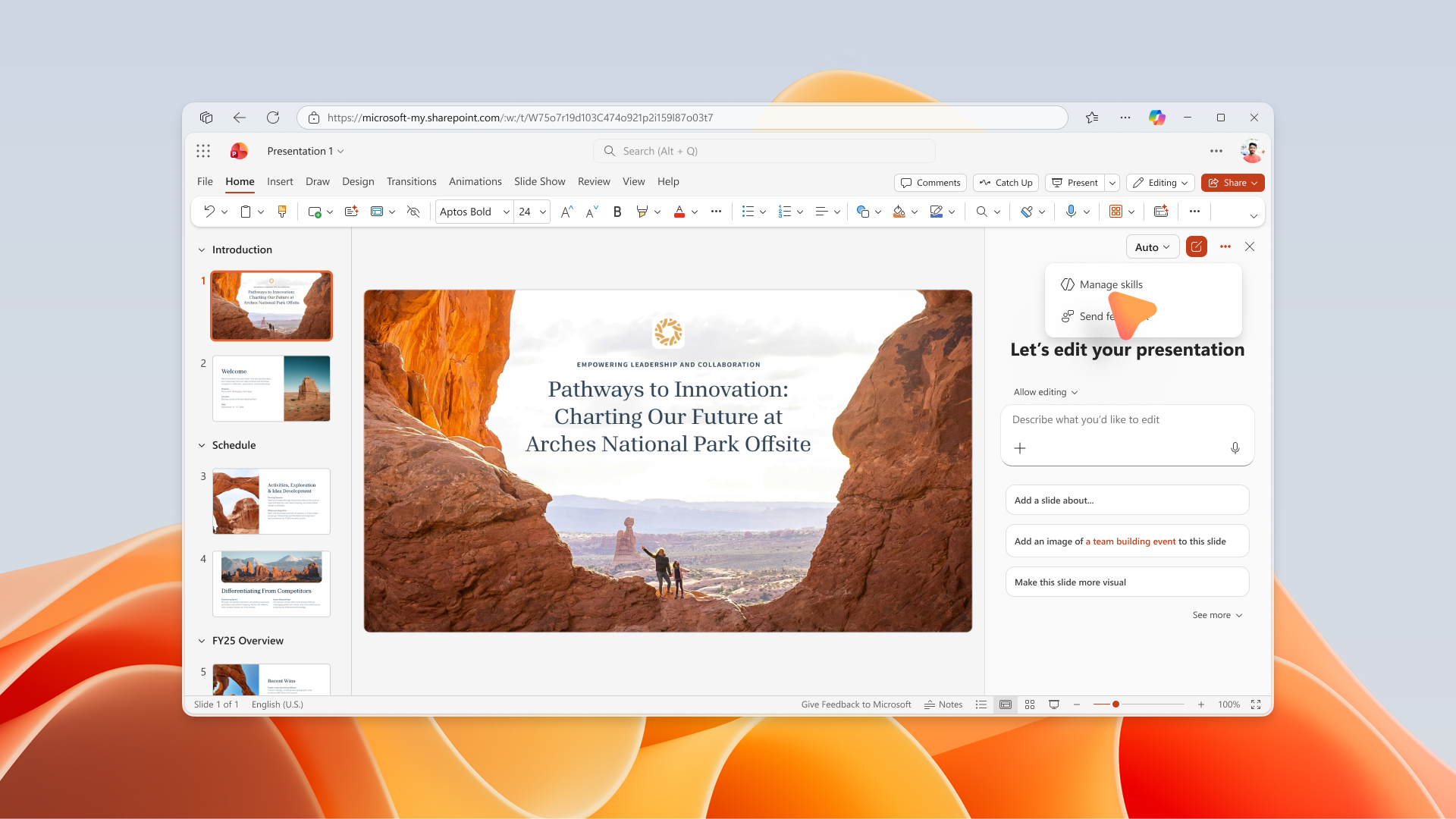
- Users will have access to a new Manage Skills experience from the three-dot menu in the Copilot pane.
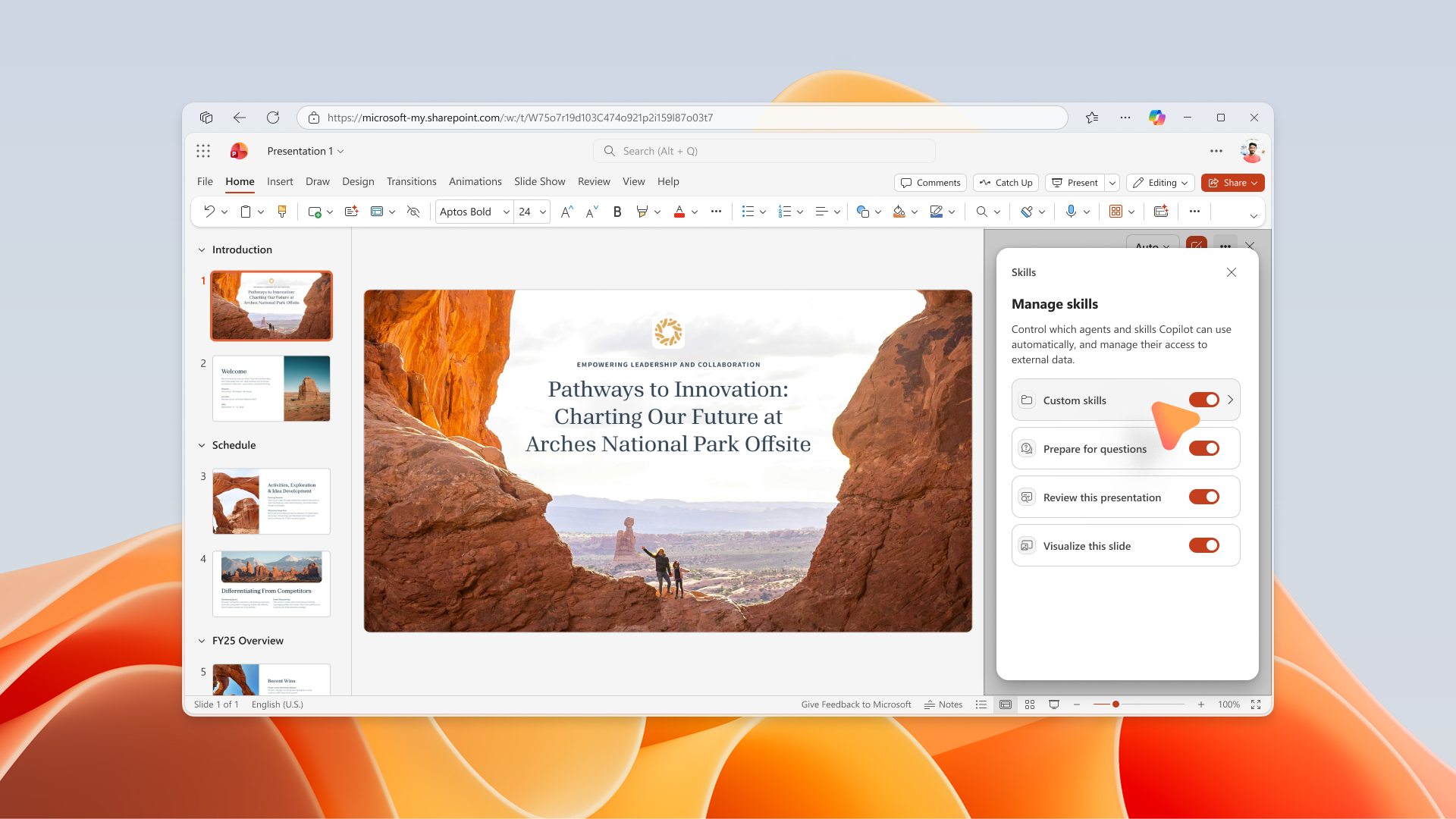
- Users can independently enable or disable individual skills.
- Skill availability within Copilot will reflect the user's selected settings.
- No additional administrator deployment actions are required for the feature to appear.
- The feature is available by default to eligible users when rollout reaches the tenant.
Screenshot 1: Users can open Manage skills from the three-dot menu in the PowerPoint Copilot on the web pane:
Screenshot 2: Users can enable or disable individual skills from the Manage skills experience in PowerPoint Copilot on the web:
[Action Required/Recommendations:]
No immediate administrator action is required.
We recommend that you:
- Review any internal governance processes related to user-created Copilot skills.
- Prepare sample skills in the required format with a valid SKILL.md file for testing.
- Identify pilot users who can validate the experience after rollout.
- Update internal Copilot adoption and training materials to include guidance on custom skills.
- Inform helpdesk and support teams about the new Skills and Manage Skills experiences.
- Monitor user feedback following rollout to understand adoption and governance needs.
[Compliance considerations:]
| Compliance Area | Explanation |
| Stores new customer data | Custom skill folders and SKILL.md files are stored in the user's OneDrive location. |
| Changes data processing or access | Copilot can leverage user-created skill definitions stored in OneDrive as part of the user interaction experience. |
| Introduces AI/ML capabilities | User-defined custom skills extend how Copilot responds and interacts with content. |
| New generative AI interaction | Users can customize Copilot behavior through personal skills and selectively enable or disable skills. |
| Admin or user controls | Users can manage skill availability through the Manage Skills experience. |
Details
Platforms
- Web
Services
- M365 Copilot
- OneDrive
- PowerPoint
Category
- Stay informed
Microsoft tags
- Admin Action
- New Feature
- User Adoption