MC1430542 Collaborate with Copilot while drafting email
Primary service: Outlook
ChangePilot summary
- Microsoft Outlook is adding Copilot directly into the email compose experience so licensed users can draft, refine, expand, and rewrite messages in real time.
- The change applies to users with a Microsoft 365 Copilot license on supported Outlook clients, with Outlook on the web, new Outlook for Windows, Outlook mobile, and later Outlook for Mac and classic Outlook for Windows.
- The feature is enabled by default for licensed users and there are no new admin controls to manage it.
- Existing email access, governance, and protection policies continue to apply, and no action is required from admins beyond user communication and training updates.
Latest update: Image URL Change
What it means for you
What admins need to do
Update helpdesk runbooks and internal user guidance to reflect the new Copilot compose experience in Outlook. Brief support teams on where the feature appears, which clients are supported, and that it is enabled by default for Copilot-licensed users. If needed, refresh training materials and communications so users understand how to start drafting with Copilot and what to expect in the compose window.
Impact on users
Copilot-licensed users will see a new side-by-side drafting experience in Outlook when composing email. They can ask Copilot to create, refine, expand, or rewrite message content directly in the compose window. Users without a Microsoft 365 Copilot license will not see the feature.
If you miss it
If IT does not prepare users and support staff, the feature will appear unexpectedly in Outlook for licensed users and may generate helpdesk questions about the new compose interface. There is no indication of a compliance or service disruption risk, but users may be confused if they are not informed that Copilot is now available in email drafting.
- Admin controls available
- No
- Licences affected
- Copilot
History
Recorded changes
- Standard end: late August 2026 (previously 2026-08-01).
Microsoft message
Updated August 14, 2026: We have updated the timeline. Thank you for your patience.
[What and Why]
We are enhancing the email drafting experience in Microsoft Outlook by integrating Microsoft 365 Copilot directly into the compose experience. This update allows users to create, refine, and edit email content in real time with Copilot assistance, helping improve productivity while maintaining full control over final content.
This message is associated with Microsoft 365 Roadmap ID 564605.
[Rollout Schedule]
General Availability (Worldwide): Beginning mid-July 2026 and expected to complete by end of August 2026 (previously early August)
[Impact on Your Organization]
Who is affected
- Users with a Microsoft 365 Copilot license who use Outlook on supported clients
Platforms/Services
- Outlook on the web
- New Outlook for Windows
- Outlook mobile
- Outlook for Mac, available after initial rollout
- Classic Outlook for Windows, planned later in 2026
What will happen
- Users will see a Copilot side-by-side drafting experience when composing email.
- Users can create new messages or edit existing drafts with Copilot assistance:
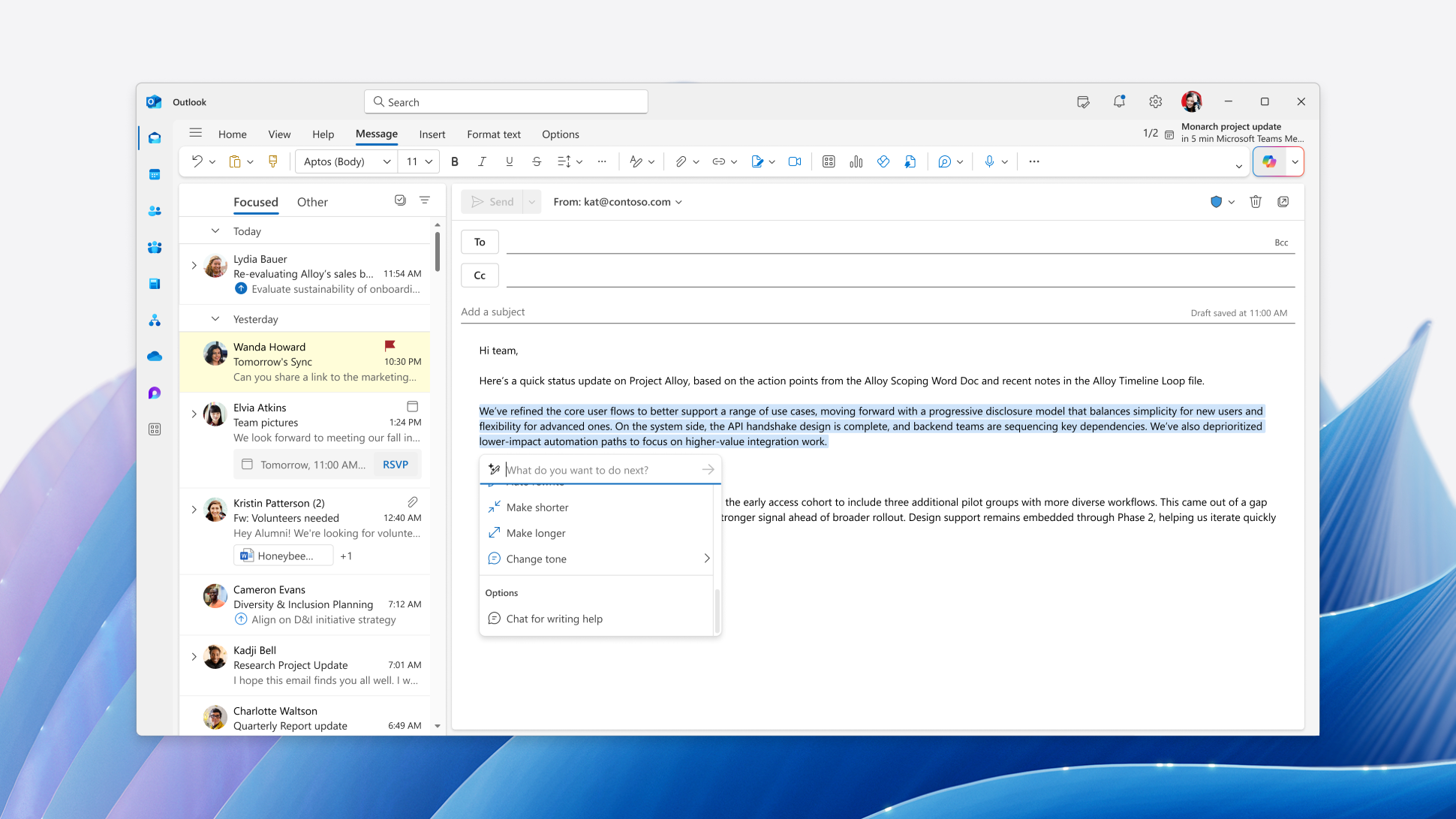
- Users can refine, expand, or rewrite content directly within the compose surface.
- The feature is enabled by default for licensed users.
- Existing policies for email access, governance, and protection continue to apply.
- No changes to admin controls at this time.
- Existing workflows outside of the compose experience are not impacted.
[Action Required/Recommendations]
No action is required.
You may consider the following:
- Update internal training materials to reflect the new drafting experience.
- Inform helpdesk teams of the updated compose experience.
- Review Microsoft Learn documentation for Microsoft 365 Copilot in Outlook.
Learn more: Draft an email message with Copilot in Outlook | Microsoft Support
[Compliance considerations]
| Question | Answer |
| Does the change introduce or significantly modify AI or machine learning capabilities that interact with customer data, and if so, what are the changes? | Yes. The change introduces Microsoft 365 Copilot capabilities within the Outlook compose experience, allowing users to generate, refine, and edit email content using AI that interacts with customer data such as email drafts. |
| Does the change provide users with a new way of interacting with generative AI, and if so, how? | Yes. Users can now interact directly with Microsoft 365 Copilot within the Outlook email compose surface to create and modify email content in real time. |
More information
Details
Platforms
- Web
- Windows
- Mobile
- Mac
Services
- Exchange
- M365 Copilot
- Outlook
Category
- Plan for change
Microsoft tags
- Admin Action
- New Feature
- User Adoption
Related changes
- 564605 Co-Authoring Highlight and Rewrite Roadmap · Outlook · Launched