MC1426716 Neutral-themed SharePoint UI in page editing and property panes
Primary service: SharePoint
ChangePilot summary
- SharePoint page editing is getting a neutral-themed UI for system controls such as web part toolbars and property panes.
- The change applies to users who create or edit SharePoint pages, and to admins/developers managing custom or third-party SPFx web parts.
- Site branding will continue to apply to page content, but editing controls will no longer inherit the site theme.
- Microsoft-provided SharePoint experiences require no admin action, but custom web parts should be reviewed for visual-only theming issues.
- Third-party or custom SPFx web parts may need validation for contrast and property pane consistency in light and dark themes.
Latest update: Image URL Change
What it means for you
What admins need to do
Review any custom or third-party SPFx web parts used for page editing and property panes to ensure controls remain readable and visually consistent under neutral theming. Validate both light and dark theme behavior, and coordinate with web part vendors or internal developers if contrast, styling, or property pane layouts need updates. Update internal guidance and helpdesk notes so support teams can explain the new editing UI if users ask about the changed appearance.
Impact on users
Users who edit SharePoint pages will see toolbars and property panes change to a neutral look instead of matching the site theme. Page content will still use site branding, but the editing interface will appear more consistent and easier to distinguish from authored content. Custom or third-party web parts may look slightly different, but their functionality should remain the same.
If you miss it
If IT does not review custom or third-party web parts, users may notice visual mismatches, reduced contrast, or inconsistent property pane styling after rollout. This is unlikely to break functionality, but it could create confusion, support calls, or minor usability issues for page authors. Microsoft-provided SharePoint editing experiences will change automatically regardless of action taken.
- Admin controls available
- No
History
Recorded changes
No changes recorded since ChangePilot first saw this post.
Microsoft message
[What and Why:]
We are updating the SharePoint page editing experience with a neutral-themed UI for system controls, including web part toolbars and property panes.
With this change, editing tools will use standard, neutral colors instead of inheriting site branding. This creates a clearer distinction between system controls and user-authored content, improving usability, accessibility, and consistency across light and dark themes as part of the SharePoint visual refresh.
This message is associated with Roadmap ID 566698.
[Rollout Schedule:]
- Targeted Release (Worldwide): Beginning late July 2026; expected to complete by early August 2026
- General Availability (Worldwide, GCC, GCC High, DoD): Beginning late August 2026; expected to complete by early September 2026
[Impact on Your Organization:]
Who is affected: Users who create or edit SharePoint pages and developers/admins managing custom or third-party SharePoint Framework web parts.
Platforms/Services: SharePoint (Web)
What will happen:
- Page editing tools (such as web part toolbars and property panes) will display using a neutral-themed UI instead of site theme colors.
- Site branding will continue to apply to page content, but not to editing controls.
- Users will see a clearer separation between editing UI and page content.
- The update improves consistency across light and dark modes.
- The change is enabled by default and requires no configuration.
- Third-party and custom web parts may show visual-only differences (for example, contrast or color mismatches), but functionality is not expected to be impacted.
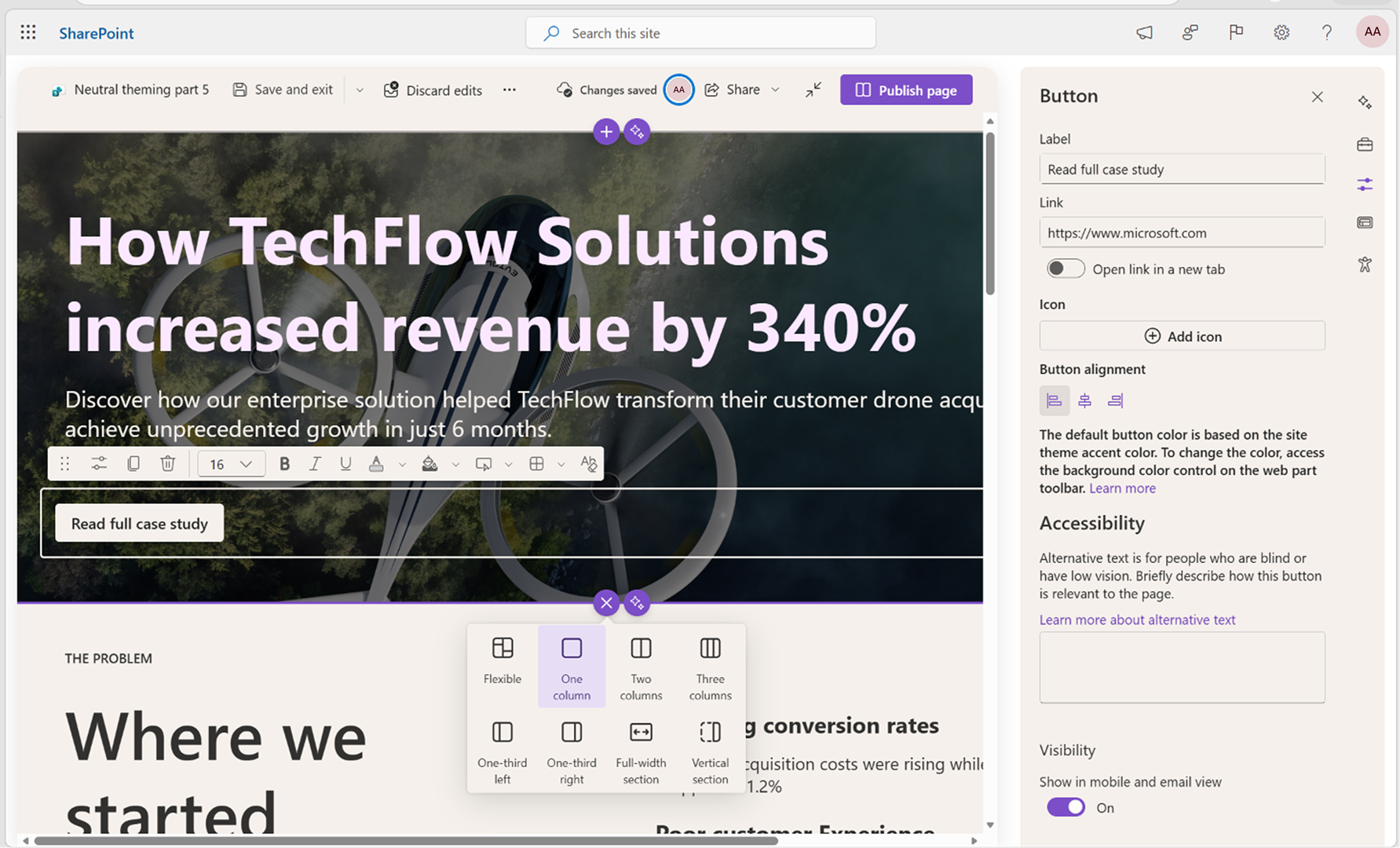
Screenshot 1: Before: The System Control inherits the site's Custom Theme colors, including the light-yellow background and purple accent color:
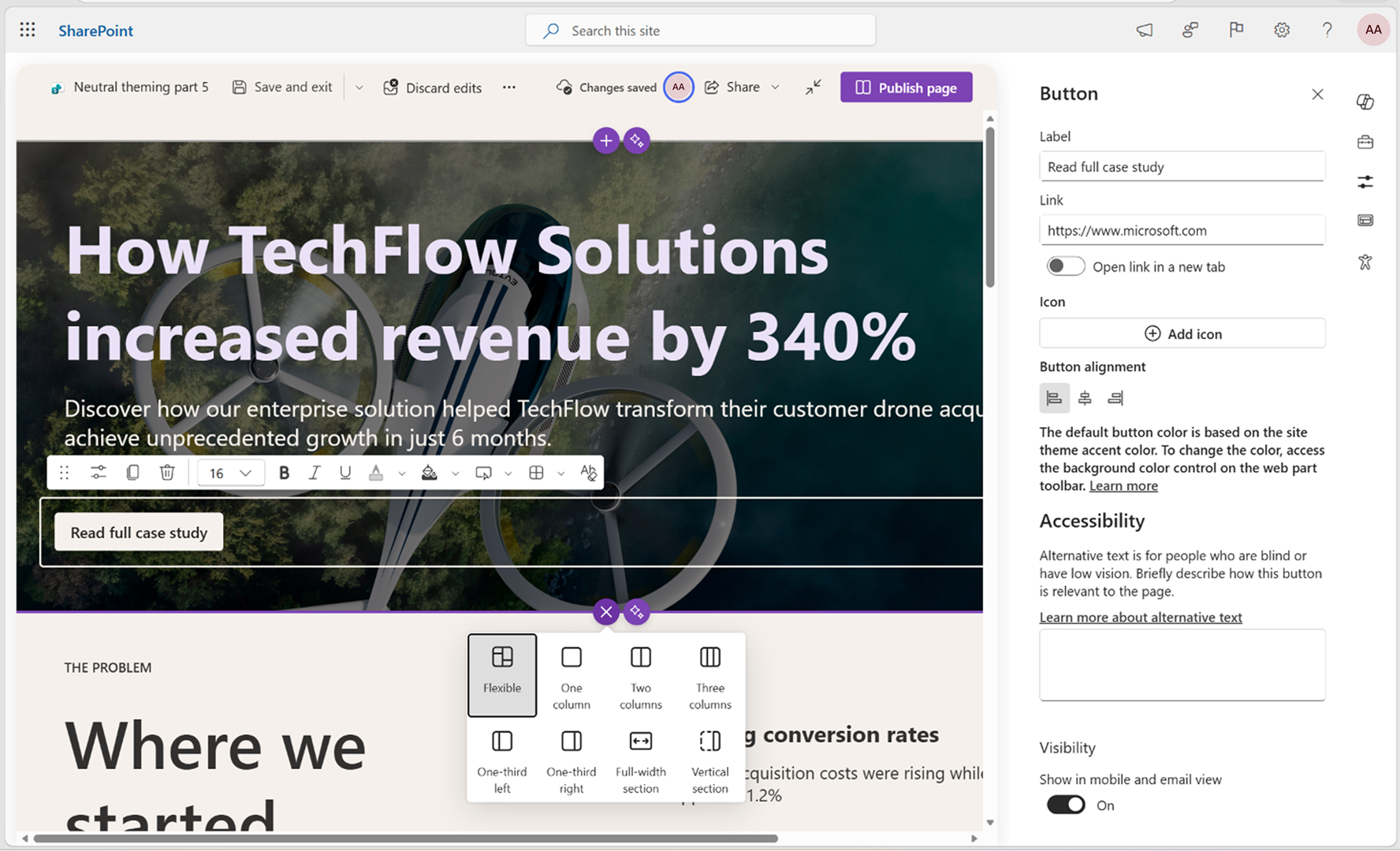
Screenshot 2: After: The System Control now uses neutral theme colors. The previously applied Custom Theme colors (light yellow and purple accents) have been replaced:
Action Required/Recommendations:
No admin action is required for Microsoft-provided SharePoint experiences.
If your organization uses custom or third-party web parts, we recommend:
- Validate third-party and custom SPFx web parts in page editing and property pane scenarios before general availability (GA).
- Test web parts in both light and dark themes to identify potential contrast or theming issues.
- Review custom property pane controls for visual consistency with neutral theming.
- Engage your web part provider or internal developers if updates are needed.
- Share updated guidance with development teams.
- Update internal documentation or helpdesk scripts if needed.
Learn more:
- Property pane theming guidance | Microsoft Learn
- Use theme colors in customizations | Microsoft Learn
- A new SharePoint Look and Feel: What’s Changing and Why It Matters | Microsoft Community Hub
Compliance considerations:
No compliance considerations identified, review as appropriate for your organization.
More information
- www.microsoft.com/microsoft-365/roadmap?filters=&
- learn.microsoft.com/sharepoint/dev/spfx/web-parts/guidance/property-pane-theme-principles
- learn.microsoft.com/sharepoint/dev/spfx/use-theme-colors-in-your-customizations
- techcommunity.microsoft.com/blog/spblog/a-new-sharepoint-look-and-feel-what%E2%80%99s-changing-and-why-it-matters/4529776
Details
Platforms
- Web
Services
- SharePoint
Category
- Stay informed
Microsoft tags
- Feature Update
- User Adoption
Related changes
- 566698 Neutral-themed SharePoint UI in Page Editing and Property Panes Roadmap · SharePoint · In development