MC1423117 Thumbnail view for PDFs is available in OneDrive and SharePoint on the web
Primary service: OneDrive
ChangePilot summary
- OneDrive and SharePoint on the web will add a thumbnail pane in the PDF viewer so users can visually browse pages and jump to a specific page.
- The feature is enabled by default and applies to users who open PDFs in OneDrive and SharePoint on the web.
- Microsoft states there are no changes to permissions, sharing, sensitivity labels, download behavior, or admin controls.
- No admin action is required, but IT may want to brief support teams and update user guidance for PDF navigation.
Latest update: Image URL Change
What it means for you
What admins need to do
Notify helpdesk and service desk staff about the new PDF thumbnail navigation so they can answer user questions. Update any internal training or quick-reference materials that explain how users browse PDFs in OneDrive and SharePoint on the web. Consider a short communication to frequent PDF users so they know a thumbnail pane is available by default.
Impact on users
Users viewing PDFs in OneDrive or SharePoint on the web will see a thumbnail pane in the PDF viewer. They can use the thumbnails to jump directly to a page and more quickly find charts, images, forms, or other visual sections in long documents.
If you miss it
If IT misses this announcement, the feature will still appear automatically for users, but helpdesk teams may be unprepared for questions about the new thumbnail pane. Users working with long PDFs may be slower to discover the new navigation option, and internal documentation may be out of date, but there is no security, compliance, or service disruption risk.
- Admin controls available
- No
History
Recorded changes
No changes recorded since ChangePilot first saw this post.
Microsoft message
[What and Why:]
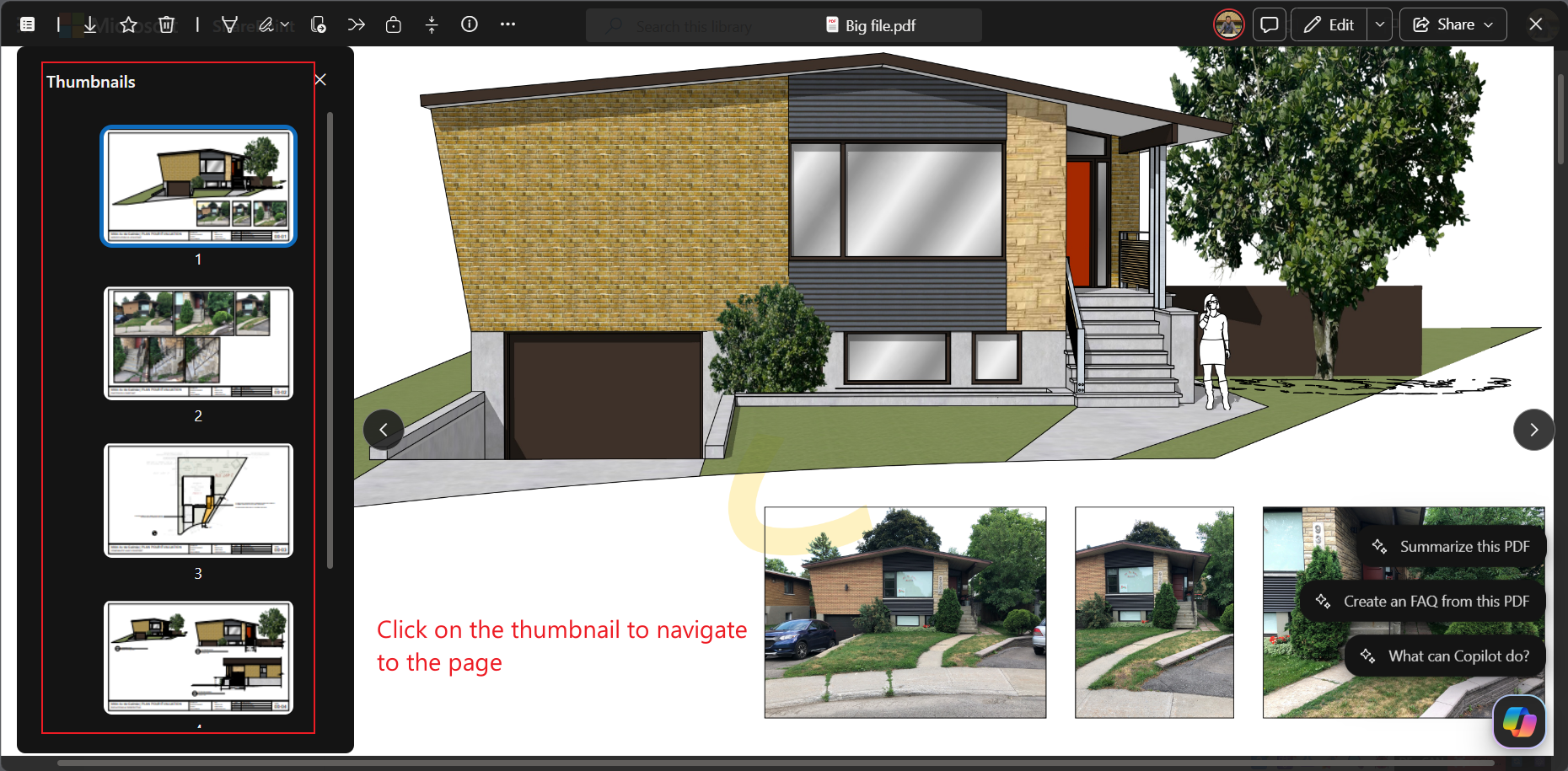
We are improving PDF navigation in OneDrive and SharePoint on the web by adding a thumbnail view in the PDF viewer. Users will be able to open a thumbnail panel to visually browse pages in a PDF and jump directly to a selected page. This update helps users navigate long PDFs more quickly, especially when they need to find a visual section, page layout, chart, image, or form page without scrolling page by page.
This message is associated with Roadmap ID 566696.
[Rollout Schedule:]
- Targeted Release (Worldwide): Beginning early August 2026; expected to complete by mid-August 2026
- General Availability (Worldwide, GCC, GCC High, DoD): Beginning mid-August 2026; expected to complete by late August 2026
[Impact on Your Organization:]
Who is affected: All users who view PDFs in OneDrive and SharePoint on the web
Platforms/Services:
- OneDrive (Web)
- SharePoint (Web)
What will happen:
- Users will see a new option to open a thumbnail pane in the PDF viewer.
- A visual list of page thumbnails will be available for navigation.
- Users can select a thumbnail to jump directly to a specific page.
- The currently viewed page will be highlighted in the thumbnail pane while scrolling.
- The feature will be enabled by default.
- There are no changes to file permissions, sharing behavior, sensitivity labels, download behavior, or admin controls.
Screenshot: Browse PDF pages with visual thumbnails:
[Action Required/Recommendations:]
No admin action is required.
Recommended actions:
- Inform helpdesk and support teams about this user experience improvement
- Update internal training materials or documentation if they reference PDF navigation workflows
- Consider notifying users who frequently work with long or complex PDF files
[Compliance considerations:]
No compliance considerations identified, review as appropriate for your organization.
More information
Details
Platforms
- Web
Services
- OneDrive
- SharePoint
Category
- Stay informed
Microsoft tags
- Feature Update
- User Adoption
Related changes
- 566696 Thumbnail view for PDFs is available in OneDrive and SharePoint on the web Roadmap · OneDrive · In development