MC1423105 Introducing Auto-Attendant Call Flow Visualizer in Teams Admin Center
Primary service: Teams
ChangePilot summary
- Teams Admin Center is getting a new Call flow Visualizer for Auto Attendants and Teams Phone agent call routing.
- The feature provides an interactive tree view of call flows, including greetings, business-hours routing, after-hours routing, holiday branches, and resource account assignments.
- It is enabled by default and requires no tenant configuration.
- Admins who manage Auto Attendants and Teams Phone agents should review the new experience and update internal guidance/helpdesk materials.
- The change is available in Teams Admin Center on the web.
What it means for you
What admins need to do
Review the new Call flow Visualizer in Teams Admin Center so support staff know where to find it and how to use it for troubleshooting. Update any internal admin documentation, runbooks, and helpdesk guidance that reference Auto Attendant or Teams Phone agent call routing. No configuration change is required.
Impact on users
End users should not see a workflow change in Teams itself. The main impact is behind the scenes for admins, who will have a new way to inspect and troubleshoot Auto Attendant and Teams Phone call routing.
If you miss it
If this is missed, the feature will still appear in Teams Admin Center, but admins and helpdesk teams may be slower to diagnose call-routing issues because they are unaware of the new visual troubleshooting tool. Business impact is likely low, limited to missed efficiency gains and delayed support resolution.
- Admin controls available
- No
History
Recorded changes
No changes recorded since ChangePilot first saw this post.
Microsoft message
[What and Why:]
We are introducing the Call Flow Visualizer in Teams Admin Center, a new interactive experience that provides a visual representation of Auto Attendant and Teams Phone agent call routing. This enhancement simplifies management of complex call flows, reduces configuration errors, and accelerates troubleshooting while improving admin productivity.
[Rollout Schedule:]
- General Availability (Worldwide, GCC): Began early June 2026; completed by late June 2026
- General Availability (GCC High, DoD): Will begin mid-August 2026; expected to complete by mid-September 2026
[Impact on Your Organization:]
Who is affected: Admins managing Auto Attendants and Teams Phone agents
Platforms/Services:
- Teams Admin Center (Web)
What will happen:
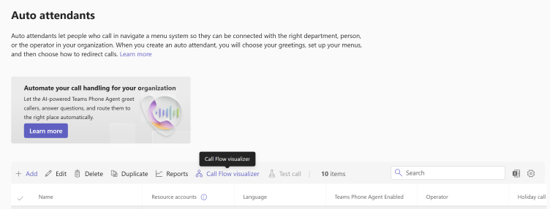
- A new “Call flow visualizer” option will be available on the Auto Attendants page.
- Admins can select an Auto Attendant or Teams Phone agent and select “Call flow visualizer” to view.
- Admins can view call routing in a tree-like, interactive diagram.
- The visualizer will display:
- Resource account assignments
- Greetings
- Business hours routing
- After-hours routing
- Holiday call flow branches
- Interactive controls such as zoom and pan will be supported.
- Upstream and downstream call routing relationships will be visible in a single view.
- Admins can select hierarchical call flows to dig deeper.
- The feature will be enabled by default; no configuration is required.
Screenshot: The Call flow visualizer option is available from the Auto attendants page in Teams admin center:
[Action Required/Recommendations:]
No action is required.
Recommended next steps:
- Review the new Call flow visualizer in Auto attendants page in Teams Admin Center.
- Update internal documentation or training materials for administrators.
- Inform helpdesk teams about the new troubleshooting capability.
[Compliance considerations:]
No compliance considerations identified, review as appropriate for your organization.
Details
Platforms
- Web
Services
- Teams
Category
- Stay informed
Microsoft tags
- Admin Action
- New Feature