MC1420901 Notebooks in the M365 Copilot App
Primary service: M365 Copilot
ChangePilot summary
- Microsoft is adding Notebooks to the Microsoft 365 Copilot app for users with a Microsoft 365 Copilot license.
- Notebooks will stay synchronized between the Microsoft 365 Copilot app and OneNote, and existing Notebook data and entry points remain in place.
- The OneNote Notebooks experience is unchanged; this is an expansion of access rather than a replacement.
- No admin action is required, but helpdesk/support teams should be briefed and user guidance updated if you document Notebook usage.
Latest update: Standard start: late September 2026 (previously late August 2026). Standard end: early October 2026 (previously early September 2026).
What it means for you
What admins need to do
Brief the helpdesk and service desk on the new Notebooks entry point in the Microsoft 365 Copilot app so they can answer user questions. Update any internal training or documentation that explains where users access Notebooks, and note that Notebook content stays in sync with OneNote. No configuration or policy change is required.
Impact on users
Licensed Microsoft 365 Copilot users will see Notebooks in the Microsoft 365 Copilot app and can open the same Notebook content from either the Copilot app or OneNote. Their existing Notebook data remains available and synchronized, and OneNote Notebooks continue to work as before.
If you miss it
If IT does not prepare users and support staff, Copilot-licensed users may be confused when Notebooks appears in the Microsoft 365 Copilot app or when they notice the same Notebook content in both Copilot and OneNote. The business impact is low, but helpdesk volume may increase and internal guidance may become outdated.
- Admin controls available
- No
- Licences affected
- Copilot
History
Recorded changes
-
- Standard start: late September 2026 (previously late August 2026).
- Standard end: early October 2026 (previously early September 2026).
-
- Standard start: late August 2026 (previously early August 2026).
- Standard end: early September 2026 (previously mid-August 2026).
-
- Standard start: late August 2026 (previously early August 2026).
- Standard end: early September 2026 (previously mid-August 2026).
Microsoft message
[What and Why:]
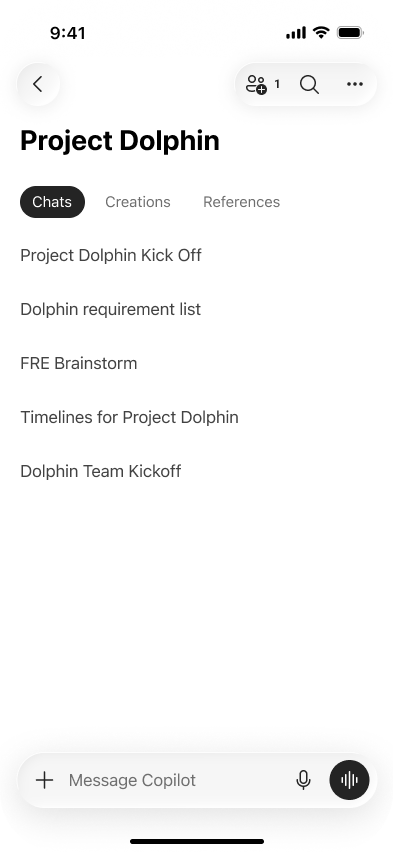
We’re updating the Notebooks experience in the Microsoft 365 Copilot app to help users keep project work organized across conversations. Notebooks bring chats, generated content, and reference materials together in a lightweight, persistent workspace so users can stay in context and move work forward. This update supports personal and team productivity by making it easier to continue work across Microsoft 365 Copilot and OneNote. The existing Notebooks experience in OneNote remains unchanged.
This message is associated with Microsoft 365 Roadmap ID 566318.
[Rollout Schedule:]
General Availability Worldwide: Rollout will begin in late September 2026 (previously late August) and is expected to be complete by early October 2026 (previously early September).
[Impact on Your Organization:]
Who is affected: Users with a Microsoft 365 Copilot license will see Notebooks in the Microsoft 365 Copilot app after rollout reaches your tenant.
Platforms/Services:
- Microsoft 365 Copilot app
- OneNote
- Microsoft 365 Copilot Notebooks
- Supported Microsoft 365 content created from Notebooks, including Word documents, PowerPoint presentations, Excel spreadsheets, Copilot Pages, and other supported objects
What will happen:
- Users with a Microsoft 365 Copilot license will see Notebooks in the Microsoft 365 Copilot app.
- The existing Copilot Notebooks entry point and existing Notebook data remain in place.
- Notebooks in OneNote are unchanged.
- Notebooks stay in sync between the Microsoft 365 Copilot app and OneNote.
- Users can open and continue working with Notebooks in either the Microsoft 365 Copilot app or OneNote.
- Content created from a Notebook, including Word documents, PowerPoint presentations, Excel spreadsheets, Copilot Pages, and other supported objects, remains associated with that Notebook.
Screenshot - Lightweight Notebook with Chats, Creations and References
[Action Required/Recommendations:]
No admin action is required.
We recommend that you:
- Inform helpdesk and support teams that licensed users may see Notebooks in the Microsoft 365 Copilot app beginning in late August 2026.
- Update internal user guidance if your organization documents Microsoft 365 Copilot or OneNote Notebooks experiences.
[Compliance considerations:]
| Consideration | Explanation |
| Does the change alter how existing customer data is processed, stored, or accessed? | The update makes existing Notebook data available through the Microsoft 365 Copilot app while keeping Notebooks in sync with OneNote. The post states that the existing entry point and existing Notebook data remain in place. |
| Does the change introduce or significantly modify AI/ML or agent capabilities that interact with or provide access to customer data? | The update expands the Notebooks experience in the Microsoft 365 Copilot app, where users can bring chats, generated content, and reference materials together in a persistent workspace. |
| Does the change provide end users any new way of interacting with generative AI? | Users with a Microsoft 365 Copilot license will see Notebooks in the Microsoft 365 Copilot app and can use Notebooks to work with chats, generated content, and reference materials. |
More information
Details
In weekly changes
Platforms
- iOS
Services
- Excel
- M365 Apps
- M365 Copilot
- OneNote
- PowerPoint
- Word
Category
- Stay informed
Microsoft tags
- Feature Update
- User Adoption
Related changes
- 566318 Updated light-weight Notebooks experience in the Microsoft 365 Copilot App (iOS) Roadmap · M365 Apps · Launched