MC1419798 Microsoft Teams Rooms: Identify in-room participants with IntelliFrame people labels
Primary service: Teams
ChangePilot summary
- Microsoft Teams Rooms on Windows will gain IntelliFrame people labels that identify in-room participants by name and show contact cards for remote attendees.
- The feature applies to Teams Rooms on Windows devices using supported intelligent cameras and Teams Rooms Pro licenses.
- It only works for participants who have enrolled in voice and face recognition (People Recognition); unenrolled participants will not be labeled.
- Existing Teams meeting policies for voice and face enrollment are honored, and the feature is enabled automatically when prerequisites are met.
- Administrators can control or disable the feature through Teams meeting policy settings or by blocking enrollment.
Latest update: Standard start: late January 2027 (previously mid-November 2026). Standard end: early February 2027 (previously mid-December 2026).
What it means for you
What admins need to do
Review Teams Rooms Pro licensing, supported intelligent camera coverage, and meeting policy settings for voice/face enrollment and in-room name display. If your organization wants to allow or block the feature, verify the appropriate PowerShell policy values are set, and update internal guidance so helpdesk and room owners know how to explain or disable it if needed.
Impact on users
In Teams Rooms meetings, remote participants may see names under in-room video feeds and can open contact cards for recognized people. Only users who have enrolled in People Recognition will be identified; others will appear without labels. If your organization disables enrollment or in-room name display, users will not see the labels.
If you miss it
If IT does nothing, the feature will still appear automatically in eligible Teams Rooms, which may create unexpected user questions about participant identification and contact cards. There is no major service disruption, but teams may need extra support if policies, licensing, or camera prerequisites are not in place. If the organization wants to prevent biometric identification, failing to update policy could allow the feature to be used where it was not intended.
- Admin controls available
- Yes
- Licences affected
- Teams Rooms Pro
History
Recorded changes
-
- Standard start: late January 2027 (previously mid-November 2026).
- Standard end: early February 2027 (previously mid-December 2026).
-
- Standard start: mid-November 2026 (previously mid-October 2026).
- Standard end: mid-December 2026 (previously late October 2026).
- GCC start: mid-November 2026 (previously mid-October 2026).
- GCC end: mid-December 2026 (previously late October 2026).
-
- Standard start: mid-October 2026 (previously early September 2026).
- Standard end: late October 2026 (previously late September 2026).
- GCC start: mid-October 2026 (previously early September 2026).
- GCC end: late October 2026 (previously late September 2026).
-
- Line added but with no screenshot
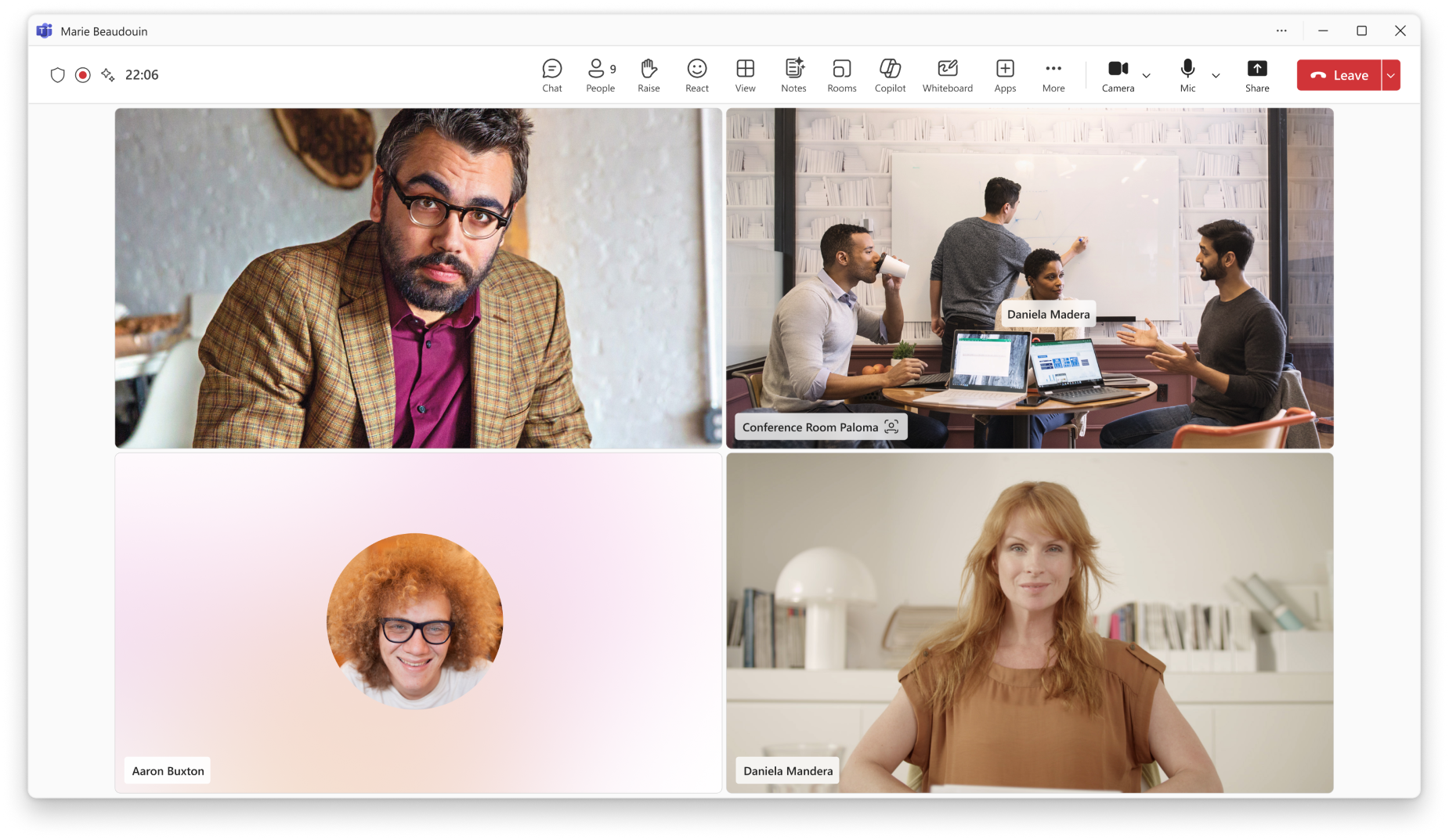
- Screenshot - IntelliFrame people labels identify enrolled in-room participants by name, helping remote attendees recognize who's speaking; selecting a label opens the person's contact card
-
- Line added but with no screenshot
- Screenshot - IntelliFrame people labels identify enrolled in-room participants by name, helping remote attendees recognize who's speaking; selecting a label opens the person's contact card
Microsoft message
Updated October 15, 2026: We have updated the timeline. Thank you for your patience.
[What and Why:]
We're introducing IntelliFrame people labels in Microsoft Teams Rooms on Windows to improve meeting clarity and inclusivity for remote participants. When enabled, this feature identifies in-room participants by name and displays a contact card, helping remote attendees easily recognize speakers and follow conversations.
This enhancement supports better hybrid meeting experiences by connecting in-room and remote participants more effectively, improving collaboration and productivity.
This message is associated with Microsoft 365 Roadmap ID 566700.
[Rollout Schedule:]
- General Availability (Worldwide, GCC): Beginning late January 2027 (previously mid-November 2026) expected to complete by early February 2027 (previously mid-December 2026)
[Impact on Your Organization:]
Who is affected:
- Organizations using Microsoft Teams Rooms on Windows with Teams Rooms Pro licenses
- In-room participants who have enrolled in voice and face recognition (People Recognition)
Platforms/Services:
- Microsoft Teams
- Teams Rooms on Windows devices
- Supported intelligent camera hardware
What will happen:
- IntelliFrame will display name labels under identified in-room participants’ video feeds.
- Remote participants can select a label to view a contact card with organizational details.
- The feature is enabled automatically when prerequisites are met.
- Existing Teams meeting policies for voice and face enrollment are honored.
- Participants without enrolled profiles will appear without labels.
- No change occurs if voice and face enrollment is disabled in your organization.
Screenshot - IntelliFrame people labels identify enrolled in-room participants by name, helping remote attendees recognize who's speaking; selecting a label opens the person's contact card
[Action Required/Recommendations:]
No action is required to enable this feature.
To maximize value, administrators may:
- Review and confirm Teams Rooms devices:
- Ensure devices are licensed with Teams Rooms Pro.
- Verify use of supported intelligent cameras.
- Review and update meeting policies:
- Allow enrollment:
Set-CsTeamsMeetingPolicy -EnrollUserOverride Enabled. - Enable name display in rooms:
Set-CsTeamsMeetingPolicy -RoomPeopleNameUserOverride On.
- Allow enrollment:
- Encourage users to enroll in voice and face recognition: Teams > Settings > Recognition.
- Update internal documentation and helpdesk guidance.
- Notify users about this capability to drive awareness and adoption.
To disable IntelliFrame people labels, administrators can:
- Turn off in-room name display (labels stop; other IntelliFrame framing unaffected):
Set-CsTeamsMeetingPolicy -RoomPeopleNameUserOverride Off - Block voice and face enrollment entirely (no one can be identified by name):
Set-CsTeamsMeetingPolicy -EnrollUserOverride Disabled - Individual users can opt out anytime by removing their profile in Teams > Settings > Recognition.
Learn more:
- What is Microsoft Multi-Stream IntelliFrame and Intelligent Camera? | Microsoft Learn (will be updated before rollout)
- Enable People Recognition on Teams Rooms (voice & face policies) | Microsoft Learn (will be updated before rollout)
- Overview and configuration of voice and face enrollment | Microsoft Learn (will be updated before rollout)
[Compliance considerations:]
| Compliance Area | Impact |
| Introduces or modifies AI/ML capabilities | Uses AI-based biometric identification (voice and face profiles) to identify in-room participants. Identification occurs only for users who have consented and completed People Recognition enrollment. |
| Stores new customer data | This feature does not create new data; it relies on existing voice and face profiles from People Recognition enrollment, governed by the organization’s current configuration. |
| Alters processing of existing customer data | Participant identity data is processed differently when recognition is enabled. |
| Provides new way of communicating between users | Labels and contact cards enhance visibility of in-room participants for remote users. |
| Adds or changes admin controls | Controlled via Teams meeting policies (EnrollUserOverride and RoomPeopleNameUserOverride). |
| Allows users to enable/disable the feature | Users can enroll or opt out of voice and face profiles in Teams settings. |
More information
Details
In weekly changes
Platforms
- Windows
- Teams Rooms
Services
- MTR
- Teams
Category
- Plan for change
Microsoft tags
- New Feature
- User Adoption
Related changes
- 566700 IntelliFrame people labels in Teams Rooms on Windows Roadmap · Teams · In development