MC1413304 Viva Engage: New Recent feed in Home
Primary service: Viva
ChangePilot summary
- Viva Engage Home is getting a new Recent feed that shows content in chronological order from followed communities, followed people, and priority communications.
- The existing For you personalized feed remains available and continues to provide recommendations.
- The change affects Viva Engage users in the web, mobile, and Viva Engage app in Teams experiences, including communications teams and community managers/leaders.
- No tenant configuration is required and the feature is enabled by default as part of the service update.
- IT should brief communications teams, community managers, and the help desk, and update user guidance as needed.
Latest update: Standard end: early October 2026 (previously late August 2026).
What it means for you
What admins need to do
No configuration is needed. Update Viva Engage adoption/user guidance, notify communications teams and community owners about the new feed choice, and prepare the help desk to explain the difference between For you and Recent. Consider refreshing screenshots or training materials that reference the Home feed.
Impact on users
Users will see a new Recent feed option in Viva Engage Home. They can switch between a personalized For you feed and a chronological Recent view showing posts from followed communities, followed people, and priority communications. Their feed preferences will carry across web and mobile clients.
If you miss it
If this is missed, the feature will still appear automatically and users may be surprised by the additional feed option or use it without guidance. The business impact is low, but communications teams, community managers, and help desk staff may receive avoidable questions and users may not understand the difference between the two Home feeds.
- Admin controls available
- No
History
Recorded changes
- Standard end: early October 2026 (previously late August 2026).
- Screenshot updated.
- Standard start: mid-August 2026 (previously early August 2026).
- Standard start: mid-August 2026 (previously early August 2026).
-
- Standard start: early August 2026 (previously late July 2026).
- Standard end: late August 2026 (previously mid-August 2026).
-
- Standard start: early August 2026 (previously late July 2026).
- Standard end: late August 2026 (previously mid-August 2026).
Microsoft message
Updated September 11, 2026: We have updated the content. Thank you for your patience.
[What and Why:]
Microsoft is introducing a new Recent feed in Viva Engage Home, giving users a chronological view of content from followed communities, followed people, and priority communications. This enhancement complements the existing For you feed, which continues to provide personalized content recommendations.
This update improves personal productivity by providing users with a more predictable way to stay current with the content and communications most relevant to them, while preserving the discovery experience offered through personalized recommendations.
This message is associated with Microsoft 365 Roadmap ID 559482.
[Rollout Schedule:]
- General Availability (Worldwide): Beginning in mid-August 2026 (previously early August); expected to complete by early October 2026 (previously late August)
[Impact on Your Organization:]
Who is affected:
- All Viva Engage users accessing the Home experience.
- Communications teams publishing organizational communications.
- Community managers and leaders who rely on user engagement with community content.
Platforms/Services:
- Viva Engage (Web)
- Viva Engage (Mobile)
- Viva Engage app in Teams (all clients)
What will happen:
- A new Recent feed option will appear in Home. The default For you feed remains unchanged.
- Users can switch between For you and Recent views.
- The Recent feed displays content in a more chronological and predictable order.
- Content surfaced in Recent includes:
- Posts from followed communities.
- Content from followed people.
- Priority communications.
- The existing For you personalized feed remains available.
- User feed preferences are preserved across web and mobile clients.
- The option to use the feature is enabled by default as part of the service update.
- No tenant configuration changes are required.
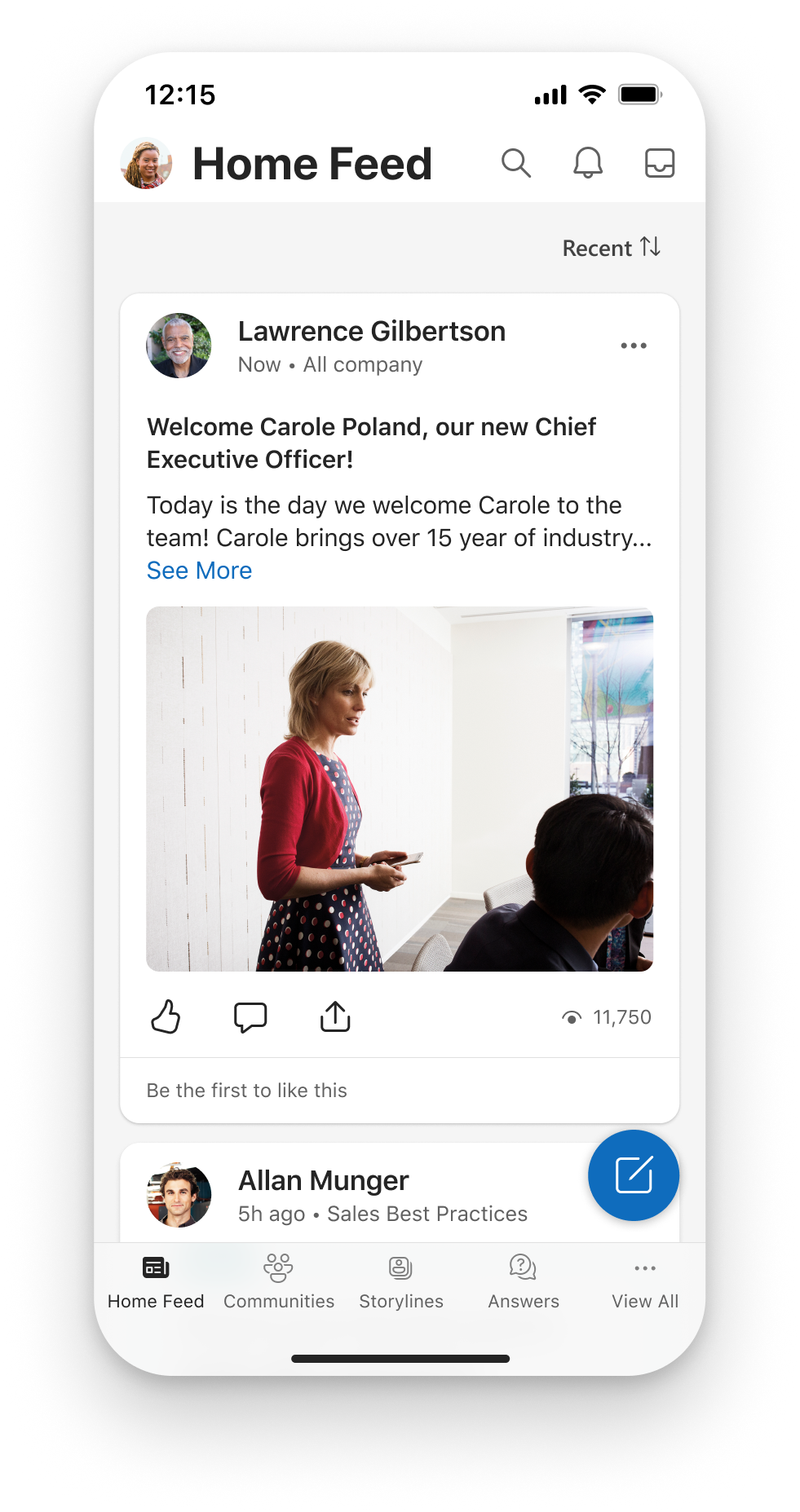
Screenshot - Recent feed option in Viva Engage Home
[Action Required / Recommendations:]
No admin action is required.
We recommend that you:
- Review internal Viva Engage adoption materials.
- Inform communications teams about the new feed experience.
- Notify community managers and leaders of the update.
- Prepare help desk teams for user questions.
- Update user documentation where appropriate.
- Monitor feedback after rollout.
[Compliance Considerations:]
No compliance considerations identified, review as appropriate for your organization.
More information
Details
In weekly changes
Platforms
- Web
- Mobile
- Teams
Services
- Viva
Category
- Stay informed
Microsoft tags
- New Feature
- User Adoption
Related changes
- 559482 Following feed in Viva Engage Roadmap · Viva · Launched