MC1411727 Copilot Notebooks: Suggested artifacts for faster content creation
Primary service: M365 Copilot
ChangePilot summary
- Copilot Notebooks will start suggesting relevant Word, Excel, and PowerPoint artifacts based on notebook content and Microsoft 365 context.
- The feature is available by default to eligible users who can already create artifacts in Copilot Notebooks.
- No admin configuration or opt-in/opt-out control is described.
- IT should brief help desk and update user/adoption materials for the new recommendation experience.
Latest update: Standard end: early November 2026 (previously late September 2026).
What it means for you
What admins need to do
No configuration is needed. If your organization uses Copilot Notebooks, prepare a short user communication and brief the help desk on the new suggested-artifact experience. Update adoption or training materials to explain that Copilot may recommend Word, Excel, and PowerPoint artifacts from notebook context.
Impact on users
Eligible users will see recommended artifacts inside Copilot Notebooks, making it easier to start new content from existing notebook context. Users remain in control of whether they use the suggestions, and they can continue working without changing any settings.
If you miss it
If IT does nothing, the feature will still appear for eligible Copilot Notebook users and may generate help desk questions from users who are not expecting the new recommendations. The business impact is otherwise low, but users may miss an opportunity to use the new productivity capability and internal guidance may be outdated.
- Admin controls available
- No
- Licences affected
- Copilot
History
Recorded changes
- Standard end: early November 2026 (previously late September 2026).
- Standard start: late August 2026 (previously late July 2026).
Microsoft message
Updated October 16, 2026: We have updated the timeline. Thank you for your patience.
[What and Why:]
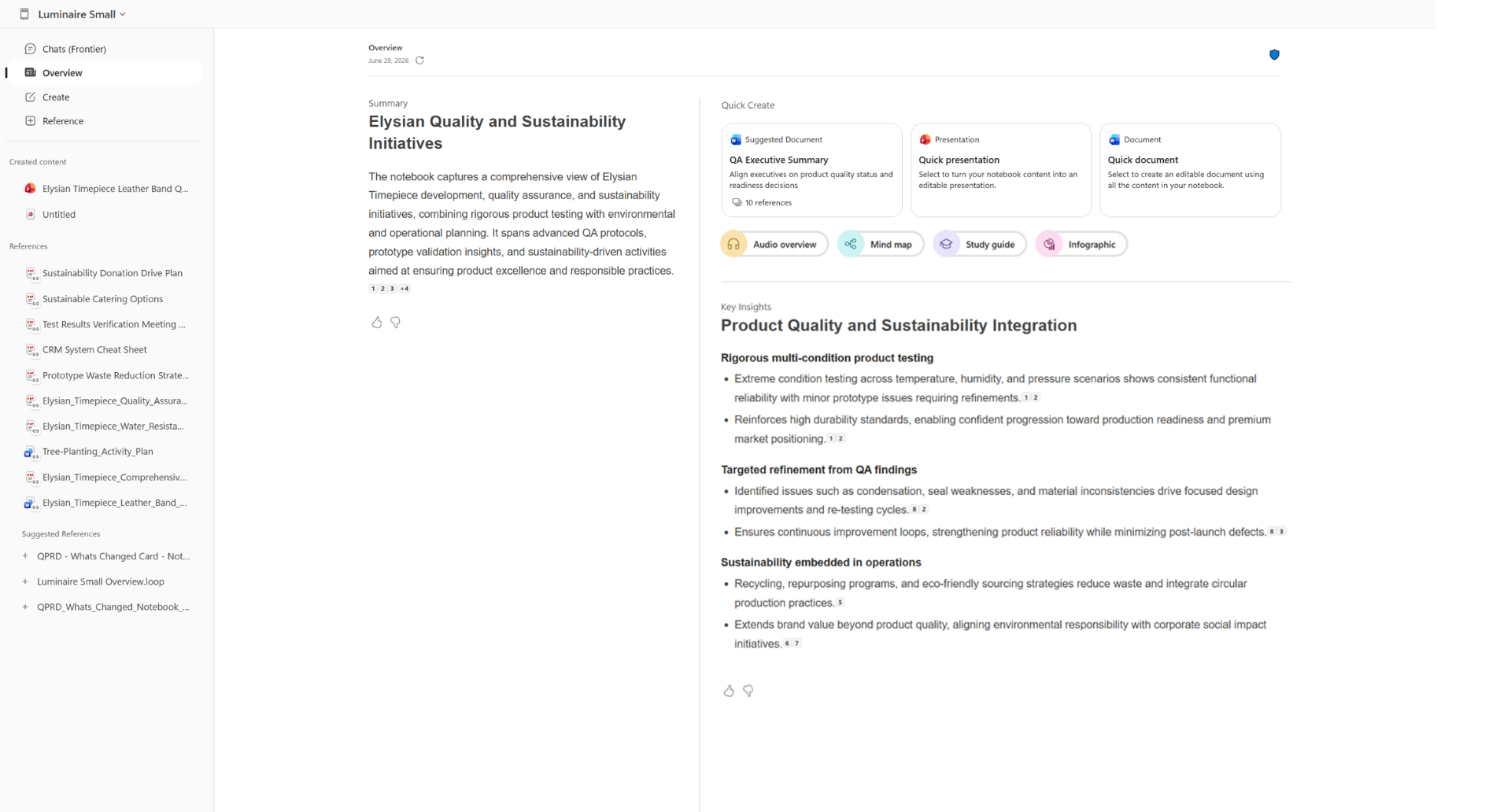
Copilot Notebooks will intelligently recommend relevant artifacts based on your Microsoft 365 knowledge and the content in your notebook, helping you move work forward faster without leaving the notebook experience. By automatically leveraging existing context and background information, Copilot reduces the need to repeatedly write prompts containing the same details when creating new content from notebook materials. Supported artifact types include Word documents, Excel workbooks, and PowerPoint presentations. Support for additional artifact types, including PDFs and Pages, will be introduced in a future release.
This message is associated with Roadmap ID 566870.
[Rollout Schedule:]
- Public Preview (Worldwide): Beginning in early July 2026; expected to complete by late August 2026.
- General Availability (Worldwide): Beginning in late August 2026; (previously late July) expected to complete by early November 2026 (previously late September).
[Impact on Your Organization:]
Who is affected:
- Users who can currently create artifacts within Copilot Notebooks.
- Organizations licensed for Microsoft 365 Copilot (Premium) with access to Copilot Notebooks.
Platforms/Services:
- Microsoft 365 Copilot
- Copilot Notebooks
- Word
- Excel
- PowerPoint
What will happen:
- Users will see proactive artifact recommendations within Copilot Notebooks.
- Suggestions are generated using notebook references, pages, and Microsoft 365 context.
- Supported artifact types include Word, Excel, and PowerPoint.
- Future releases are expected to add support for PDFs and Pages.
- The feature is available by default for eligible users.
- No admin configuration is required.
Screenshot - Copilot Notebooks screen with recommended artifacts
[Action Required/Recommendations:]
No action is required.
We recommend that you:
- Review user-facing communications regarding Copilot Notebooks.
- Inform help desk teams about the new recommendation experience.
- Update internal training and adoption materials as appropriate.
- Monitor roadmap communications for future artifact type support.
[Compliance Considerations:]
| Compliance consideration | Explanation |
| Does the change alter how existing customer data is processed, stored, or accessed? | Artifact suggestions are generated using content already available in Copilot Notebooks, including notebook references, pages, and the user's Microsoft 365 context. This introduces additional AI-driven processing of existing customer data to determine relevant artifact recommendations. |
| Does the change introduce or significantly modify AI/ML or agent capabilities that interact with or provide access to customer data? | The feature adds proactive AI-generated artifact recommendations that analyze notebook content and Microsoft 365 context to suggest next-step deliverables such as Word documents, Excel workbooks, and PowerPoint presentations. |
| Does the change provide end users any new way of interacting with generative AI? | Users can receive contextual artifact recommendations directly within Copilot Notebooks and generate content from pre-populated prompts that incorporate relevant notebook information. |
| Does the change alter how admins can monitor, report on, or demonstrate compliance activities? | The announcement does not specify whether recommendation activity will be surfaced in existing audit, reporting, or compliance experiences. Organizations may wish to review future documentation for additional compliance-related details. |
| Does the change include an admin control and can it be controlled through Entra ID group membership? | No new administrative controls are described. The feature appears to be available to users who already have permission to create artifacts in Copilot Notebooks, but Microsoft has not explicitly documented control mechanisms. |
| Does the change allow a user to enable and disable the feature themselves? | The announcement states that users remain in control of whether they use suggested artifacts, but it does not specify whether the recommendation experience itself can be enabled or disabled by individual users. |
More information
Details
In weekly changes
Platforms
- Desktop
- Web
Services
- Excel
- M365 Apps
- M365 Copilot
- PowerPoint
- Word
Category
- Plan for change
Microsoft tags
- New Feature
- User Adoption
Related changes
- 566870 Suggested Artifact Creation in Copilot Notebooks Roadmap · M365 Copilot · Launched