MC1409307 Microsoft Purview Data Loss Prevention: User-based aggregation of DLP alerts
Primary service: Purview
ChangePilot summary
- Microsoft Purview DLP is adding user-based alert aggregation so multiple DLP events from the same user can be grouped into one alert.
- Compliance and security admins can configure whether alerts aggregate by user and set the aggregation time window.
- This changes how DLP alerts are surfaced and investigated, including cases where a single alert contains matches from different DLP rules.
- The feature is not enabled by default and does not change DLP policy enforcement.
- Admins should review the new setting, decide whether to enable it, and update internal procedures and team communications as needed.
Latest update: Image URL Change
What it means for you
What admins need to do
Review the new DLP alert aggregation setting in the Microsoft Purview compliance portal once it appears in your tenant. Decide whether user-based aggregation fits your alert triage model, choose an aggregation window if enabling it, and update SOC/compliance runbooks, alert-handling procedures, and internal documentation. Inform security operations and compliance teams so they understand alerts may now combine multiple events from the same user.
Impact on users
End users should not see a change in DLP policy enforcement. If your admins enable user-based aggregation, users may still trigger the same underlying DLP events, but administrators will see those events grouped into fewer alerts.
If you miss it
If the new setting is not reviewed, alert handling will continue in the existing per-event model, which may create more alert noise and slower investigations than necessary. If aggregation would have improved your operations but is not enabled, compliance and security teams may spend more time triaging related alerts separately and miss the efficiency benefit. There is no direct service disruption or enforcement risk because DLP policy behavior itself is unchanged.
- Admin controls available
- Yes
History
Recorded changes
No changes recorded since ChangePilot first saw this post.
Microsoft message
[What and Why:]
Microsoft Purview Data Loss Prevention (DLP) is introducing user-based aggregation of alerts, enabling related DLP events triggered by the same user to be grouped into a single alert. This enhancement reduces alert noise, streamlines investigation workflows, and provides richer context for security and compliance teams.
This message is associated with Microsoft 365 Roadmap ID 564765.
Rollout Schedule:
- General availability (Worldwide): We will begin rolling out in mid-August 2026 and expect to complete by mid-August 2026.
Impact on Your Organization:
Who is affected: Compliance admins and security admins managing Microsoft Purview DLP
Platforms/Services:
- Microsoft Purview compliance portal (web)
- Data Loss Prevention (DLP)
What will happen:
- A new configuration option will be available for event aggregation into alerts.
- Admins can select user-based aggregation and define an aggregation time window.
- Multiple DLP events triggered by the same user within the defined time window will be consolidated into a single alert.
- Alerts may include events that match different DLP rules.
- The feature is not enabled by default and requires admin configuration.
- No change to DLP policy enforcement.
Once enabled, alerts are aggregated by user, regardless of which DLP rules are matched within the defined aggregation window.
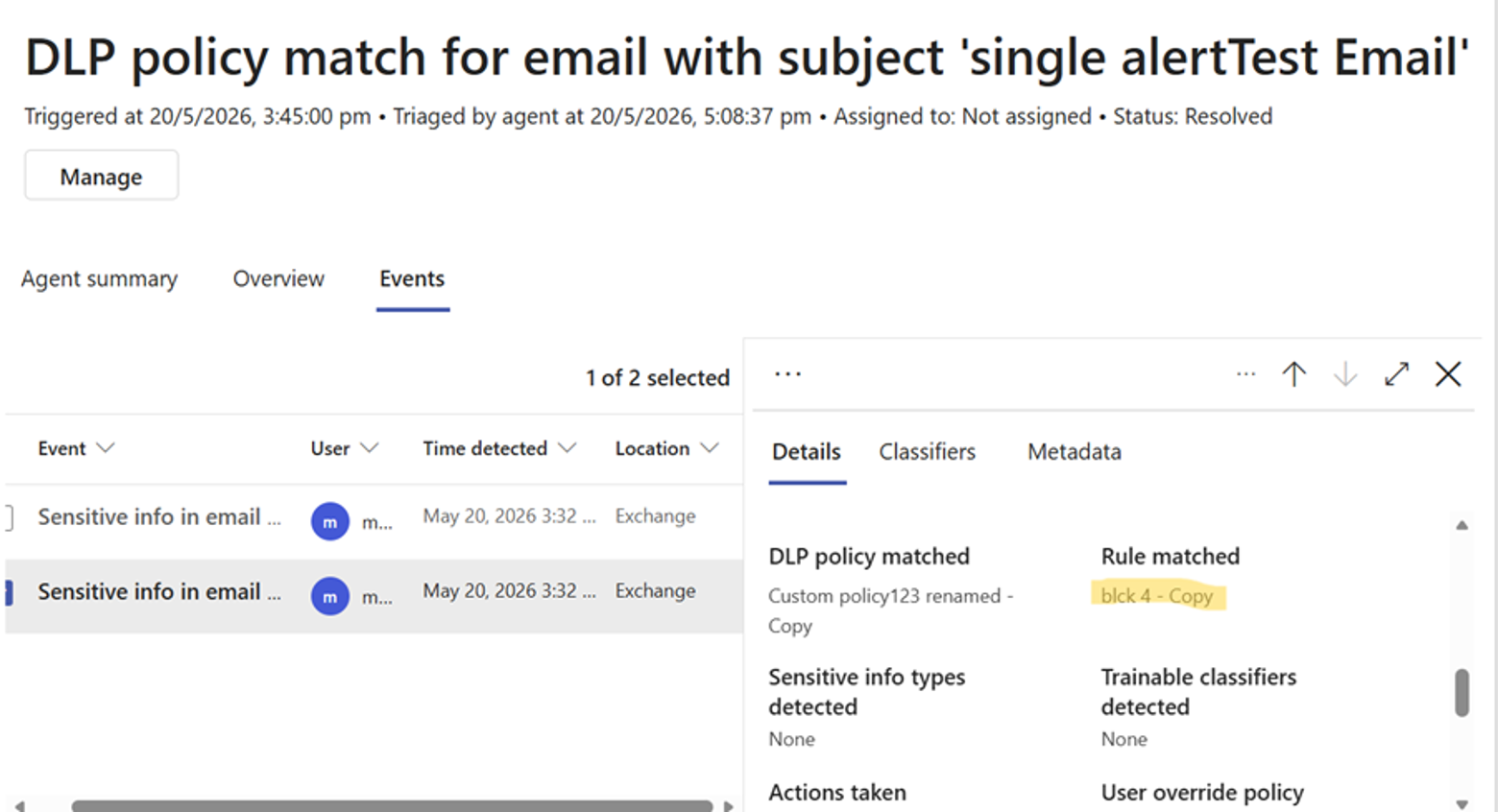
Example: A single alert may include multiple events triggered by the same user, even when those events match different DLP rules.
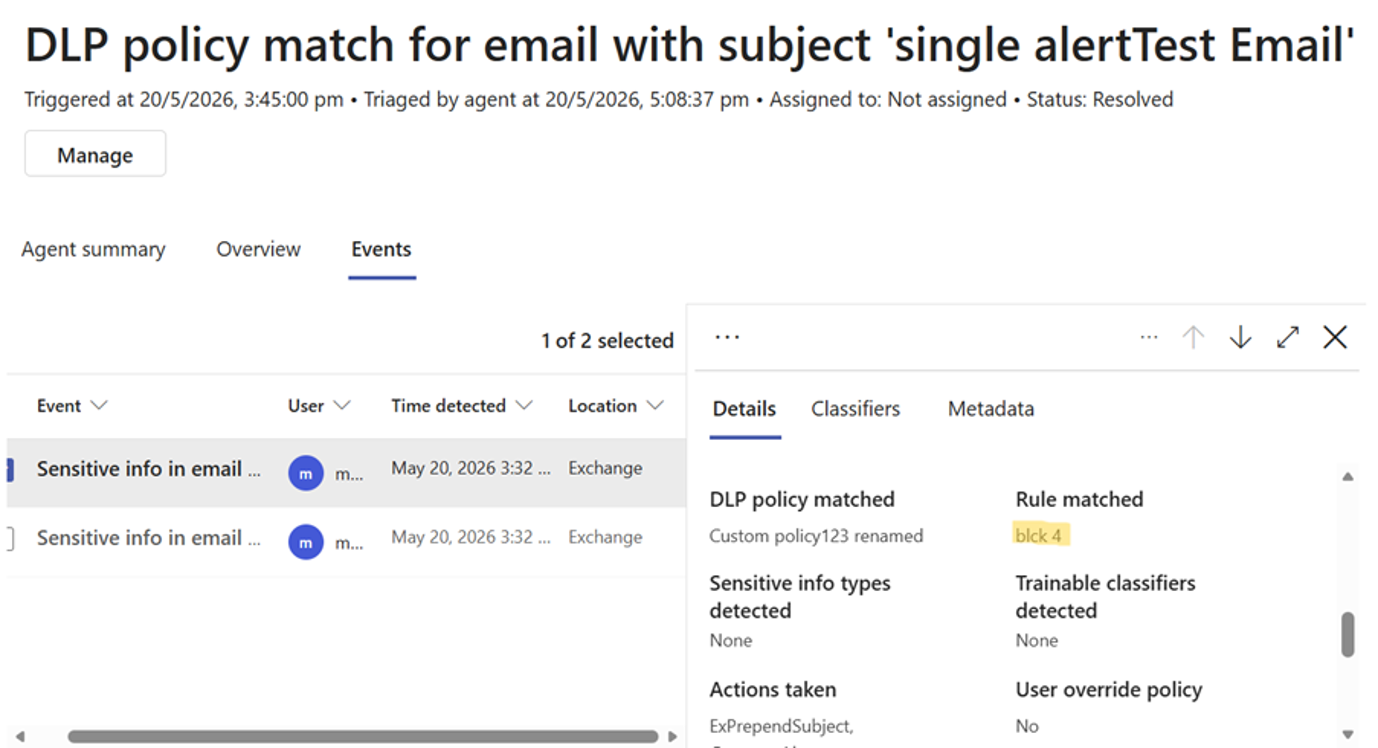
The following examples illustrate the difference between aggregated and non-aggregated alerts:
Screenshot 1: Aggregated alert — multiple events triggered by the same user are grouped into a single alert, including events that match different DLP rules:
Screenshot 2: Non-aggregated alert — each event generates a separate alert, showing a single event and rule match:
Action Required/Recommendations:
- Review the new setting once available in your tenant.
- To enable:
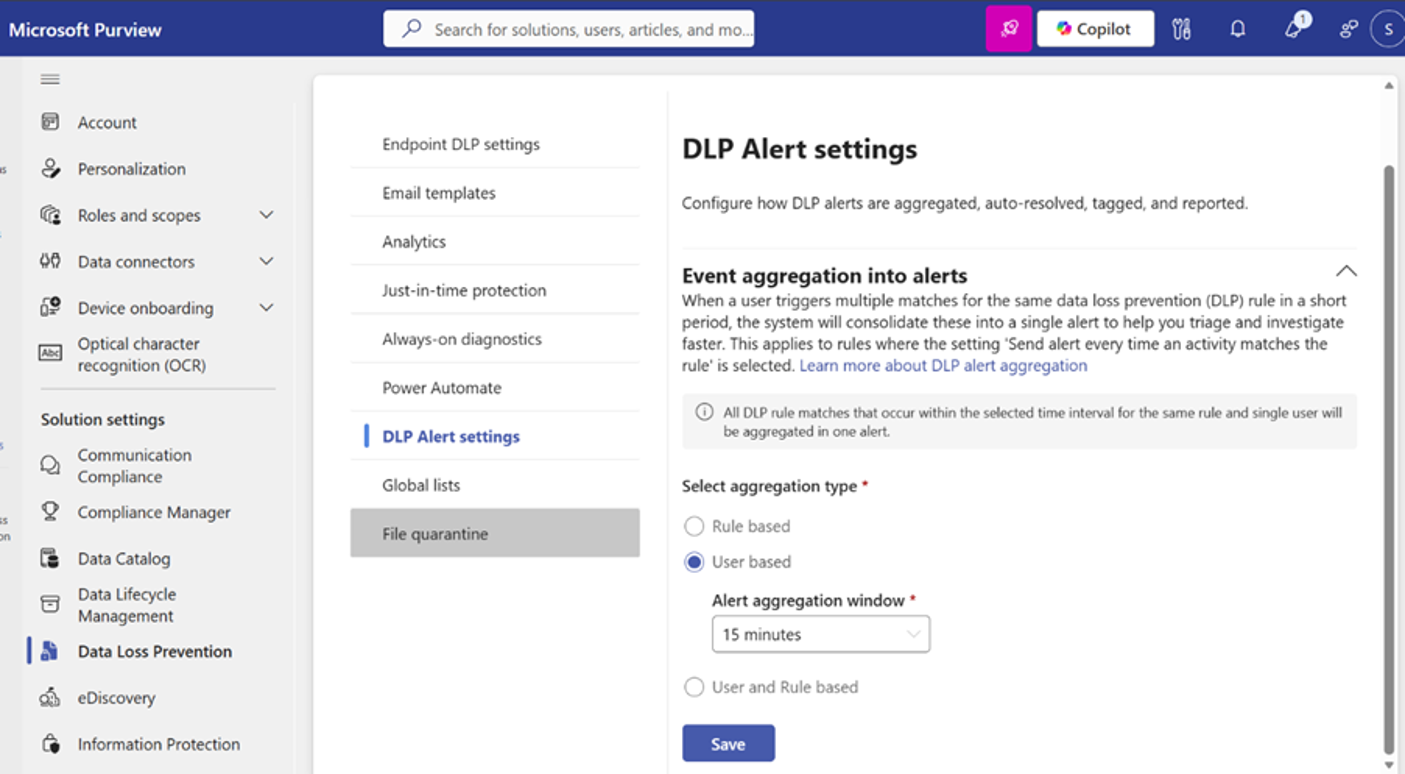
- Go to Settings > DLP settings > Alert settings > Event aggregation into alerts
- Select User-based aggregation
- Configure the alert aggregation time window
- Select Save
Screenshot 3: Enable user-based aggregation and set the alert aggregation window in DLP Alert settings
- Evaluate whether aggregation aligns with your organization’s alert triage and investigation processes.
- Communicate this change to your security operations or compliance teams.
- Update internal documentation or runbooks if you rely on DLP alert workflows.
Compliance considerations:
| Compliance Area | Explanation |
|---|---|
| Alters how existing customer data is processed, stored, or accessed | DLP alert data is processed differently by aggregating multiple events into a single alert object for the same user. |
| Modifies DLP policies or enforcement behavior | There is no change to policy enforcement itself, but alerting behavior and how events are surfaced to admins is modified. |
| Alters how admins monitor, report, or demonstrate compliance activities | Alert aggregation changes how incidents are viewed, triaged, and reported in Purview. |
| Includes an admin control | Admins can enable or disable user-based aggregation and configure the aggregation window in Purview settings. |
More information
Details
Platforms
- Web
Services
- DLP
- Purview
Category
- Stay informed
Microsoft tags
- Admin Action
- New Feature
Related changes
- 564765 Data Loss Prevention - User Based Aggregation of DLP Alerts Roadmap · Purview · Launched