MC1405505 Access your brand assets in PowerPoint
Primary service: PowerPoint
ChangePilot summary
- Microsoft is adding native access to brand assets in PowerPoint through Microsoft 365 Copilot, including colors, logos, images, icons, and related branding elements.
- The change applies to Microsoft 365 Copilot licensed PowerPoint users and the admins who manage tenant branding.
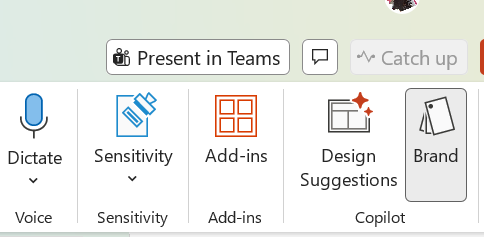
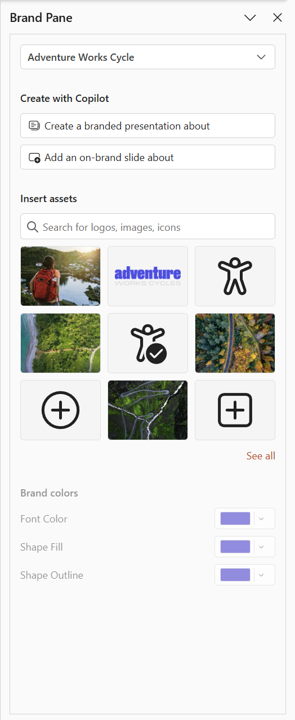
- Users will see a dedicated Brand option and brand pane in PowerPoint to help create on-brand presentations more quickly.
- Tenant-wide official brand kits can be published for centralized governance, and users without official kits can still create personal brand kits.
- No default configuration is required for basic use, but admins can set up brand manager policies and official brand kits if they want centralized control.
Latest update: Image URL Change
What it means for you
What admins need to do
Review whether your organization wants centralized brand governance in PowerPoint Copilot. If so, assign Microsoft 365 Copilot licenses, configure the brand manager policy, create and publish official brand kits, and verify existing presentation templates and brand assets are ready for Copilot-generated output. Also brief helpdesk and communications teams so they can answer questions from Copilot-licensed users.
Impact on users
Licensed PowerPoint users with Microsoft 365 Copilot will be able to open a brand pane and insert approved brand assets directly while creating presentations. If your tenant has official brand kits, users can work from the organization’s standard branding; otherwise, they can create personal brand kits for their own use.
If you miss it
If IT does nothing, Copilot-licensed users will still get the default experience and can use brand assets in PowerPoint, but the organization may lose the chance to centrally govern branding. Users may create inconsistent personal brand kits, support teams may receive avoidable questions, and presentations may not align with approved visual standards.
- Admin controls available
- Yes
- Licences affected
- Copilot
History
Recorded changes
- Standard end: late August 2026 (previously early August 2026).
Microsoft message
Updated July 29, 2026: We have updated the timeline. Thank you for your patience.
[What and Why:]
Microsoft is introducing native access to brand assets (colors, logos, images, icons, and more) directly within PowerPoint through Microsoft 365 Copilot. This improves productivity by helping users quickly create presentations that stay on-brand while enabling admins to standardize branding through official brand kits.
This message is associated with Roadmap Id 566351.
[Rollout Schedule:]
- Targeted Release (Worldwide): Beginning in mid-July 2026 and expect to complete by late July 2026
- General Availability (Worldwide): Beginning in mid-July 2026 and expect to complete by late August 2026 (previously early August)
[Impact on Your Organization:]
Who is affected: All Microsoft 365 Copilot (Premium) licensed PowerPoint users and admins managing branding
Platforms/Services:
- PowerPoint (Windows, Mac, Web)
What will happen:
- Users can access brand assets (colors, logos, icons, images) directly within PowerPoint.
- Brand assets are surfaced through a dedicated brand pane to enable quick, on-brand edits.
- Official brand kits (if configured) will be available tenant-wide.
- Users without official kits can create personal brand kits.
- The feature is available to Copilot licensed users and does not require additional configuration for basic usage.
Screenshot 1: Locate the Brand option on the PowerPoint ribbon:
Screenshot 2: Brand pane in PowerPoint showing brand assets and colors:
[Action Required/Recommendations:]
No action is required to enable the default experience for licensed users.
For organizations that want centralized brand governance:
- Enable and assign Microsoft 365 Copilot licenses.
- Configure brand manager policy to designate brand managers.
- Create and publish official brand kits for tenant-wide use.
- Validate existing templates for optimal Copilot output.
- Communicate this feature to users and helpdesk teams.
Learn more:
- Enterprise brand manager policy setup | Microsoft Learn
- Create and manage official Brand kits in the Microsoft 365 Copilot app | Microsoft Support
- Keep your presentation on-brand with Copilot | Microsoft Support
[Compliance considerations:]
| Area | Explanation |
|---|---|
| Stores new customer data | Brand kits store organizational assets such as logos, templates, color palettes, and guidelines within Microsoft 365 Copilot. |
| Alters processing of existing customer data | Copilot uses existing templates and brand kit assets to generate presentations, influencing how organizational content is processed and applied. |
| Introduces AI/ML capabilities interacting with data | Copilot uses AI to analyze templates, brand kits, and prompts to generate on-brand presentations. |
| New generative AI interaction for users | Users can create presentations using Copilot prompts that automatically incorporate brand assets and styles. |
| Includes admin controls | Admins can configure brand manager policies and assign designated users to manage official brand kits. |
| User enable/disable capability | Users can create and manage personal brand kits when official kits are not centrally configured. |
More information
- www.microsoft.com/microsoft-365/roadmap?filters=&
- learn.microsoft.com/microsoft-365/copilot/enterprise-brand-manager
- support.microsoft.com/microsoft-365-copilot/create-and-manage-official-brand-kits-in-the-microsoft-365-copilot-app
- support.microsoft.com/PowerPoint/copilot/keep-your-presentation-on-brand-with-copilot
Details
Platforms
- Desktop
- Mac
- Web
- Windows
Services
- M365 Copilot
- PowerPoint
Category
- Stay informed
Microsoft tags
- New Feature
- User Adoption
Related changes
- 566351 Create on brand presentations with additional brand assets Roadmap · PowerPoint · Launched