MC1404319 Microsoft Purview: Endpoint data loss prevention support for FTP and SFTP
Primary service: Purview
ChangePilot summary
- Microsoft Purview Endpoint DLP is gaining support for FTP and SFTP transfers from managed Windows devices.
- FTP and SFTP activity will show up as a new activity type in Activity Explorer, expanding visibility into sensitive data movement.
- Admins can enforce Endpoint DLP actions such as audit, block, and block with override for FTP/SFTP once the capability is enabled in policy settings.
- The feature is not enabled by default, so organizations must configure FTP/SFTP transfer activities in Endpoint DLP policies before protection applies.
- Review existing Endpoint DLP policies and decide whether to start with audit mode before turning on blocking actions.
Latest update: Image URL Change
What it means for you
What admins need to do
Review existing Microsoft Purview Endpoint DLP policies and decide whether FTP/SFTP transfers should be audited, blocked, or allowed with override. Configure the relevant policy settings before enabling enforcement, start with audit-only for validation, then monitor Activity Explorer and refine rules based on observed file-transfer activity. Update helpdesk guidance and user communications for any new blocking behavior.
Impact on users
Once enabled in policy, users on managed Windows devices may see FTP or SFTP file transfers audited or blocked based on DLP rules. If IT leaves the feature disabled, there is no change to user experience.
If you miss it
If IT does nothing, FTP and SFTP transfers will continue without Endpoint DLP protection, leaving a gap in sensitive data monitoring and exfiltration controls. That can increase compliance and security risk for organizations that rely on Endpoint DLP to govern file movement. If admins intended to enforce policy, users may be able to transfer sensitive content over these channels without the expected audit or blocking behavior.
- Admin controls available
- Yes
History
Recorded changes
-
- Targeted Release start: early September 2026 (previously late July 2026).
- Targeted Release end: late September 2026 (previously early August 2026).
- Standard start: October 2026 (previously mid-August 2026).
- Standard end: October 2026 (previously mid-August 2026).
- GCC start: October 2026 (previously mid-August 2026).
- GCC end: October 2026 (previously mid-August 2026).
- GCC High start: October 2026 (previously mid-August 2026).
- GCC High end: October 2026 (previously mid-August 2026).
- DoD start: October 2026 (previously mid-August 2026).
- DoD end: October 2026 (previously mid-August 2026).
Microsoft message
Updated August 11, 2026: We have updated the timeline. Thank you for your patience.
[What and Why]
Microsoft is introducing support for FTP and SFTP in Endpoint data loss prevention (DLP) in Microsoft Purview. This capability helps organizations monitor and protect sensitive data transferred using FTP and SFTP from managed Windows devices. It prevents unauthorized data exfiltration while maintaining visibility and control and closes a gap in protection across common transfer methods.
[Rollout Schedule]
- Public Preview: Beginning early September 2026 (previously late July) and expected to complete by end of September 2026 (previously early August)
- General Availability (Worldwide, GCC, GCC High, and DoD): Beginning and completing October 2026 (previously mid-August)
[Impact on Your Organization]
Who is affected
- Admins managing Microsoft Purview Endpoint DLP
- Users on managed Windows devices
Platforms/Services
- Microsoft Purview
- Endpoint DLP
- Windows devices
What will happen
- Endpoint DLP will support monitoring and protection of files transferred over FTP and SFTP.
- FTP and SFTP events will appear as a new activity type in Activity Explorer.
- Admins can apply DLP actions such as audit, block, and block with override to FTP and SFTP transfer activities after enabling the capability in policy settings:
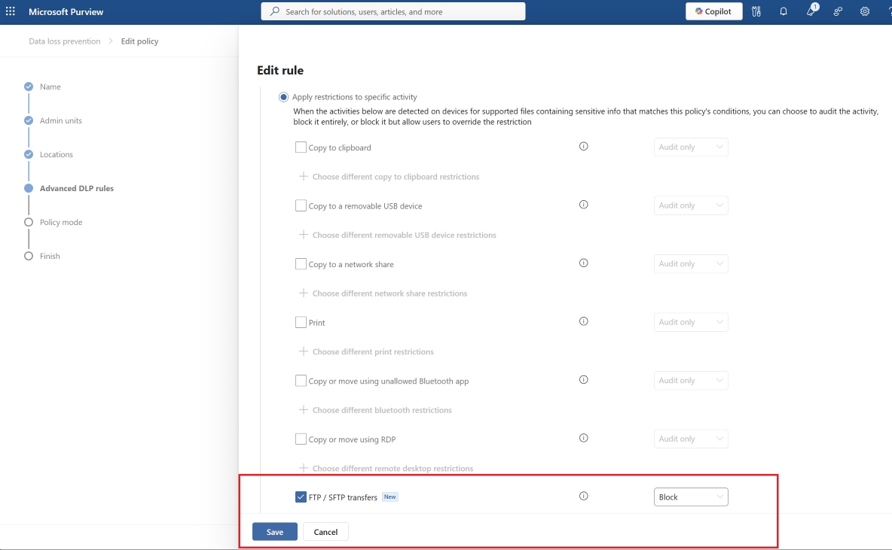
- FTP and SFTP protection is not enabled by default. Administrators must configure FTP/SFTP transfer activities in Endpoint DLP policies to apply protection.
- Once enabled, FTP and SFTP transfer activities are evaluated using the conditions, scope, and enforcement actions configured in Endpoint DLP policies.
[Action Required / Recommendations]
No immediate action is required before rollout.
Recommended actions:
- Review your existing Endpoint DLP policies for devices.
- Identify where FTP and SFTP transfer protection should be applied.
- Start with audit only mode before enabling blocking actions.
- Use Activity Explorer to monitor FTP and SFTP events after rollout.
- Refine policies based on observed activity.
Learn more:
- Create and deploy data loss prevention policies | Microsoft Purview | Microsoft Learn
- Get started with activity explorer | Microsoft Purview | Microsoft Learn
- Get started with Endpoint data loss prevention | Microsoft Purview | Microsoft Learn
- Help protect against sharing of a defined set of unsupported files | Microsoft Purview | Microsoft Learn
- Learn about Endpoint data loss prevention | Microsoft Purview | Microsoft Learn
[Compliance Considerations]
This change extends existing Endpoint DLP policy enforcement to additional data transfer channels and may affect how sensitive data movement is monitored and controlled across endpoints. Review as appropriate for your organization.
More information
- learn.microsoft.com/purview/dlp-create-deploy-policy
- learn.microsoft.com/purview/data-classification-activity-explorer
- learn.microsoft.com/purview/endpoint-dlp-getting-started
- learn.microsoft.com/purview/dlp-create-policy-sharing-set-unsupported-files
- learn.microsoft.com/purview/endpoint-dlp-learn-about
Details
Platforms
- Web
- Windows
Services
- DLP
- Purview
- Windows
Category
- Stay informed
Microsoft tags
- Admin Action
- New Feature
- User Adoption