MC1403407 OneDrive for the web: New libraries browsing experience
Primary service: OneDrive
ChangePilot summary
- OneDrive for the web is replacing the existing "More places" area with a new "Libraries" view.
- The new view helps users find SharePoint document libraries tied to recent activity, Teams, and favorite SharePoint sites more easily.
- Users will be able to filter, sort, and switch between list and tiles views in the new libraries experience.
- The change is enabled by default, applies to all OneDrive for the web users, and requires no admin configuration or policy changes.
- Existing permissions and access controls are unchanged; IT should mainly update training and support readiness.
Latest update: Image URL Change
What it means for you
What admins need to do
Update internal training and self-help सामग्री to reflect that "More places" is being replaced by the new Libraries view in OneDrive for the web. Brief the helpdesk on the new filtering, sorting, and list/tile options, and make sure user communications explain where to find recent libraries, Teams-linked libraries, and favorite SharePoint sites.
Impact on users
Users will see a refreshed Libraries area in OneDrive for the web instead of More places. They can more easily find recently accessed document libraries, libraries associated with Teams, and favorite SharePoint sites, and they can filter, sort, and change the display between list and tiles views.
If you miss it
If IT does nothing, the change will still appear automatically and users may be confused when the More places experience is replaced. Helpdesk volume may increase as users look for familiar navigation, and internal documentation or training may become outdated. There is no expected security or compliance impact because permissions and access controls do not change.
- Admin controls available
- No
History
Recorded changes
- Standard end: late August 2026 (previously late July 2026).
Microsoft message
Updated August 14, 2026: We have updated the timeline. Thank you for your patience.
[What and Why:]
We’re introducing a refreshed Libraries view in OneDrive for the web that replaces the existing More places experience. This update makes it easier for users to discover and access SharePoint document libraries across recent activity, Teams, and favorite sites. The new experience improves navigation and findability, helping users and teams quickly return to shared content and work more efficiently.
This message is associated with Roadmap ID 566315.
[Rollout Schedule:]
- Targeted Release (Worldwide): Beginning early July 2026 and expected to complete by mid-July 2026
- General Availability (Worldwide): Beginning mid-July 2026 and expected to complete by end of August 2026 (previously late July)
[Impact on Your Organization:]
Who is affected: All users of OneDrive for the web
Platforms/Services:
- OneDrive for the web
- SharePoint Online
- Microsoft Teams
What will happen:
- The More places experience will be replaced by a new Libraries view in OneDrive for the web.
- The feature will be enabled by default.
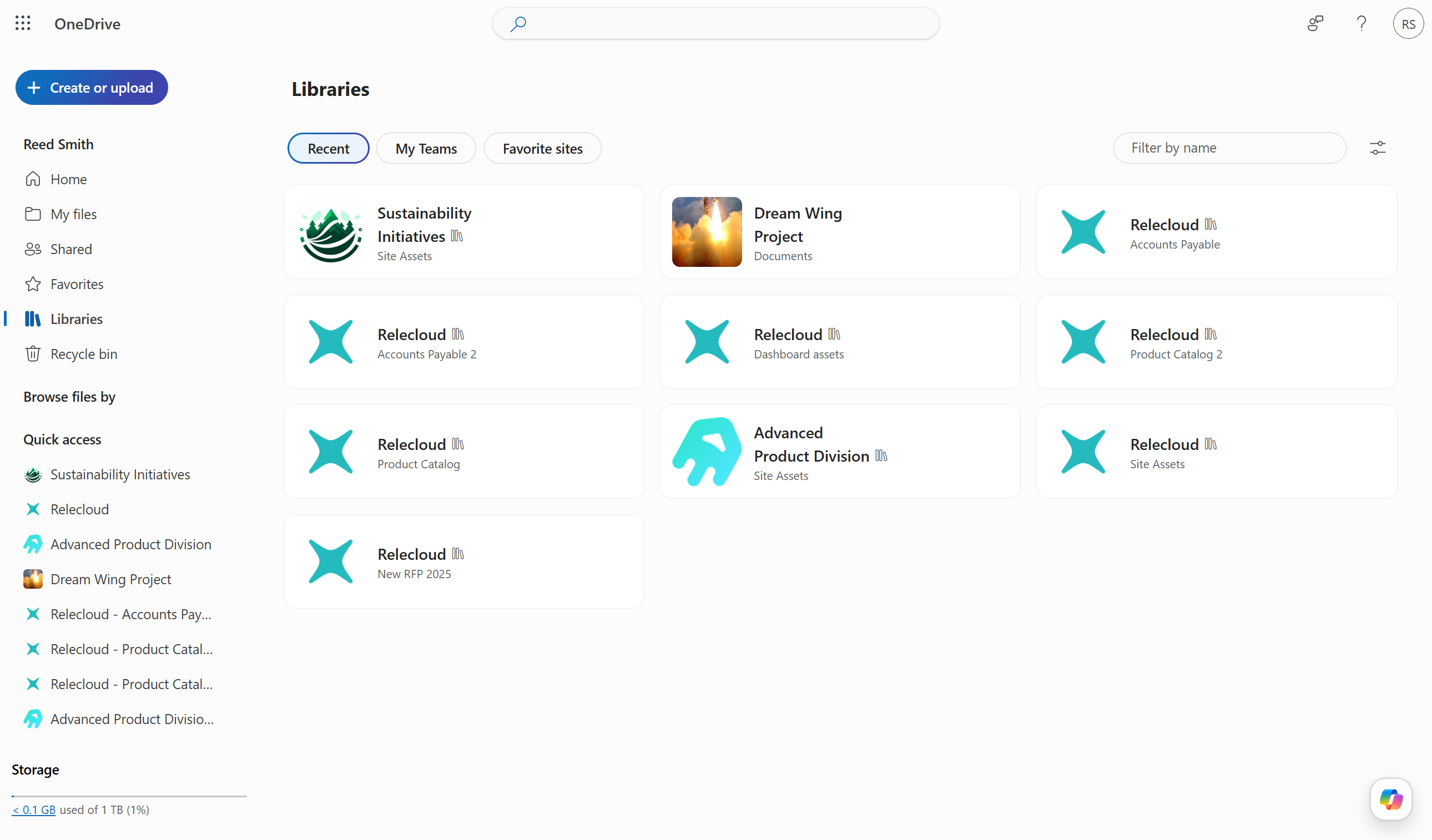
- Users will see more recently accessed document libraries for quicker access.
- Users can access libraries tied to Teams and favorite SharePoint sites directly.
- Users can:
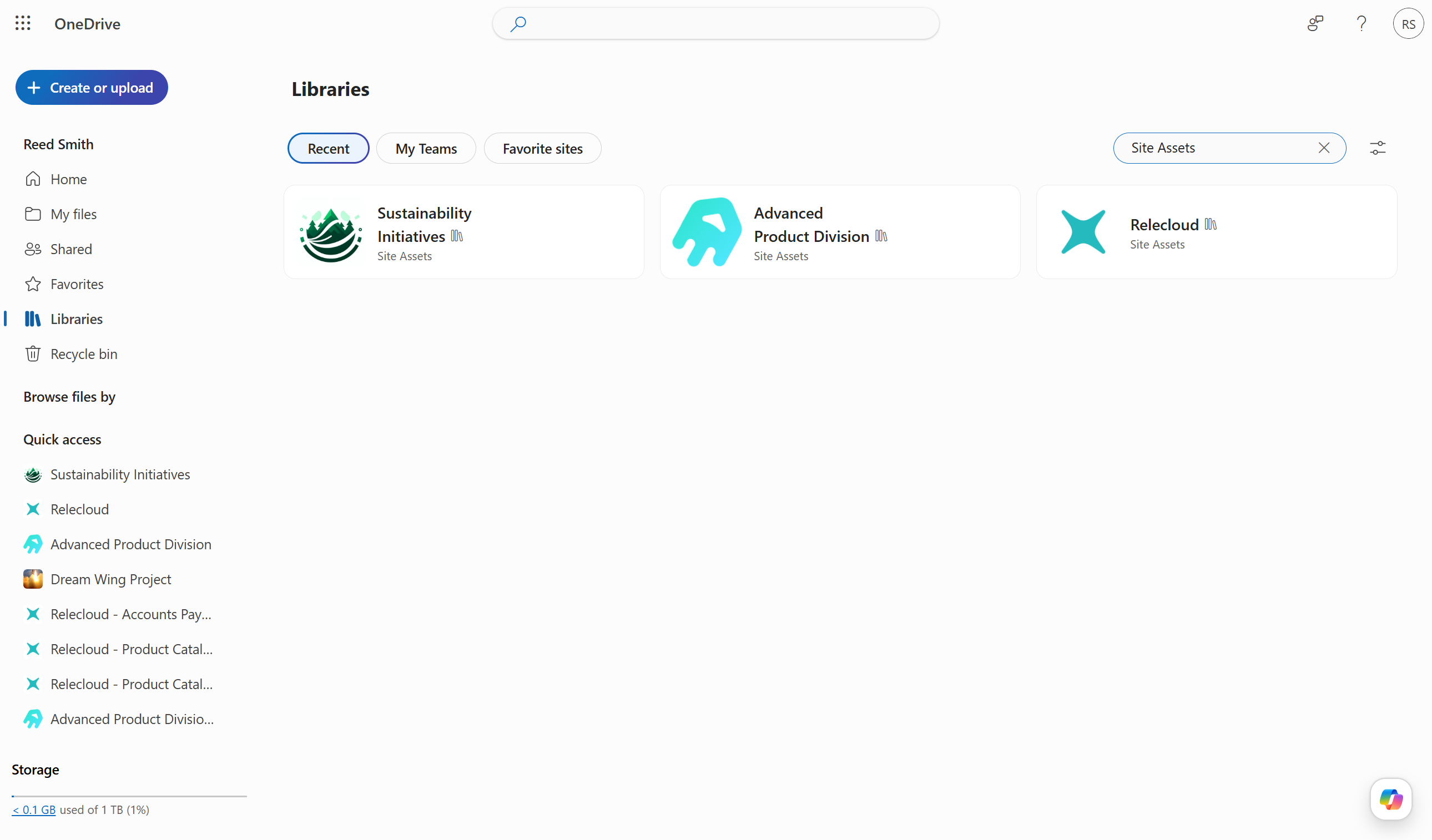
- Filter libraries using keywords.
- Sort libraries by recent activity or alphabetically.
- Switch between list and tiles views.
Screenshot 2: Recent document libraries, filtered to Site assets
 >
- Existing permissions and access controls remain unchanged.
- No admin configuration or policy changes are required.
Screenshot 1: New libraries view showing recently accessed document libraries:
[Action Required/Recommendations:]
No action is required.
Recommended actions:
- Review and update internal training materials to reflect the new Libraries experience.
- Inform helpdesk and support teams about the replacement of More places.
- Communicate the new capabilities to end users (filtering, sorting, view options).
No compliance considerations identified, review as appropriate for your organization.
More information
Details
Platforms
- Web
Services
- OneDrive
- SharePoint
- Teams
Category
- Stay informed
Microsoft tags
- Feature Update
- User Adoption
Related changes
- 566315 Refreshed Libraries View in OneDrive Web Roadmap · OneDrive · Launched