MC1400830 Room optimization mode relocated to context-dependent option
Primary service: Teams
ChangePilot summary
- Microsoft Teams is renaming the room optimization feature from “add shared display” to “optimize for room.”
- The option is also moving to a context-dependent location in the Teams desktop interface.
- This affects users who run Teams meetings on laptops connected to shared room equipment or BYOD conference setups.
- Microsoft states no admin action is required, but IT should update internal guidance and prepare support teams for the new terminology.
Latest update: Image URL Change
What it means for you
What admins need to do
Update internal documentation, screenshots, and helpdesk guidance to use the new “optimize for room” terminology and to show where the option now appears in Teams. Brief support teams and meeting-room users so they can recognize the renamed control and understand that it is user initiated, not an admin setting.
Impact on users
Users who join meetings from a laptop in a shared room or BYOD setup will see the former “add shared display” option renamed to “optimize for room” and moved to a different place in Teams. When selected, Teams will automatically adjust the meeting for room use, including audio/video device selection and shared display behavior when an external monitor is connected.
If you miss it
If IT does not prepare users and support staff, the feature may appear under a new name and location without warning, causing confusion and extra helpdesk contacts. The underlying functionality will still work, so the business impact is limited, but users may not recognize the feature or know how to enable it for hybrid meetings.
- Admin controls available
- No
History
Recorded changes
No changes recorded since ChangePilot first saw this post.
Microsoft message
Updated June 24, 2026: We have updated the timeline. Thank you for your patience.
[What and Why]
Microsoft Teams is updating the location and naming of the room optimization experience, previously called “add shared display,” to a context dependent “optimize for room” option. This change improves usability and helps users more easily configure Teams for shared and in-room meeting scenarios. The updated experience automatically optimizes audio, video, and display behavior to support more effective hybrid collaboration.
This message is associated with Microsoft 365 Roadmap ID 564912.
[Rollout Schedule]
- General Availability (Worldwide): Begins in early August 2026 (previously mid-July) and expected to complete by late August 2026 (previously late July).
[Impact on Your Organization]
Who is affected
- Users who run Microsoft Teams meetings on laptops connected to shared or room-based equipment, such as conference rooms or bring your own device meeting setups.
Platforms/Services
- Microsoft Teams desktop
What will happen
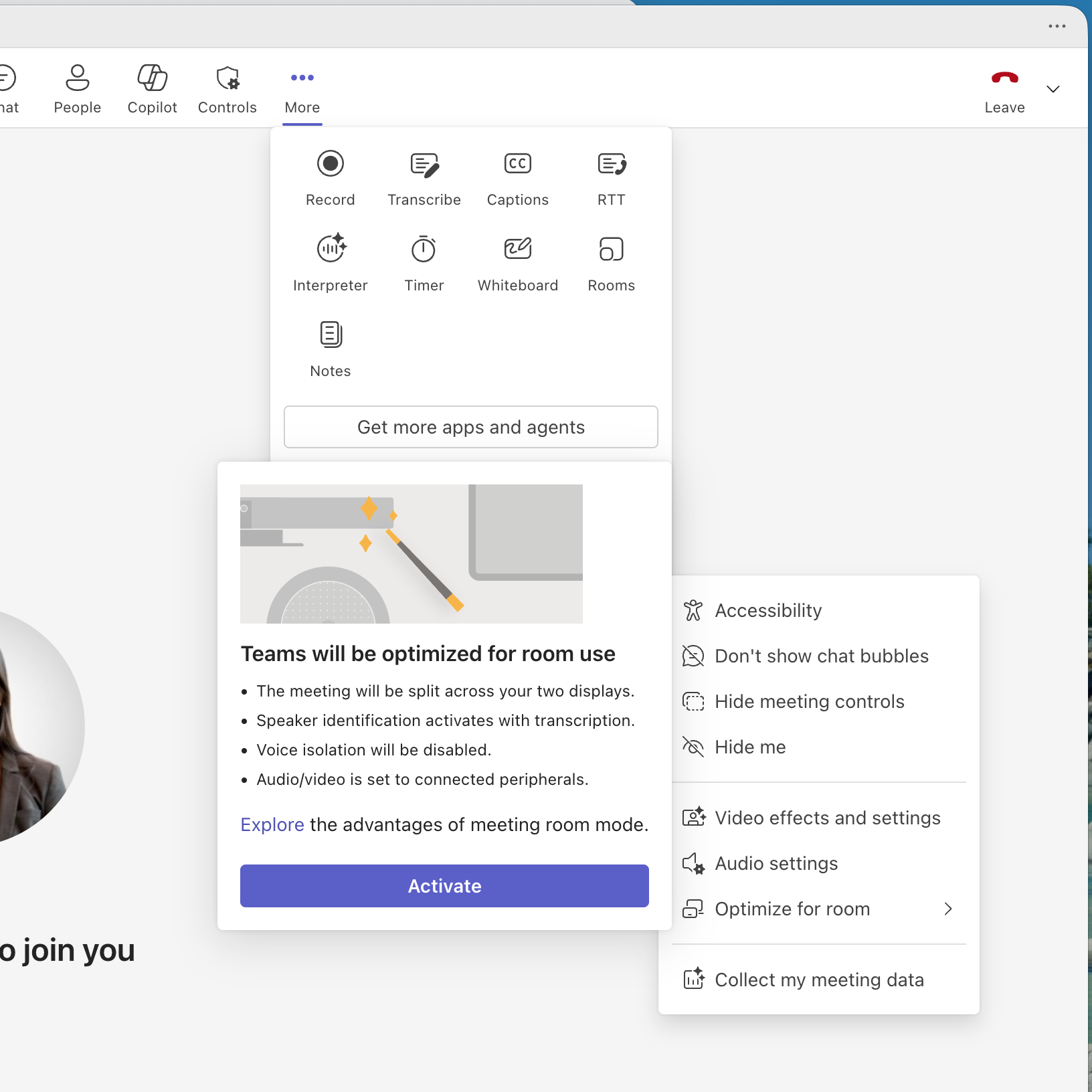
- The "add shared display" option is renamed to "optimize for room."
- The option is moved to a context dependent location in the Teams interface.
- When enabled, Teams will optimize the meeting experience for room scenarios.
- Connected room peripherals, such as AV devices associated with a room, will be automatically selected instead of laptop audio and video devices.
- If an external display is connected, shared display mode will activate and split Teams into two windows.
- Voice isolation will be disabled so in room participants can be heard clearly.
- Voice recognition will be enabled if allowed by policy.
- A room node will appear in the meeting roster to represent in room participants.
- The feature is user initiated and is not enabled by default.
[Action Required or Recommendations]
No admin action is required.
Recommended actions:
- Inform users of the updated “optimize for room” terminology and where to find it.
- Update internal documentation that references “add shared display.”
- Communicate the change to support and helpdesk teams.
- Encourage users to adopt the feature for improved hybrid meeting experiences.
[Compliance considerations]
No compliance considerations identified, review as appropriate for your organization.
More information
Details
Platforms
- Desktop
- TeamsAndSurfaceDevices
Services
- Teams
Category
- Plan for change
Microsoft tags
- Admin Action
- Feature Update
- User Adoption
Related changes
- 564912 New room optimization mode user experience in Teams desktop Roadmap · Teams · Launched