MC1387575 Microsoft Purview | Endpoint Data Loss Prevention: Scope Just-in-time audit by user or group
Primary service: Purview
ChangePilot summary
- Microsoft Purview Endpoint DLP Just-in-time protection audit logging is changing from automatic logging to an explicitly scoped setting: admins must configure which users or groups have activities audited.
- Affected: Purview/Endpoint DLP administrators who manage Just-in-time protection and Activity explorer visibility; audited vs blocked scopes determine whether activities are logged or enforcement occurs.
- Admin action required: deploy anti-malware client 4.18.26060 or later, review current Just-in-time configuration, and explicitly add any users or groups that should continue generating audit events.
- Verify after configuration by validating expected events appear in Activity explorer; users not added to audit or block scopes will no longer have their Just-in-time activities recorded.
Latest update: Standard start: mid-December 2026 (previously mid-September 2026). Standard end: late December 2026 (previously late September 2026).
What it means for you
What admins need to do
Before rollout, install or ensure anti-malware client version 4.18.26060 or later on managed endpoints. Review your existing Just-in-time protection settings in Microsoft Purview (Settings > Data loss prevention > Just-in-time protection) and explicitly configure the 'Audit covered user activities' scope under the Devices tab. Add all users and groups that must continue to generate audit events, document the chosen audit and block scopes, and run tests to confirm expected events appear in Activity explorer. Update operational/runbook documentation and notify security/compliance teams of the scoping change.
Impact on users
If IT configures audit scopes as recommended, end users will not notice any change. Users added to audit scope will have relevant activities (printing, removable media transfers, RDP file moves, uploads to restricted cloud domains, etc.) recorded for review, and users in block scope may be prevented from completing some actions while files are evaluated. Users not included in either scope will not have those activities recorded.
If you miss it
If administrators do not review and explicitly add users/groups to the audit scope, previously audited user activities may no longer be recorded, reducing visibility for investigations and compliance reporting. Failure to deploy the required anti-malware client version may prevent correct auditing or block behavior. This can lead to gaps in forensic data, compliance reporting failures, and incomplete enforcement telemetry.
- Admin controls available
- Yes
History
Recorded changes
-
- Standard start: mid-December 2026 (previously mid-September 2026).
- Standard end: late December 2026 (previously late September 2026).
-
- Standard start: mid-September 2026 (previously early July 2026).
- Standard end: late September 2026 (previously early July 2026).
-
- Standard start: mid-September 2026 (previously early July 2026).
- Standard end: late September 2026 (previously early July 2026).
Microsoft message
Updated September 14, 2026: We have updated the timeline. Thank you for your patience.
[What and Why:]
Admins can now scope which users and groups have their activities audited when Just-in-time protection is enabled in Microsoft Purview Endpoint Data Loss Prevention.
Previously, when Just-in-time protection was turned on, user activities were logged automatically for users who were not targeted by policies. With this update, audit logging must be explicitly configured so that only users or groups included in the audit scope have their activities logged. This change gives organizations greater control over audit signal collection and helps reduce unnecessary audit noise.
This message is associated with Microsoft 365 Roadmap ID 562991.
[Rollout Schedule:]
Global: We will begin rolling out in mid-December 2026 (previously mid-September) and expect to complete by end of December 2026 (previously end of September).
[Impact on Your Organization:]
Who is affected: Admins managing Microsoft Purview Endpoint Data Loss Prevention and Just-in-time protection settings.
Platforms/Services:
- Microsoft Purview
- Endpoint Data Loss Prevention
- Activity explorer.
What will happen:
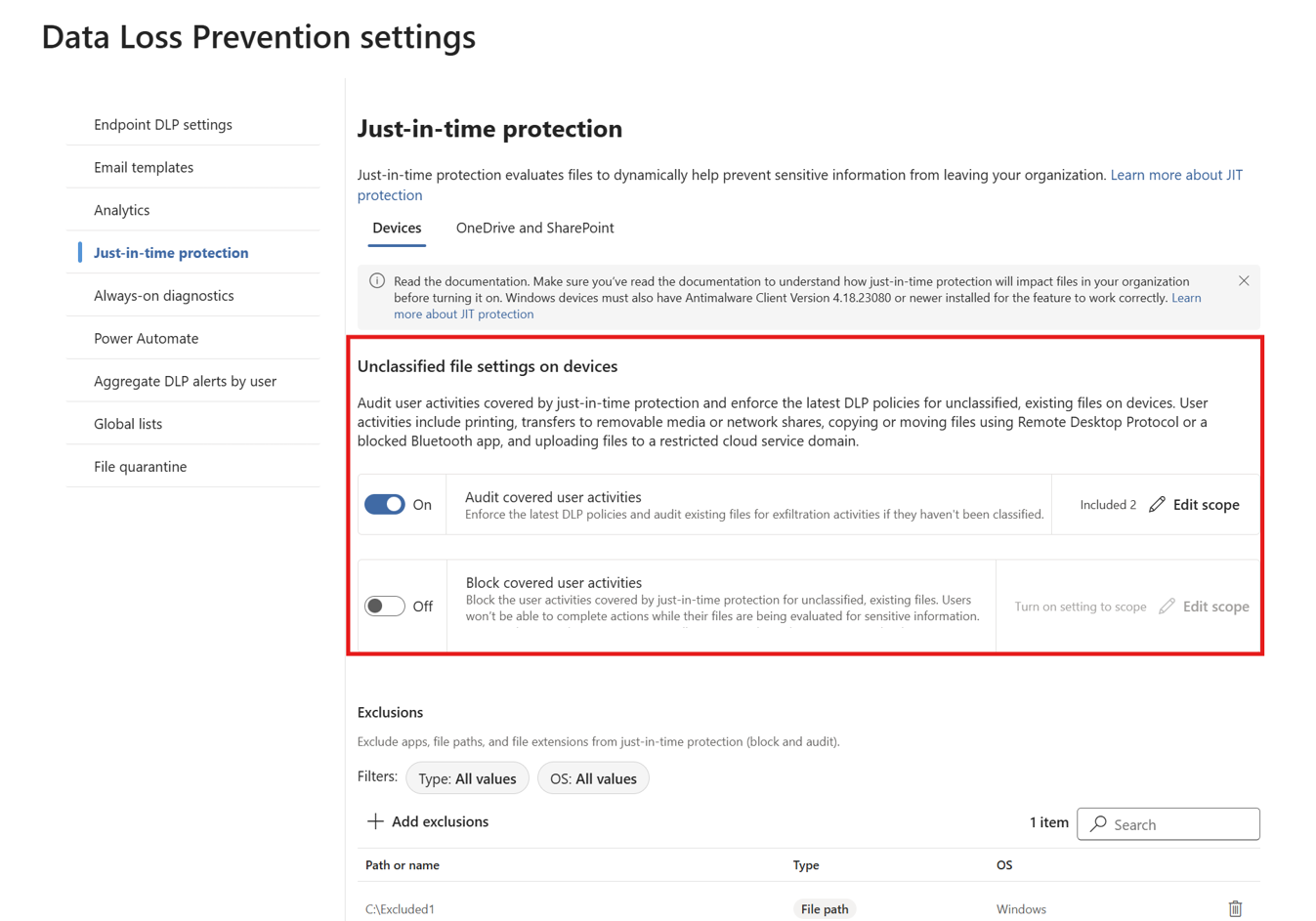
- Just-in-time audit behavior is now managed through the Audit covered user activities setting under Settings > Data loss prevention > Just-in-time protection. Under the Devices tab, turn on Audit covered user activities.
- Users included in audit scope will not see enforcement actions, and their activities will be recorded in Activity explorer.
- Users included in block scope will be prevented from completing actions while files are evaluated for sensitive information. Their activities are recorded in Activity explorer.
- Users not included in audit or block scope will not have activities covered by Just-in-time protection recorded.
- Audited activities include printing, transfers to removable media or network shares, copying or moving files using Remote Desktop Protocol or an unapproved Bluetooth app, and uploading files to a restricted cloud service domain.
Screenshot: Just-in-time protection settings with Audit covered user activities turned on:
[Action Required / Recommendations:]
- Deploy anti-malware client version 4.18.26060 or later before enabling this feature.
- Review your existing Just-in-time configuration to identify users currently generating audit events.
- Explicitly add all users or groups that should continue generating Just-in-time audit events to the audit scope.
- Validate your configuration to ensure expected activities appear in Activity explorer.
Learn more: Get started with Microsoft Purview Data Loss Prevention just-in-time protection | Microsoft Learn
[Compliance considerations:]
| Compliance area | Impact |
|---|---|
| Audit logging capabilities | Audit logging behavior changes from automatic to explicitly scoped, affecting which user activities are recorded for Just-in-time protection. |
| Admin compliance monitoring and reporting | Admins must configure audit scope to maintain expected visibility of user activity in Activity explorer. |
| Purview reporting and compliance workflows | The change alters how Just-in-time audit data is collected and reviewed for compliance and investigation workflows. |
| Admin controls and group-based configuration | The feature introduces additional admin configuration controls for scoping audit behavior, which may be applied using user or group selection. |
More information
Details
In weekly changes
Platforms
- Web
Services
- DLP
- Purview
Category
- Stay informed
Microsoft tags
- Admin Action
- New Feature
Related changes
- 562991 Endpoint Data Loss Prevention - Allow customer to scope JIT Audit to specific user or user group Roadmap · Purview · In development