MC1384422 Rolling out a simplified, consistent design and navigation experience in Viva Engage
Primary service: Viva
ChangePilot summary
- Viva Engage (web and Teams app) will receive a simplified, consistent design and navigation update that moves and consolidates modules into a right-side panel and updates community membership pages.
- All users who access Viva Engage on the web or in Microsoft Teams are affected; community admins will see additional tabs (Agents, Settings) on the new membership page.
- The change is enabled by default with no admin configuration required; two older low-use modules (intelligent importer and community resources link) are removed or relocated (Files tab overflow menu).
- No admin action is required, but IT should notify community admins, update documentation/screenshots, and prepare helpdesk for UI-related questions.
Latest update: Image URL Change
What it means for you
What admins need to do
No configuration or policy change is required. Prepare communications for community admins and end users describing the new layout and membership page, update internal documentation and training screenshots, and brief helpdesk staff on the changes and the new locations for removed/relocated modules (intelligent importer removed; community resources moved to Files tab overflow menu). If feasible, test the new layout in web and Teams to confirm any custom workflows or integrations still behave as expected.
Impact on users
Users will see an updated, cleaner layout in Viva Engage on the web and in Teams with a more consistent right-side panel, a dedicated membership page replacing the previous Members panel, and consolidated modules. Two low-use modules will be removed or relocated (intelligent importer removed; community resources accessible via the Files tab overflow menu). Overall functionality remains but some items are in new places, which may require brief reorientation.
If you miss it
If IT does nothing, the change will still roll out (enabled by default) and users may be surprised by the new layout and by relocated or removed modules; community admins may need guidance finding Agents/Settings and membership controls. There are no compliance or security consequences expected, but helpdesk may see increased tickets and documentation/screenshots will be out of date, causing short-term confusion.
- Admin controls available
- No
History
Recorded changes
No changes recorded since ChangePilot first saw this post.
Microsoft message
[What and Why:]
We’re introducing the first phase of a simplified, more consistent design and navigation experience in Viva Engage to help users focus on conversations and community engagement. This update aligns Engage’s web and Teams experiences with modern Microsoft design patterns, reduces visual clutter, and improves usability across screen sizes.
[Rollout Schedule:]
General Availability (Worldwide): Rollout begins in late June 2026 and is expected to complete by mid-August 2026.
[Impact on Your Organization:]
- Who is affected: All users who access Viva Engage on the web or in Microsoft Teams.
- Platforms / Services: Viva Engage (Web), Viva Engage app in Microsoft Teams.
- Users will see an updated layout and navigation with consistent design patterns across Viva Engage pages on web and in Microsoft Teams.
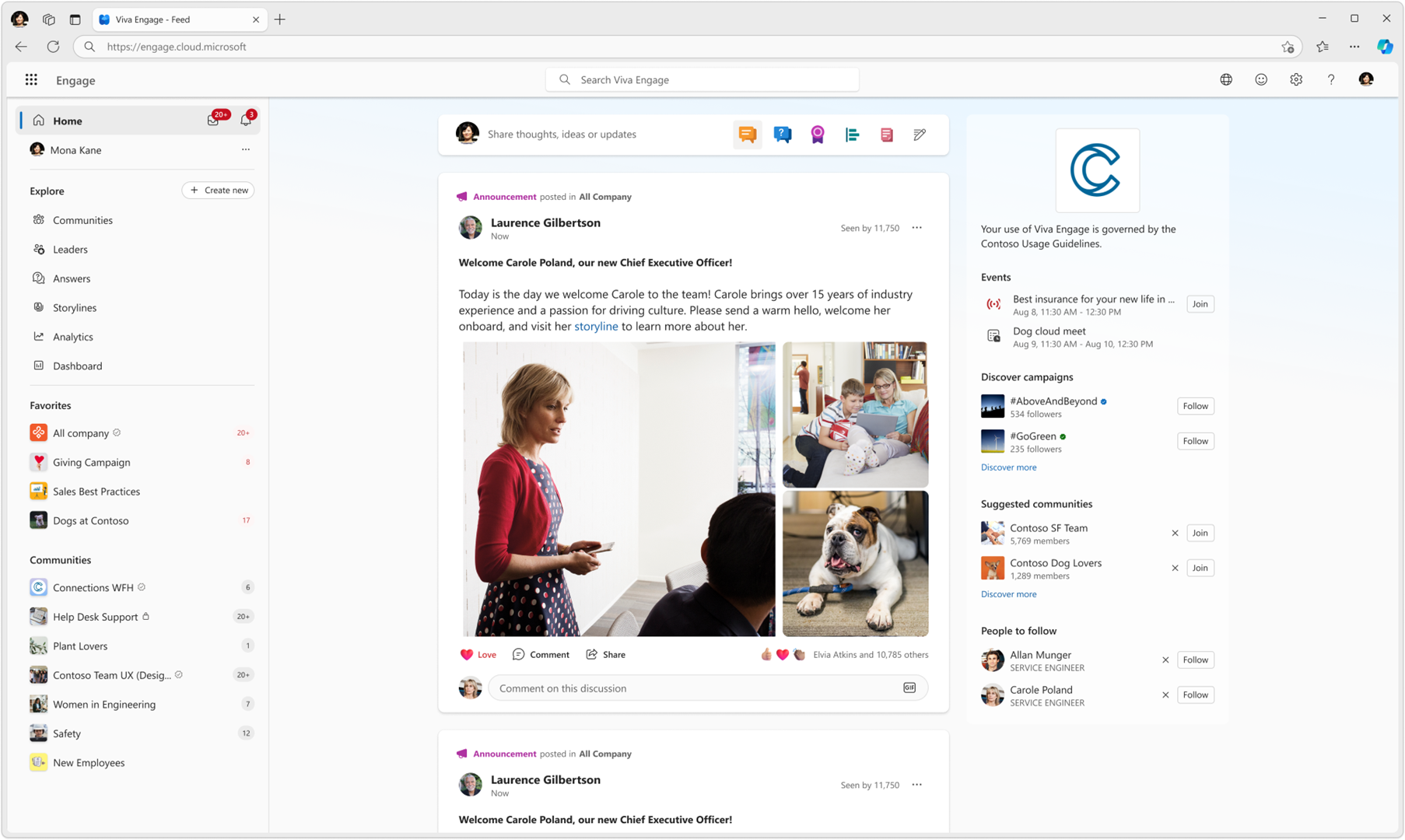
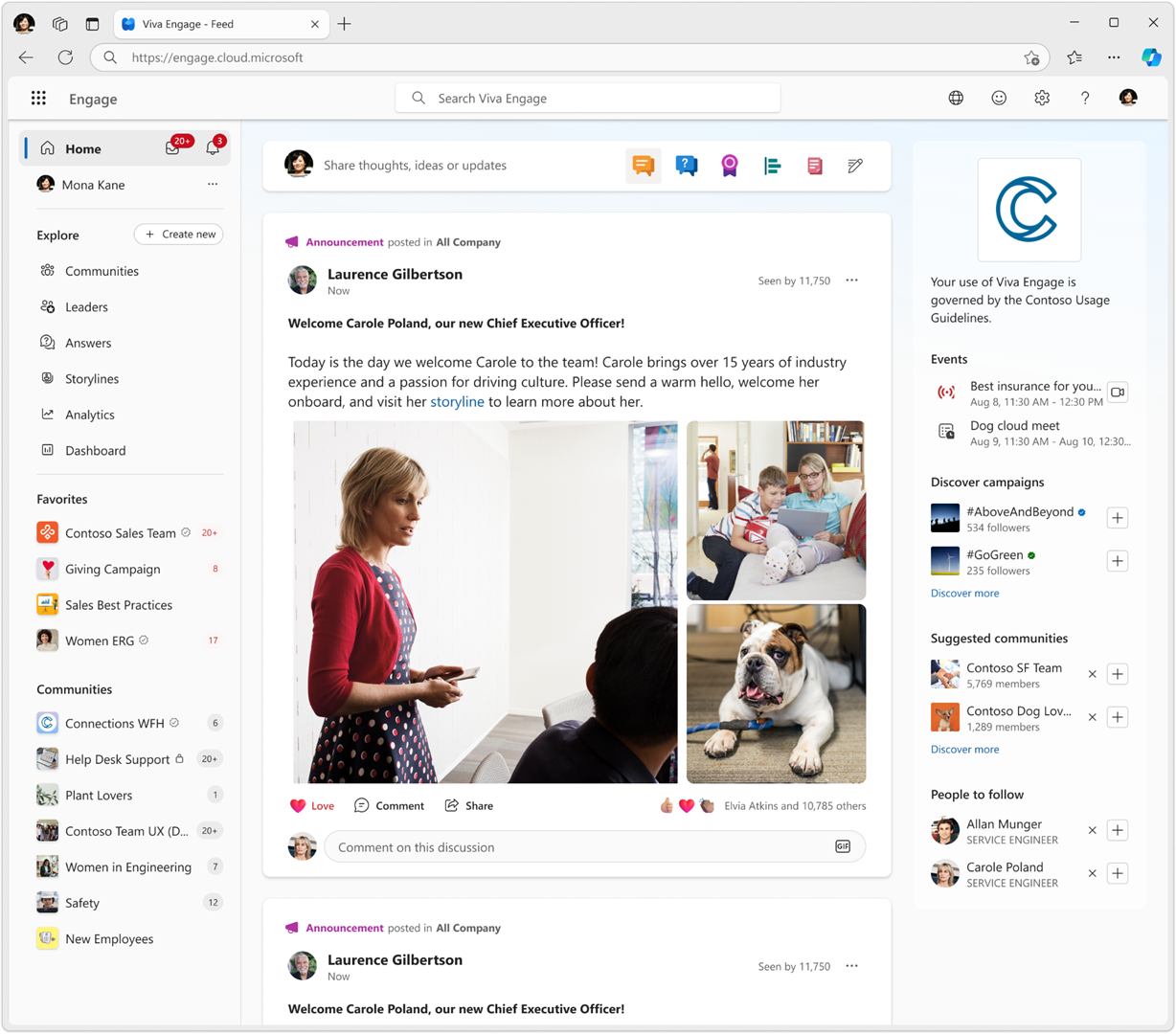
- A more consistent right-side panel will appear across all pages, showing the most relevant information alongside conversations to keep conversation content front and center.
- On the web, users will see a better-fitting layout:
- A wider content area and right-side panel on larger screens.
- A narrow mode of the right-side panel on smaller screens.
- Community navigation is simplified:
- Redundant or empty entry points are removed.
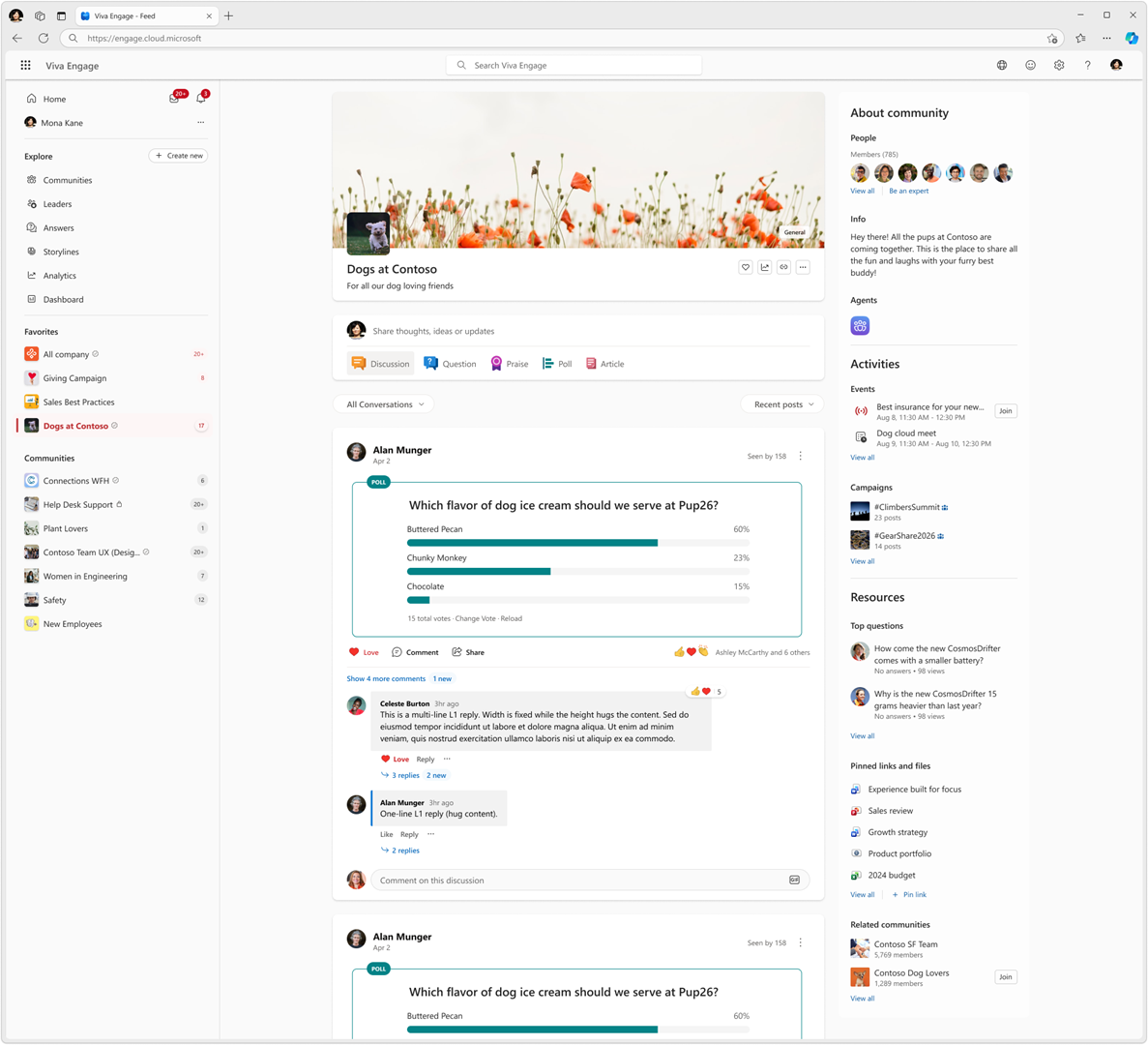
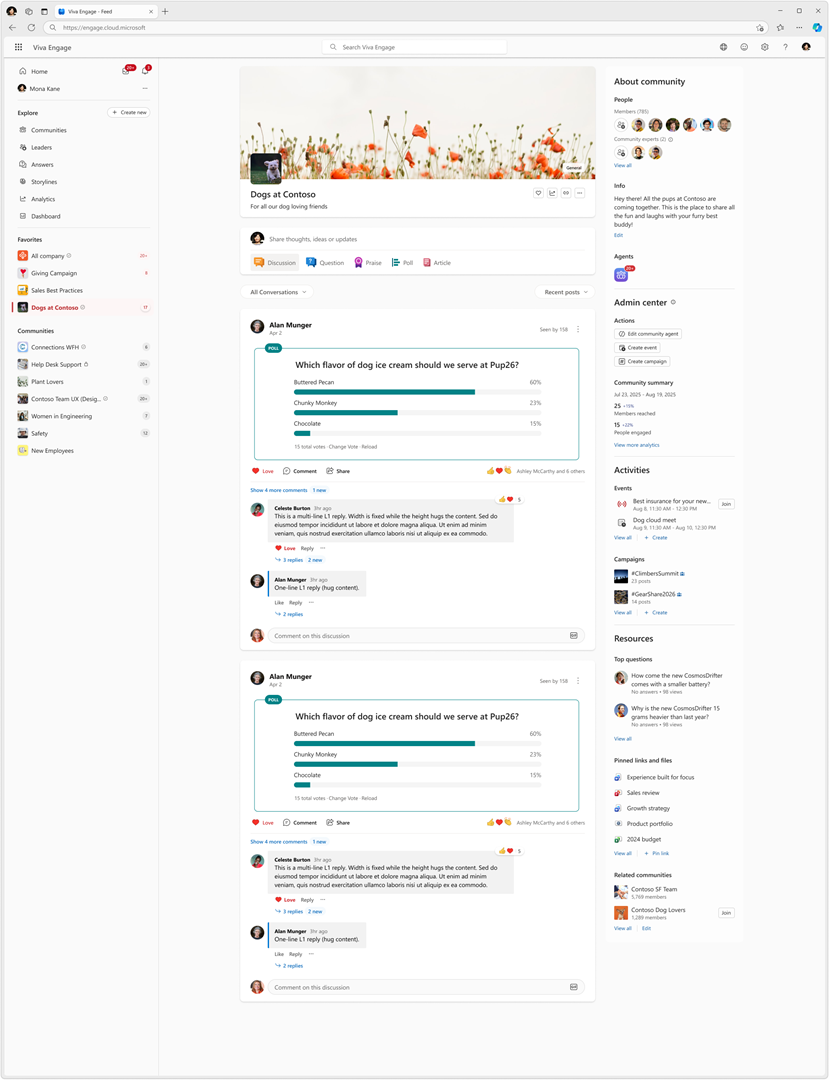
- Existing modules are consolidated from the header into the right-side panel.
- Modules that are not relevant to a community (for example, events or campaigns when there is nothing to show) are hidden automatically
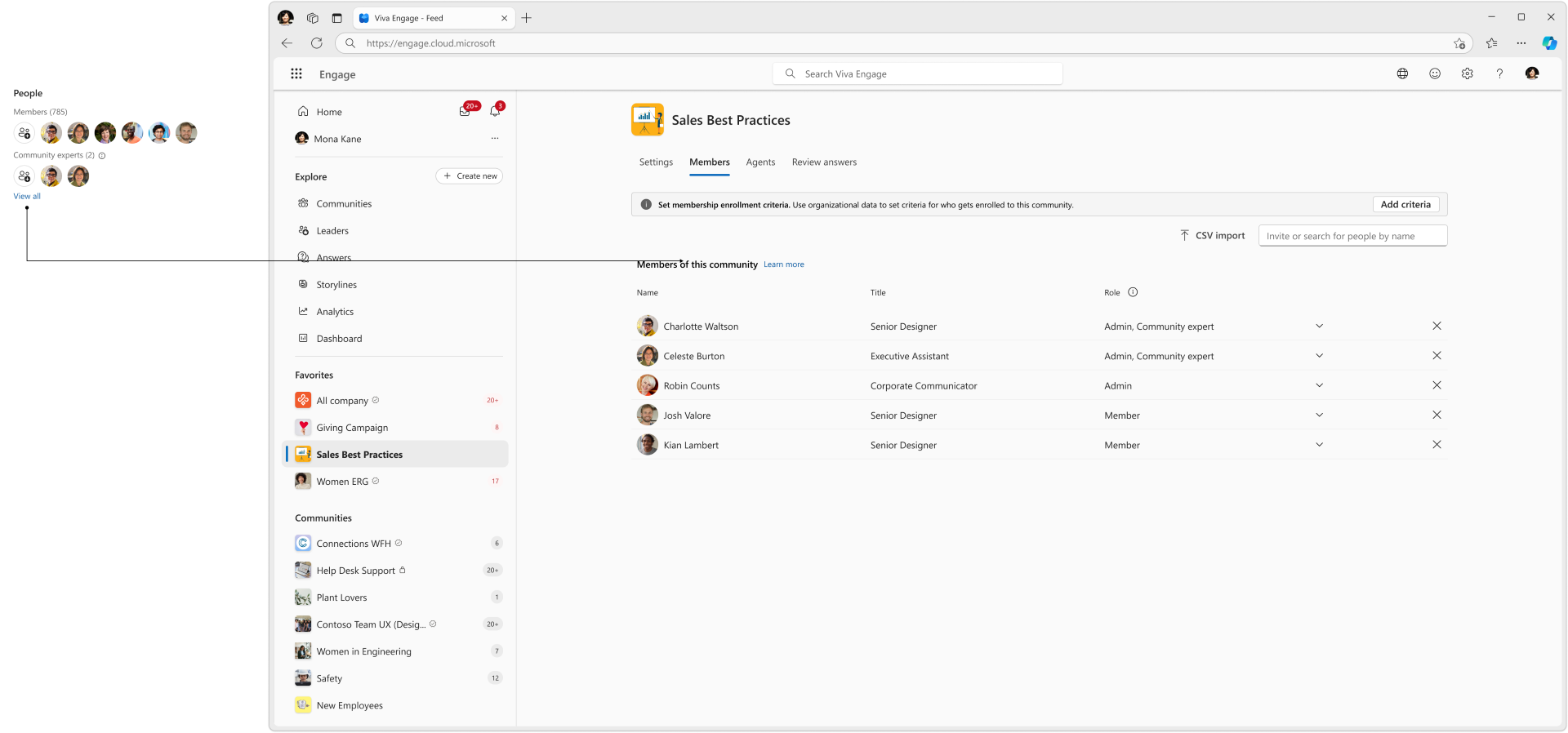
- In a community, users will see a dedicated membership page, replacing the previous Members panel. Community admins will see additional tabs for Agents, and Settings.
- Two older, low-use modules are removed from the community right-side panel:
- The intelligent importer for populating questions and answers.
- Community resources for the linked SharePoint library and site. This remains available through the overflow menu in the Files tab.
- The update is enabled by default. No admin configuration or policy changes are required.
What will happen:
Screenshot 1: Home feed with the new right-side panel on a wide screen:
Screenshot 2: Home feed with the new right-side panel on a narrow screen:
Screenshot 3: Community page with reconsolidated modules on right-side panel for community members:
Screenshot 4: Community page with reconsolidated modules on right-side panel for community admins:
Screenshot 5: Membership page with tabs for Settings, Members, Agents for community admins when clicked on the right-side panel for People:
[Action Required / Recommendations:]
- No admin action is required.
- Consider informing community admins, updating internal documentation or screenshots, and notifying helpdesk teams of the layout changes.
[Compliance considerations:]
No compliance considerations identified; review as appropriate for your organization.
Details
Platforms
- Web
- Teams
Services
- Teams
- Viva
Category
- Plan for change
Microsoft tags
- Feature Update
- User Adoption