MC1384420 Microsoft Purview | Endpoint Data Loss Prevention - Ability to protect files stored in the excluded folders in Windows
Primary service: Purview
ChangePilot summary
- Microsoft Purview Endpoint DLP will be able to apply protection to files stored in commonly excluded Windows folders (for example %AppData% and temporary directories) during egress actions (copy, print, upload, save to network shares).
- Affected: Admins and users who use Microsoft Purview Endpoint DLP on Windows endpoints; Microsoft Defender anti-malware client v4.18.26051 or later is required on devices before enabling the feature.
- Admins can choose audit or block enforcement (audit logs actions; block prevents restricted actions; block takes precedence if both apply).
- Action for IT: deploy/update Defender client to the required version, review excluded-folder paths, extend/update Endpoint DLP policies, pilot in audit mode, and educate users/support teams before enabling enforcement.
Latest update: Standard start: late February 2027 (previously mid-December 2026). Standard end: mid-March 2027 (previously end of December 2026).
What it means for you
What admins need to do
Ensure devices have Microsoft Defender anti-malware client version 4.18.26051 or later before enabling this feature. Identify which excluded Windows folder paths (AppData, temp directories, etc.) may contain sensitive data and decide which should be protected. Update or extend existing Endpoint DLP policies to include those protected excluded paths and configure policies initially in audit mode for a pilot group to monitor logs and false positives. Prepare support documentation and user communications explaining potential blocked actions, and monitor audit logs to tune rules before enabling block enforcement broadly.
Impact on users
Users accessing sensitive files stored in previously excluded folders (for example AppData or temp directories) may see actions blocked for copying to removable media, printing, uploading to cloud services, or saving to network shares if Endpoint DLP enforcement is enabled; in audit mode their actions will be logged but not blocked. If IT pilots and tunes policies beforehand, most users will see no change until admins enable enforcement.
If you miss it
If IT does not prepare, devices without the required Defender client cannot be protected and enabling the feature later could fail or have uneven coverage. Enabling protection without piloting may result in unexpected user-facing blocks, increased helpdesk tickets, business disruption, and potential workflow breakage. Conversely, failing to enable the feature leaves sensitive files in excluded folders unmonitored, increasing compliance and data-exfiltration risk.
- Admin controls available
- Yes
History
Recorded changes
-
- Standard start: late February 2027 (previously mid-December 2026).
- Standard end: mid-March 2027 (previously end of December 2026).
-
- Standard start: mid-December 2026 (previously mid-September 2026).
- Standard end: late December 2026 (previously late September 2026).
-
- Standard start: mid-September 2026 (previously early July 2026).
- Standard end: late September 2026 (previously early July 2026).
-
- Standard start: mid-September 2026 (previously early July 2026).
- Standard end: late September 2026 (previously early July 2026).
Microsoft message
Updated October 28, 2026: We have updated the timeline. Thank you for your patience.
[What and Why:]
Microsoft Purview Endpoint Data Loss Prevention (DLP) is introducing the ability to protect sensitive files even when they reside in commonly excluded Windows folders such as AppData directories and temporary folders. Previously, files stored in these excluded paths were not subjected to Endpoint DLP policy enforcement. With this update, policy checks will apply during key egress actions, including copying, printing, saving to network shares, and uploading to cloud services, helping reduce the risk of sensitive data leaving your organization from these user-writable locations.
This message is associated with Microsoft 365 Roadmap ID 562992.
[Rollout Schedule:]
General Availability (Worldwide): We will begin rolling out in late February 2027 (previously mid-December) and expect to complete by mid-March 2027 (previously end of December).
[How this will affect your organization:]
Who is affected: Admins and users in organizations that use Microsoft Purview Endpoint Data Loss Prevention (DLP) on Windows devices
Platforms:
- Microsoft Purview compliance portal
- Windows endpoints supported by Microsoft Purview Endpoint DLP
- Microsoft Defender anti-malware client version 4.18.26051 or later required
What will happen:
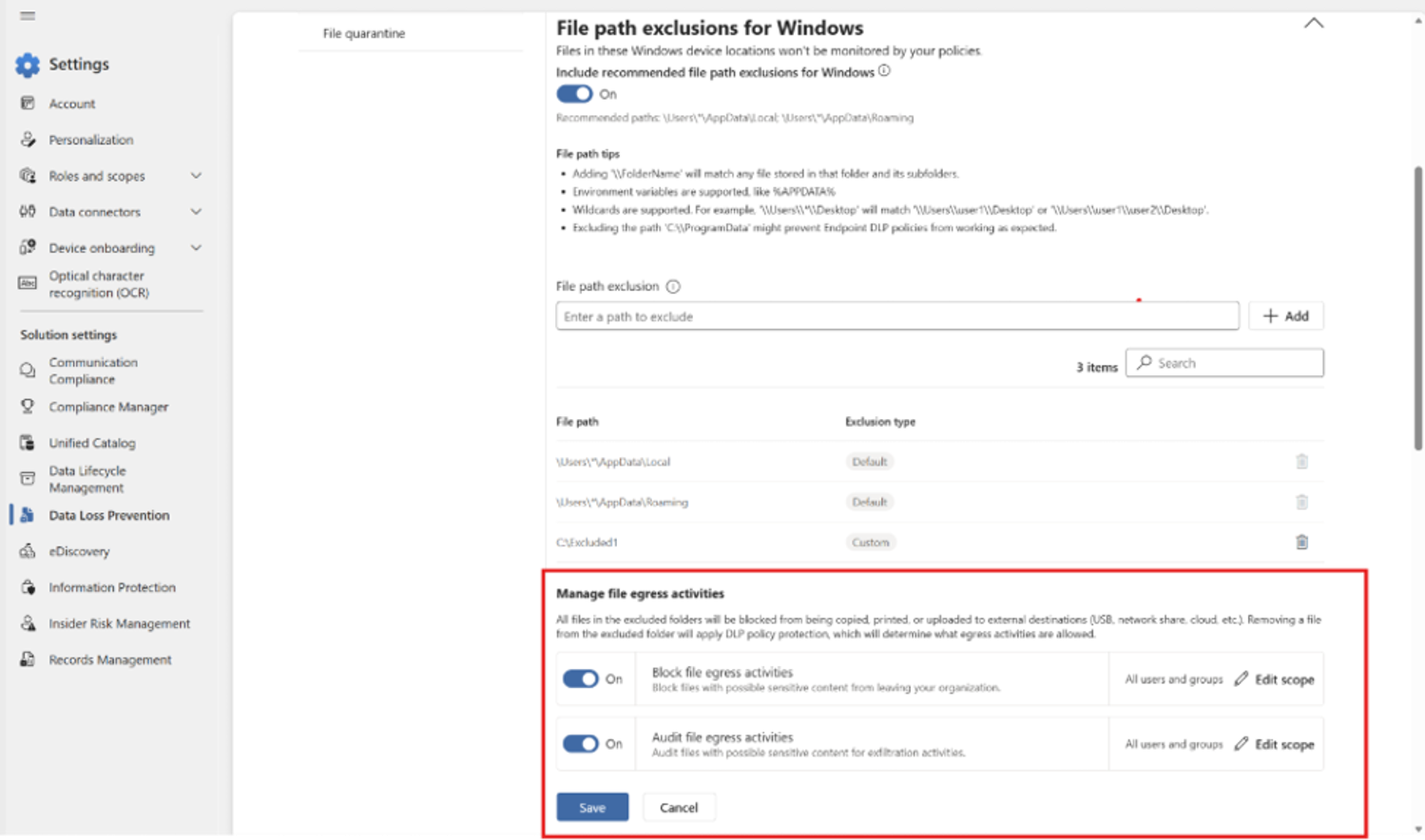
With this update, admins can extend Endpoint DLP protection to files stored in excluded Windows folders (for example, %AppData% and temporary directories) during egress activities.
- Users in audit mode can continue their actions, which will be logged for review.
- Users in block mode will be prevented from performing restricted actions (for example, copying to removable media, uploading to cloud services, or printing)
- If both audit and block policies apply to a user, block takes precedence
This change improves protection coverage by addressing scenarios where sensitive data in excluded paths may have previously gone unmonitored.
Screenshot: Endpoint DLP settings for excluded Windows folders and file egress activities:
[Action Required / Recommendations:]
- Before enabling this feature, you must first deploy anti-malware Client version 4.18.26051 or later
- Review excluded folder paths: Identify which excluded paths (such as AppData and temporary directories) contain or could contain sensitive files and should be added to the protected exclusion paths list.
- Stage your rollout: Start with an audit-mode pilot to assess impact before enabling enforcement.
- Update DLP policies: Extend existing Endpoint DLP policies to cover protected excluded folders where applicable.
- Educate users and support teams: Inform them of expected behavior changes, including potentially blocked actions such as copy, print, or upload operations.
[Compliance considerations:]
| Compliance consideration | Explanation |
| Admin control | Admins must review excluded Windows folder paths and update Endpoint DLP policies to enable protection for files stored in excluded folders. |
| User impact | Users may experience blocked actions such as copying to removable media, printing, saving to network shares, or uploading to cloud services when interacting with sensitive files stored in protected excluded folders. |
| Policy changes | Organizations may need to extend existing Endpoint DLP policies to include protected excluded folders. |
| User training | Organizations should educate users and support teams about new enforcement behavior and potential blocked actions. |
| Monitoring/Auditing | Audit mode logging will capture user actions involving sensitive files in protected excluded paths for review and analysis. |
| Prerequisite dependency | Devices must run anti-malware client version 4.18.26051 or later before enabling this feature. |
| Security/Compliance impact | This update expands Endpoint DLP protection coverage to previously excluded Windows folder locations, helping reduce the risk of sensitive data exfiltration. |
| Rollout risk assessment | Organizations may want to pilot the feature in audit mode before enabling enforcement to assess operational impact. |
More information
Details
In weekly changes
Platforms
- Web
- Windows
Services
- Defender
- DLP
- Purview
- Windows
Category
- Plan for change
Microsoft tags
- Admin Action
- New Feature
- User Adoption
Related changes
- 562992 Endpoint Data Loss Prevention - Ability to protect files stored in the excluded folders in Windows Roadmap · Purview · In development