MC1384415 Microsoft Purview | Endpoint Data Loss Prevention now supports a pre‑curated file extension list
Primary service: Purview
ChangePilot summary
- Endpoint DLP file extension condition will switch to a pre-curated list of supported/scannable file extensions; free-form extension entry will be removed.
- Affects Microsoft 365 administrators who manage Microsoft Purview Endpoint DLP device policies (applies to Windows endpoints and the Purview web admin experience).
- Existing policies continue to enforce unless edited; if you edit a policy any unsupported extensions present must be removed before the policy can be saved.
- No action required if you do not plan to modify policies; if you will create or edit policies, review and update extension lists and use the "Apply restrictions to only unsupported file extensions" feature to preserve coverage for non-scannable types.
Latest update: Standard start: mid-December 2026 (previously mid-September 2026). Standard end: late December 2026 (previously late September 2026).
What it means for you
What admins need to do
Before editing or creating Endpoint DLP policies after rollout, review all existing File extension conditions and remove any unsupported/non-scannable extensions. Identify policies you plan to edit and prepare a list of unsupported extensions to convert to the "Apply restrictions to only unsupported file extensions" pattern. Update policy documentation and notify policy owners of the change window. Test policy edits in a non-production tenant or with a controlled policy to confirm behavior. Train helpdesk staff to handle save-errors when admins attempt to save policies containing unsupported extensions.
Impact on users
Most end users will not notice any change. If admins edit policies to remove unsupported extensions (or convert them to the unsupported-file-extension restriction), some specific file types may no longer be matched by extension-based rules and could be handled differently by DLP; otherwise the overall protection posture remains the same.
If you miss it
If IT does nothing, there is minimal immediate user disruption because existing policies continue to enforce until edited. However, admins who later attempt to edit policies may be prevented from saving until unsupported extensions are removed, and misconfigured edits could unintentionally reduce coverage for non-scannable file types if the 'unsupported file extensions' handling is not configured. Overall compliance/security risk is low if teams follow the guidance, but policy owners should review lists to avoid save failures and gaps.
- Admin controls available
- Yes
History
Recorded changes
-
- Standard start: mid-December 2026 (previously mid-September 2026).
- Standard end: late December 2026 (previously late September 2026).
-
- Standard start: mid-September 2026 (previously early July 2026).
- Standard end: late September 2026 (previously late July 2026).
-
- Standard start: mid-September 2026 (previously early July 2026).
- Standard end: late September 2026 (previously late July 2026).
Microsoft message
Updated September 18, 2026: We have updated the timeline. Thank you for your patience.
[What and Why:]
Microsoft Purview Endpoint Data Loss Prevention (DLP) is improving how file extension conditions are configured to help ensure policies are accurate, reliable, and efficient. By limiting file extension selection to supported, scannable file types, this update reduces misconfiguration risk and improves enforcement consistency across endpoints while maintaining existing protection coverage.
This change aligns Endpoint DLP configuration with supported enforcement capabilities and helps admins create policies that behave as expected.
This message is associated with Microsoft 365 Roadmap ID 562993.
[Rollout Schedule:]
General Availability (Worldwide): We will begin rolling out in mid-December 2026 (previously mid-September) and expect to complete by end of December 2026 (previously end of September).
[Impact on Your Organization:]
Who is affected:
- Microsoft 365 administrators managing Microsoft Purview Endpoint DLP device policies.
Platforms/Services:
- Microsoft Purview
- Endpoint Data Loss Prevention
- Supported Windows endpoints
What will happen:
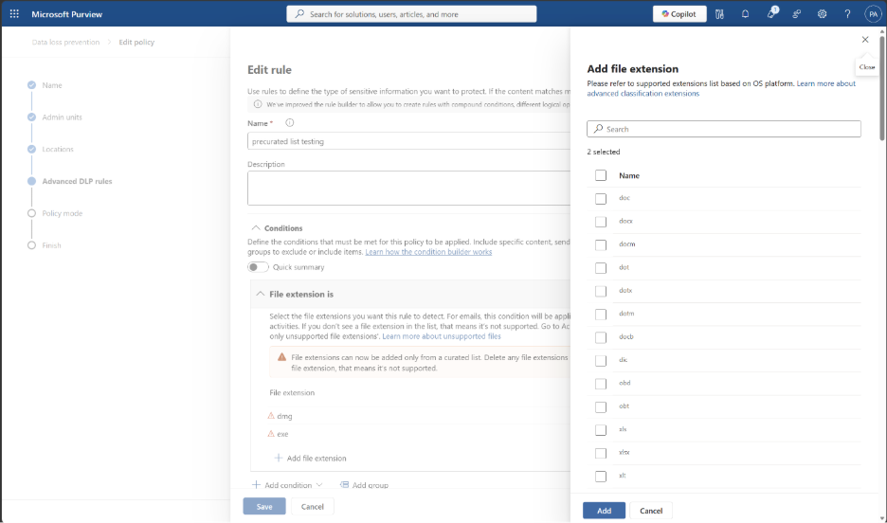
- Endpoint DLP now includes a pre‑curated list of supported file extensions for the File extension condition.
- Only file types that are supported and can be scanned appear in the picker.
- Free‑form text entry for file extensions is no longer available.
- Existing policies continue to enforce as they do today unless edited.
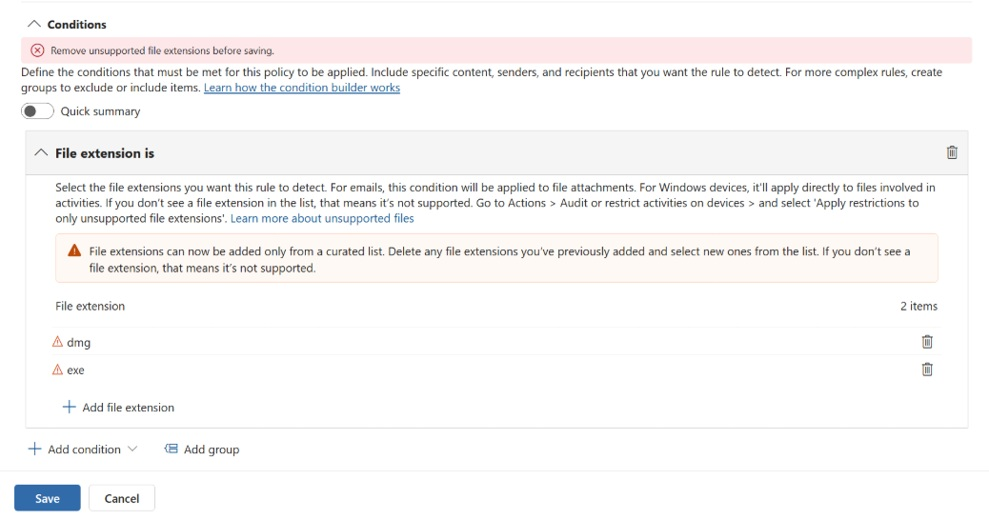
- If an edited policy contains unsupported file extensions, those entries must be removed before the policy can be saved.
- To maintain coverage for unsupported or non‑scannable file types, use the Apply restrictions to only unsupported file extensions feature. Learn more: Help protect against sharing of a defined set of unsupported files.
- Your overall protection posture does not change with this update.
Screenshot 1: Add file extension options:
Screenshot 2: Unsupported file extension warning in Microsoft Purview policy settings:
[Action Required / Recommendations:]
- No action required if you are not modifying existing policies.
- If you plan to edit or create a policy:
- Review your current file extension list.
- Keep supported file extensions.
- Remove unsupported file extensions and use Apply restrictions to only unsupported file extensions feature instead.
- Use the curated list when adding new supported file types.
Learn more:
- Learn about Endpoint data loss prevention | Microsoft Learn (will be updated before rollout)
- Conditions supported for Endpoints | Microsoft Learn (will be updated before rollout)
[Compliance considerations:]
No compliance considerations identified, review as appropriate for your organization.
More information
- www.microsoft.com/microsoft-365/roadmap?filters=&
- learn.microsoft.com/purview/dlp-create-policy-sharing-set-unsupported-files#help-protect-against-sharing-of-a-defined-set-of-unsupported-files
- learn.microsoft.com/purview/endpoint-dlp-learn-about
- learn.microsoft.com/purview/dlp-policy-reference#conditions-supported-for-endpoints
Details
In weekly changes
Platforms
- Web
- Windows
Services
- DLP
- Purview
- Windows
Category
- Stay informed
Microsoft tags
- Admin Action
- Feature Update
Related changes
- 562993 Endpoint Data Loss Prevention - Endpoint DLP now supports a pre curated list of file extensions for the file extension condition Roadmap · Purview · In development