MC1330887 Enhanced bookable desk experience with Teams panel based desk devices
Primary service: Teams
ChangePilot summary
- Enhanced bookable desk experience for Microsoft Teams panel-based desk devices (for example Logi Dock Flex and Yealink Linkhub) enabling at-a-glance availability and device-based reservations.
- Feature requires a Teams Shared Space license assigned per device and will appear automatically after the Teams app update on supported Android panel devices.
- No new admin configuration is introduced; however, IT should inventory panel devices, verify device licensing, and test the booking flow after rollout.
- Visitors (users without tenant accounts) can reserve desks from the device, and devices will prompt users to connect a laptop running the Teams app to complete reservations.
Latest update: Image URL Change
What it means for you
What admins need to do
Inventory all Microsoft Teams panel-based desk devices in your estate (e.g., Logi Dock Flex, Yealink Linkhub) and confirm each device has a Teams Shared Space license assigned. Plan to test one or more supported Android panel devices after the Teams app update to validate the booking/reservation and check-in flow. Update internal workspace booking guidance and brief helpdesk staff about the new flow (devices will prompt users to connect a laptop running Teams). No admin configuration changes are required, but ensure licensing and device firmware/app update processes are prepared so devices receive the Teams app update promptly.
Impact on users
Users will see desk availability directly on supported Teams panel devices and can reserve desks from the device UI. Visitors without tenant accounts can make reservations from the device, but devices will prompt users to connect a laptop running the Teams app to complete reservations or check-ins. The experience is automatic after the Teams app update; users should be informed about the new flow and the need to connect their laptop to confirm bookings.
If you miss it
If IT does nothing, impact is low operationally but users may be confused or unable to use the new device-based reservation flow if devices are not licensed or not running the updated Teams app. Failure to assign Teams Shared Space licenses to devices may prevent booking functionality on those panels. No compliance or security risks were identified, but helpdesk may receive support calls until users are informed and devices are validated.
- Admin controls available
- No
- Licences affected
- Teams Shared Space license
History
Recorded changes
- Standard end: late August 2026 (previously mid-August 2026).
-
- The start of the rollout is delayed from early July 2026 to early August 2026.
- Completion is now expected by mid-August 2026 instead of mid-July 2026.
-
- The start of the rollout is delayed from early July 2026 to early August 2026.
- Completion is now expected by mid-August 2026 instead of mid-July 2026.
Microsoft message
Updated August 17, 2026: We have updated the timeline. Thank you for your patience.
[What and Why]
We are introducing an enhanced bookable desk experience for Microsoft Teams panel based desk devices, such as Logi Dock Flex and the upcoming Yealink Linkhub. This update enables users to view at-a-glance desk availability and for visitors to reserve desks directly from the device, improving flexibility and productivity in hybrid work environments. Each device requires a Teams Shared Space license.
This message is associated with Microsoft 365 Roadmap ID 561031.
[Rollout Schedule]
General Availability (Worldwide): Rollout will begin in early August 2026 (previously early July) and is expected to complete by late August 2026 (previously mid-August).
[Impact on Your Organization]
Who is affected
- Organizations using Microsoft Teams panel based desk devices (for example, Logi Dock Flex).
Platforms/Services
- Microsoft Teams
- Teams panels based desk devices
- Android (Teams panel devices)
- Requires Teams Shared Space license
What will happen
After the Teams app update, device's user experience will directly reference desk booking and ask users to connect their laptop with the Teams app running to make a desk reservation.
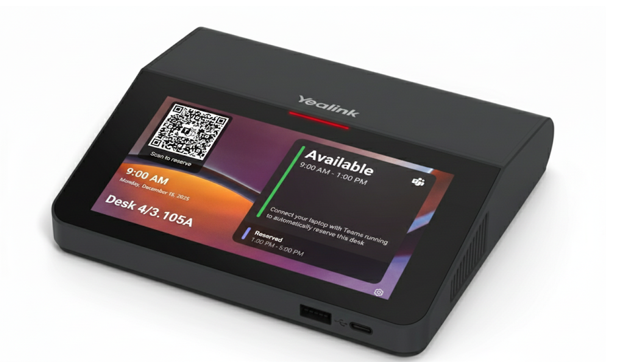
- Users will be able to:
- View desk availability directly on supported devices.
- Reserve desks directly from the device interface when they are visitors that do not have an account on the tenant.
- Devices will prompt users to connect their laptop running the Teams app to do desk reservations or to check-in to a reservation.
- The updated experience will be available automatically after the Teams app update on supported Android-based devices.
- Existing licensing requirements apply (Teams Shared Space license required per device).
- No new admin configuration is introduced for this change.
[Action Required / Recommendations]
No action is required.
We recommend that you:
- Identify Teams panel-based desk devices in your organization (for example, Logi Dock Flex).
- After rollout, test one or more devices to validate the updated booking experience.
- Inform users about the updated booking flow (connecting their laptop to confirm reservations).
- Update internal documentation or workspace booking guidance if applicable.
[Compliance considerations]
No compliance considerations identified. Review as appropriate for your organization.
More information
Details
Platforms
- Android
Services
- Teams
Category
- Stay informed
Microsoft tags
- Admin Action
- New Feature
- User Adoption
Related changes
- 561031 Enhanced bookable desk experience with Teams panel-based desk dock devices Roadmap · Teams · Launched