MC1330886 Get suggested edits from Copilot in your Copilot Pages
Primary service: M365 Copilot
ChangePilot summary
- Adds Copilot‑generated "Suggest edits" in Copilot Pages so users can request writing feedback and apply single‑click edits inline.
- Who is affected: users with Microsoft 365 Copilot and Copilot Pages (web); feature is available by default to eligible users and respects existing Copilot policies and permissions.
- Admin action: No required configuration, but admins should verify Copilot Pages and OneDrive are enabled, review Copilot access policies, update user guidance, and monitor usage and feedback.
- Compliance note: Copilot analyzes page content (AI/ML interacts with user‑authored data) — review privacy/compliance policies as needed.
Latest update: Image URL Change
What it means for you
What admins need to do
No configuration is required to enable suggested edits, but IT should: verify Copilot access and Copilot Pages are enabled for intended users; ensure OneDrive for Business provisioning is not blocking usage; review existing Copilot policies and permissions to confirm acceptable data handling; update internal documentation and support scripts to show how to invoke suggested edits via Copilot Shortcuts or Copilot Chat; communicate the new capability and data‑use implications to users; and monitor usage and feedback during Frontier/GA rollout.
Impact on users
Users with Microsoft 365 Copilot and Copilot Pages (web) will see a new "Suggest edits" option that analyzes page content and surfaces comment‑style suggestion cards in a right‑hand sidebar. Users can request feedback via Copilot Shortcuts or Chat and apply suggested edits with a single click. The feature is available by default to eligible users and respects existing Copilot permissions.
If you miss it
If IT does nothing, the feature will still roll out to eligible users by default. The main risks are increased helpdesk calls or user confusion if users are not informed, and potential compliance questions because Copilot analyzes user‑authored content. There is no service outage risk, but failing to review Copilot access/policies or inform users may increase support load and surface unreviewed privacy concerns.
- Admin controls available
- Yes
- Licences affected
- Copilot
History
Recorded changes
-
- Standard start: late August 2026 (previously late July 2026).
- Standard end: mid-September 2026 (previously early August 2026).
-
- Standard start: late July 2026 (previously late June 2026).
- Standard end: early August 2026 (previously mid-July 2026).
-
- Standard start: late July 2026 (previously late June 2026).
- Standard end: early August 2026 (previously mid-July 2026).
Microsoft message
Updated July 30, 2026: We have updated the timeline. Thank you for your patience.
[What and Why]
We are introducing Copilot‑generated suggested edits in Copilot Pages to help users improve the clarity and quality of their content without leaving their workflow. This enhancement brings AI‑powered writing feedback directly into the page experience, enabling users to review and apply actionable suggestions in context. This aligns with our goal to improve personal and team productivity by helping users create higher‑quality content more efficiently.
This message is associated with Microsoft 365 Roadmap ID 562351.
[Rollout Schedule]
- Frontier: We will begin rolling out to Frontier Private and Public in early June 2026.
- General Availability (Worldwide): We will begin rolling out end of August 2026 (previously late July) and expect to complete by mid-September 2026 (previously early August).
[Impact on Your Organization]
Who is affected
Users with access to Microsoft 365 Copilot and Copilot Pages
Platforms/Services
- Copilot Pages (web)
- Microsoft 365 Copilot
What will happen
- Users can request writing feedback directly within Copilot Pages using Copilot Shortcuts or Copilot Chat.
- A new Suggest edits option will be available:
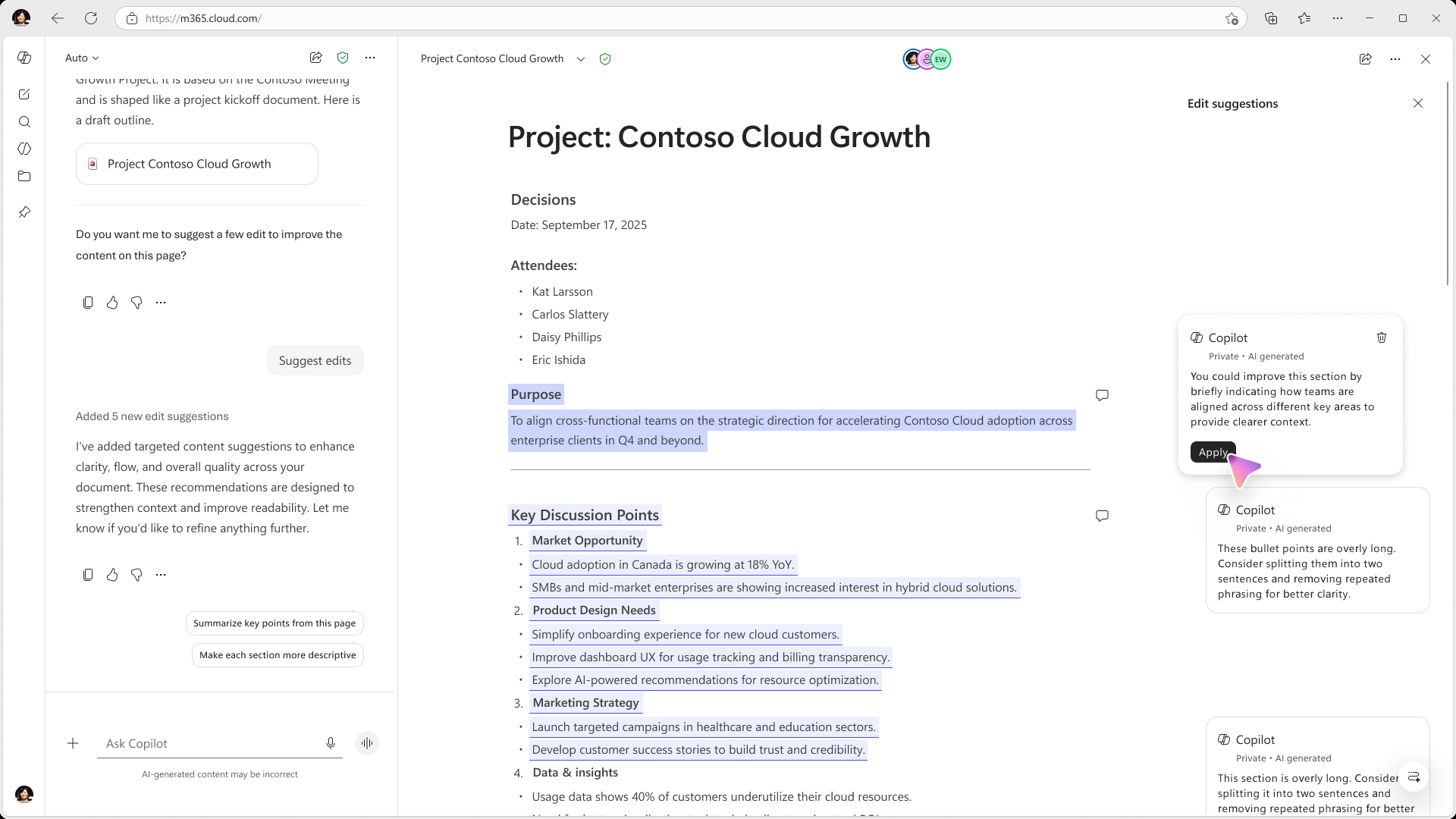
- Copilot analyzes page content and generates suggestions to improve clarity and writing quality.
- Suggestions appear as comment-like cards in a right-hand sidebar aligned to relevant content.
- Each suggestion can be applied with a single click using an Apply button.
- The feature is available by default to eligible users; no additional configuration is required.
- Existing Copilot policies and permissions are respected.
[Action Required / Recommendations]
No action is required.
Admins may consider the following:
- Inform users about the availability of suggested edits in Copilot Pages.
- Share guidance on accessing suggestions via Copilot Shortcuts or Copilot Chat.
- Set expectations that Frontier releases are early experiences intended for feedback and validation.
- Monitor usage and feedback as users adopt this capability.
- Review Copilot access and ensure Copilot Pages and OneDrive for Business remain enabled.
Learn more:
- Admin policies for Copilot Pages and Copilot Notebooks | Microsoft 365 | Microsoft Learn
- Disable OneDrive creation for some users - Manage user profiles in the SharePoint admin center | SharePoint in Microsoft 365 | SharePoint | Microsoft Learn
- Frontier program - Microsoft Adoption
[Compliance considerations]
| Question | Answer |
| Does the change introduce or significantly modify AI/ML capabilities that interact with customer data? | Yes. Copilot analyzes page content and generates suggestions based on user-authored content within Copilot Pages. |
| Does the change provide end users a new way to interact with generative AI? | Yes. Users can directly request and apply AI-generated writing suggestions within Copilot Pages. |
| Does the change allow a user to enable/disable the feature themselves? | Yes. Users can choose when to invoke suggested edits via Copilot Shortcuts or Chat. |
More information
- www.microsoft.com/microsoft-365/roadmap?filters=&
- www.microsoft.com/microsoft-365-copilot/frontier-program
- learn.microsoft.com/microsoft-365/loop/cpcn-admin-configuration?view=o365-worldwide
- learn.microsoft.com/sharepoint/manage-user-profiles#disable-onedrive-creation-for-some-users
- learn.microsoft.com/microsoft-365/loop/cpcn-admin-configuration?view=o365-worldwide
- learn.microsoft.com/sharepoint/manage-user-profiles#disable-onedrive-creation-for-some-users
- www.microsoft.com/microsoft-365-copilot/frontier-program
Details
Platforms
- Web
Services
- Loop
- M365 Apps
- M365 Copilot
- OneDrive
- SharePoint
Category
- Stay informed
Microsoft tags
- Admin Action
- New Feature
- User Adoption