MC1326520 Notebooks in Microsoft 365 Copilot: Organize work across conversations
Primary service: M365 Copilot
ChangePilot summary
- updated Notebooks experience in the Microsoft 365 Copilot app provide a persistent workspace that brings chats, generated content, and reference materials together and stays in sync with OneNote.
- Who is affected: users assigned a Microsoft 365 Copilot (Premium) license; Notebooks will be ON by default for eligible users when rollout reaches the tenant.
- Admin controls: Notebooks are governed by existing Microsoft 365 Copilot policies; there is no separate admin toggle for Notebooks.
- Action: No admin action required, but admins should inform users, update internal documentation, and prepare helpdesk guidance.
Latest update: Image URL Change
What it means for you
What admins need to do
No proactive configuration is required. Review your assignment of Microsoft 365 Copilot (Premium) licenses to understand who will see Notebooks by default. Confirm existing Microsoft 365 Copilot policies reflect your desired governance (there is no separate Notebooks toggle). Update internal documentation and helpdesk KB articles to describe the new Notebooks workspace and its OneNote sync behavior, and prepare user communications or training materials so support can answer questions when rollout reaches your tenant.
Impact on users
Eligible users with a Microsoft 365 Copilot (Premium) license will see a new Notebooks workspace in the Copilot web app that persists chats, generated outputs, and reference materials and synchronizes with OneNote. Content created from a Notebook (Word, PowerPoint, Excel, Copilot Pages) will remain associated with that Notebook. Users without the Copilot license will not see this feature.
If you miss it
If admins do not act, the feature will still roll out and be enabled by default for eligible Copilot users. The likely impacts are increased helpdesk inquiries and some user confusion about where to find Copilot-generated content; there are no new separate admin controls to prevent rollout. Microsoft identified no additional compliance impacts, but organizations should ensure Copilot policy settings meet their governance needs since Notebooks are governed by those existing policies.
- Admin controls available
- Yes
- Licences affected
- Microsoft 365 Copilot (Premium)
History
Recorded changes
-
- Targeted Release end: end of July 2026 (previously end of June 2026).
- Standard start: late July 2026 (previously mid-July 2026).
- Standard end: mid-August 2026 (previously late July 2026).
-
- Targeted Release end: end of July 2026 (previously end of June 2026).
- Standard start: late July 2026 (previously mid-July 2026).
- Standard end: mid-August 2026 (previously late July 2026).
-
- The rollout schedule for the Public Preview completion has been updated from early July 2026 to the end of June 2026.
- The start of the General Availability rollout has been adjusted from early July 2026 to mid-July 2026.
-
- The rollout schedule for the Public Preview completion has been updated from early July 2026 to the end of June 2026.
- The start of the General Availability rollout has been adjusted from early July 2026 to mid-July 2026.
Microsoft message
Updated July 15, 2026: We have updated the timeline. Thank you for your patience.
[What and Why:]
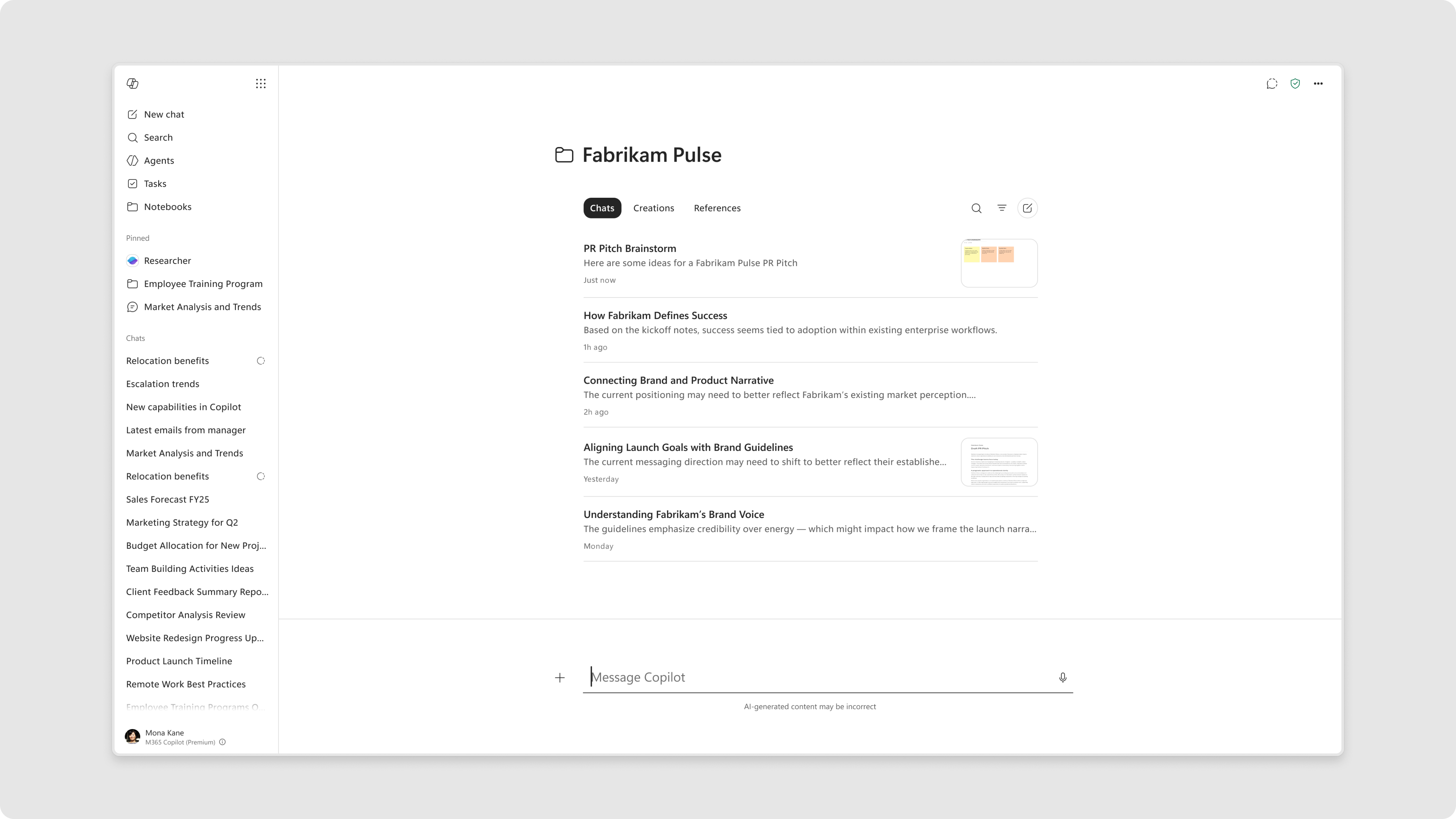
The updated Notebooks experience in the Microsoft 365 Copilot app helps users keep project work organized across conversations. Notebooks bring chats, generated content, and reference materials together in a lightweight, persistent workspace, making it easier to stay in context and move work forward. This update complements the existing Notebooks experience in OneNote, which remains unchanged. Notebooks stay in sync across the Microsoft 365 Copilot app and OneNote, allowing users to move between experiences without losing context.
This message is associated with Roadmap ID 562662.
[Rollout Schedule:]
- Public Preview (Worldwide): We will begin rolling out in mid-June 2026 and expect to complete by end of July 2026 (previously end of June).
- General Availability (Worldwide): We will begin rolling out in late July 2026 (previously mid-July) and expect to complete by mid-August 2026 (previously late July).
[Impact on Your Organization:]
Who is affected: Users with a Microsoft 365 Copilot (Premium) license
Platforms/Services:
- Microsoft 365 Copilot app (web)
- OneNote
What will happen:
- Users with a Microsoft 365 Copilot license will see Notebooks in the Microsoft 365 Copilot app once rollout reaches their tenant.
- The existing Copilot Notebooks offering in the Microsoft 365 Copilot app continues to be referred to as Notebooks; the entry point and existing Notebook data remain in place.
- Notebooks in OneNote are unchanged. Users can continue working with Copilot Notebooks in OneNote.
- Notebooks stay in sync between the Microsoft 365 Copilot app and OneNote, and users can open Notebooks in either experience.
- Content created from a Notebook—including Word documents, PowerPoint presentations, Excel spreadsheets, Copilot Pages, and other supported objects—remains associated with that Notebook.
- Default state: On for eligible users once rollout reaches the tenant.
- Admin controls: Governed by existing Microsoft 365 Copilot policies; there is no separate admin toggle for Notebooks.
Screenshot: Notebooks experience in the Microsoft 365 Copilot app:
[Action Required / Recommendations:]
No admin action is required.
We recommend that admins:
- Inform end users that Notebooks is the workspace name in the Microsoft 365 Copilot app.
- Reinforce that Notebooks in OneNote remain available and unchanged.
- Update internal documentation or helpdesk guidance, if applicable, to reference Notebooks as the organizing workspace in the Copilot app.
Notebooks in the Microsoft 365 Copilot app are governed by your organization’s existing Microsoft 365 Copilot policies.
Before rollout, we will update this post with new documentation.
[Compliance considerations:]
This change introduces a new way for users to interact with generative AI by organizing Copilot chats and outputs in a persistent Notebook workspace. No other compliance impacts were identified.
More information
Details
Platforms
- Web
Services
- Excel
- M365 Copilot
- OneNote
- PowerPoint
- Word
Category
- Plan for change
Microsoft tags
- Feature Update
- User Adoption
Related changes
- 562662 New Copilot Notebooks design in the Microsoft 365 Copilot App Roadmap · M365 Apps · Launched