MC1325413 Microsoft Teams | RemoteApp End of support for WebRTC optimization in Azure Virtual Desktop and Windows 365
Primary service: Teams
ChangePilot summary
- Microsoft Teams RemoteApp on Azure Virtual Desktop and Windows 365 will transition from the legacy WebRTC-based VDI optimization to a SlimCore-based media engine and eligible RemoteApp users will be moved automatically.
- Affected environments include Teams running as RemoteApp on Azure Virtual Desktop and Windows 365 from Windows endpoints; the "Give and Take Control" feature is not supported with the new optimization.
- No admin action is required to trigger the transition, but admins should verify minimum client versions (Windows App for Windows >= 2.0.964.0; Teams >= 26043.2016.4478.2773), inform helpdesk, and update internal documentation and user communications.
- Users will see dismissible and modal notifications ahead of retirement; if the new SlimCore optimization cannot be established after retirement, Teams will fall back to server-side rendering.
Latest update: Image URL Change
What it means for you
What admins need to do
Verify and inventory Teams RemoteApp usage on Azure Virtual Desktop and Windows 365 and ensure Windows App for Windows is at least version 2.0.964.0 and Microsoft Teams is at or above version 26043.2016.4478.2773. Update internal documentation and run a pilot test for the SlimCore optimization if possible. Brief and train helpdesk/support teams on the retirement timeline, expected dismissible and modal user notifications, the unsupported "Give and Take Control" behavior, and the fallback to server-side rendering. Communicate the change and any expected differences to impacted users and update runbooks for troubleshooting media-quality regressions after the transition.
Impact on users
If you use Teams as a RemoteApp on Azure Virtual Desktop or Windows 365 from Windows endpoints, Teams will automatically switch to a new SlimCore media engine which should improve audio/video performance and reliability. You will see dismissible and later modal notifications about the change; the Give and Take Control feature will not be available with the new optimization. If the new optimization cannot be established after retirement of WebRTC, Teams will fall back to server-side rendering which may reduce media quality.
If you miss it
Because the transition is automatic, no admin configuration is required, but missing the recommended checks and communications may leave helpdesk unprepared for user questions and troubleshooting. Users could be surprised by modal notifications and by the removal of Give and Take Control; after the WebRTC optimization is turned off, affected sessions that cannot establish SlimCore will fall back to server-side rendering and may experience reduced audio/video quality. There are no stated compliance or licensing penalties, but user experience and support load could increase if planning is missed.
- Admin controls available
- No
History
Recorded changes
No changes recorded since ChangePilot first saw this post.
Microsoft message
[What and Why]
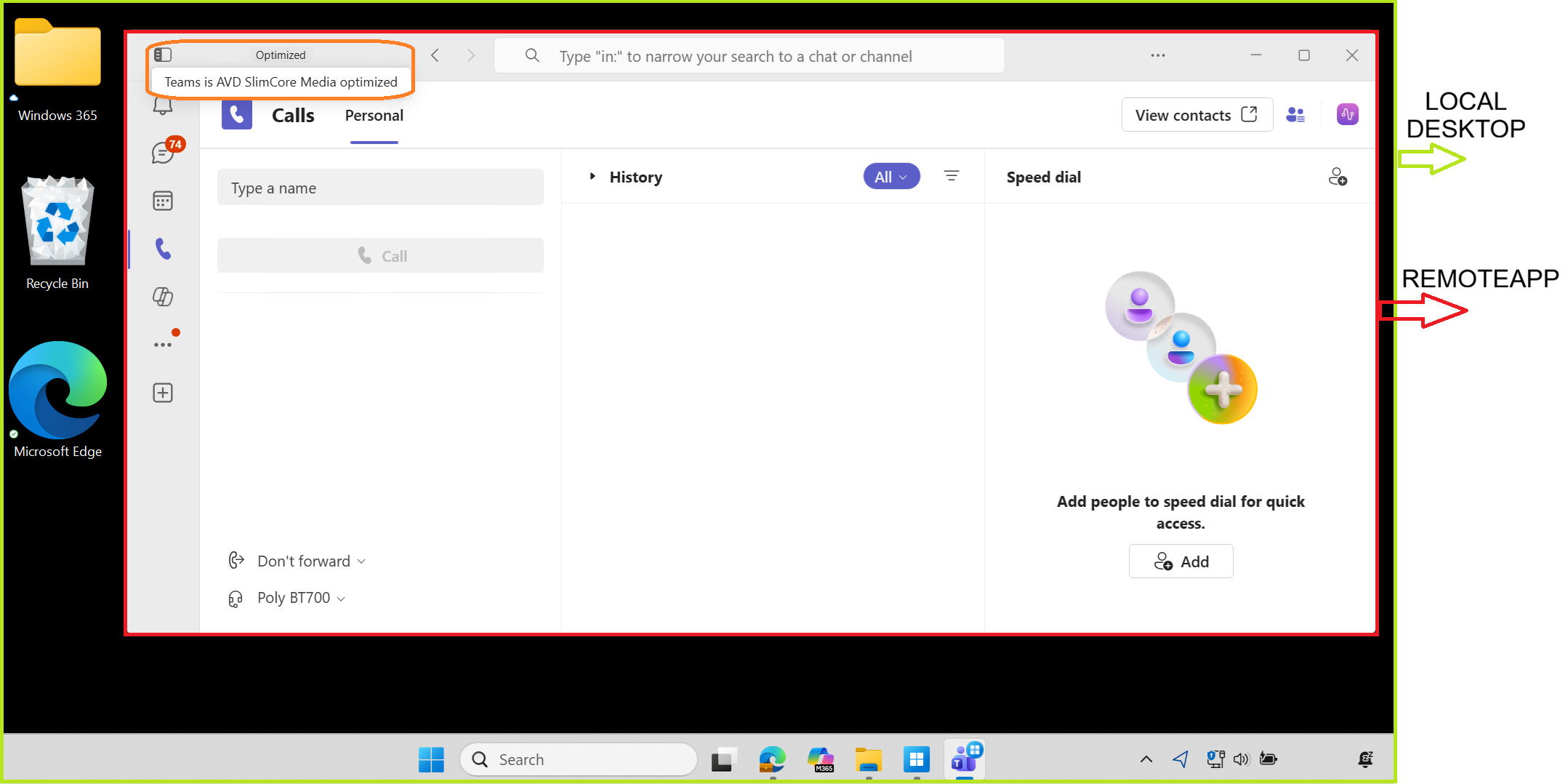
As announced in Message Center post MC1272546, Microsoft Teams is moving from the legacy WebRTC based Virtual Desktop Infrastructure optimization to a new SlimCore based media engine for RemoteApp and Cloud App scenarios on Azure Virtual Desktop and Windows 365. The new optimization improves audio and video performance, reliability, and security, and simplifies support by allowing media engine updates without frequent VDI infrastructure or client upgrades. As part of this transition, Microsoft will retire support and availability for the legacy WebRTC based optimization.
[Rollout Schedule]
General Availability (Worldwide, GCC, GCCH and DOD): Rollout will begin in early August 2026 and is expected to complete by early April 2027.
Key milestones:
- End of Support: August 1, 2026 through September 30, 2026
- Starting October 1, 2026, WebRTC optimization is no longer supported but may still function.
- End of Availability: February 1, 2027 through March 30, 2027
- Starting April 1, 2027, WebRTC optimization will stop working and the new optimization will be enforced.
[Impact on Your Organization]
Who is affected
- Organizations using Microsoft Teams as a RemoteApp on Azure Virtual Desktop or Windows 365 from Windows endpoints
Platforms and Services
- Microsoft Teams, Azure Virtual Desktop, Windows 365, Windows App for Windows
What will happen
- Eligible Team users running in RemoteApp will automatically transition to the new SlimCore based optimization:
- Audio and video performance and reliability will improve compared to WebRTC optimization.
- Media engine updates will no longer require frequent upgrades to VDI infrastructure or client.
- Users will see dismissible dialogue notifications ahead of end of support.
- Users will see modal dialog notifications ahead of end of availability.
- After April 1, 2027, WebRTC optimization will no longer function. If the new optimization cannot be established, Teams will fall back to server-side rendering.
- The Give and Take Control feature is not supported at this time.
[Action Required or Recommendations]
No admin action is required for the transition.
Recommended actions:
- Verify that your environment meets the minimum version requirements:
- Windows App for Windows version 2.0.964.0 or later
- Microsoft Teams version 26043.2016.4478.2773 or later
- Inform helpdesk and support teams about the retirement timeline and expected user notifications.
- Communicate the change to impacted users.
- Review current Teams VDI documentation for supported scenarios and known limitations.
- Update any internal documentation referencing WebRTC optimization.
Learn more: New VDI solution for Teams | Microsoft Teams | Microsoft Learn
[Compliance considerations]
No compliance considerations identified. Review as appropriate for your organization.
More information
Details
Platforms
- Windows
- Desktop
Services
- Teams
- VDI
- Windows
- Windows 365
Category
- Plan for change
Microsoft tags
- Admin Action
- Retirement
- User Adoption
Related changes
- MC1272546 Microsoft Teams | RemoteApp support for Azure Virtual Desktop and Windows 365 with SlimCore optimization Message Center · Teams · Admin Low