MC1324286 Profanity filter disabled by default for live captions
Primary service: Teams
ChangePilot summary
- Microsoft Teams live captions profanity filter default will change from On to Off for users who have never configured the setting; captions may show unfiltered language by default.
- Change applies to all Microsoft 365 tenants using Teams (meetings, calls, events) and Microsoft Teams Rooms; users who already configured the setting are not affected.
- No admin policies or tenant configuration changes are made; users retain control and can re-enable profanity filtering in Teams settings.
- No admin action required, but admins should inform helpdesk, update user guidance, and consider communicating the change to end users.
Latest update: Image URL Change
What it means for you
What admins need to do
No tenant configuration changes are required. Prepare helpdesk and support teams with a brief explaining that live captions may show unfiltered language by default for new/unconfigured users and how to re-enable profanity filtering (Teams > Settings > Captions & transcripts > Profanity filter). Update internal KB/training and user-facing documentation, and plan a short user communication if your organization needs to set expectations or provide guidance for regulated groups.
Impact on users
If you have never set the profanity filter in Teams, live captions may display unfiltered language by default after rollout. You can change this anytime in Teams settings under Captions & transcripts by turning the profanity filter back on. Users who already set a preference will see no change.
If you miss it
If IT does nothing, the change will still roll out and some users (especially those who haven't configured captions) may see unfiltered profanity in live captions, possibly causing confusion or complaints and extra helpdesk requests. Organizations with strict content or regulatory requirements should review and communicate guidance to impacted users; there are no tenant-level controls to prevent the default change.
- Admin controls available
- No
History
Recorded changes
-
- GCC end: late August 2026 (previously late July 2026).
- GCC High end: late August 2026 (previously late July 2026).
- DoD end: late August 2026 (previously late July 2026).
- GCC, GCC High and DoD end: late July 2026 (previously late June 2026).
- GCC, GCC High and DoD end: late July 2026 (previously late June 2026).
Microsoft message
Updated August 17, 2026: We have updated the timeline. Thank you for your patience.
[What and Why]
We are updating the default setting for the profanity filter in Microsoft Teams live captions from On to Off. This change ensures captions more accurately reflect spoken content, supporting accessibility needs and aligning with regional regulatory requirements (including the EU). Users retain full control and can enable or disable the filter at any time.
This message is associated with Microsoft 365 Roadmap ID 560323.
[Rollout Schedule]
- Targeted Release: Early June 2026 – Mid-June 2026
- General Availability (Worldwide): Mid-June 2026
- General Availability (GCC, GCCH, and DoD): Mid-June 2026 – end of August 2026 (previously end of July)
[Impact on Your Organization]
Who is affected
- Users who have never configured their live captions profanity filter setting in Teams
- Applies to all Microsoft 365 tenants using Microsoft Teams
Platforms/Services
- Microsoft Teams
- Meetings, calls, and events
- Microsoft Teams Rooms (MTR) devices
- Desktop, web, and mobile clients
What will happen
- The profanity filter for live captions will be Off by default for newly initialized users.
- Users who have already configured this setting will not be affected.
- Live captions may display unfiltered language by default after rollout.
- Users can update their preference at any time in Teams settings:
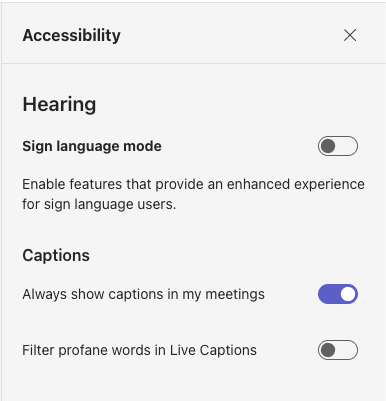
- No changes are made to admin policies or configurations.
[Action Required / Recommendations]
No admin action is required.
Admins may consider the following:
- Inform helpdesk and support teams about this change.
- Communicate to users that:
- Live captions may display unfiltered language by default.
- Users can re-enable profanity filtering in Teams settings.
- Update internal documentation or training materials if applicable.
Learn more: Use live captions in Microsoft Teams meetings | Microsoft Support
[Compliance considerations]
No compliance considerations identified. Review as appropriate for your organization.
More information
Details
Platforms
- Android
- Desktop
- iOS
- Mac
- Web
- Teams Rooms
Services
- Live Events
- MTR
- Teams
- Teams UC
Category
- Plan for change
Microsoft tags
- Admin Action
- New Feature
- User Adoption
- Highlighted
Related changes
- 560323 Profanity filter is disabled by default for captions Roadmap · Teams · Launched