MC1324284 New entry point for "Create pages with Copilot in SharePoint"
Primary service: SharePoint
ChangePilot summary
- New Copilot in SharePoint adds AI-assisted page and news post creation with prompt boxes on the Publish landing page and in the Site Template Gallery.
- Feature is enabled by default for eligible users and respects SharePoint permissions; authors retain full editing and customization control.
- A Microsoft 365 Copilot (Premium) license is required to use the feature; availability is limited to licensed/eligible users.
- No admin action is required, but IT should verify Copilot licensing, update authoring docs, communicate to SharePoint authors, and review grounding-file/data governance.
Latest update: Image URL Change
What it means for you
What admins need to do
No configuration is required before rollout, but IT should: confirm which users have Microsoft 365 Copilot (Premium) licenses and allocate licenses to authors who should use the feature; update internal SharePoint authoring documentation and training to cover the new entry points and grounding-file use; inform helpdesk and content owners about the new AI-assisted workflow; and review content governance and data access controls for use of grounding files to avoid unwanted data exposure.
Impact on users
SharePoint authors will see new prompt boxes on the Publish landing page and in the Site Template Gallery allowing them to describe desired content, optionally select grounding files, and choose Page or News Post. Copilot will generate a draft authors can refine in the page editor. The feature is only available to users who have the Microsoft 365 Copilot (Premium) license.
If you miss it
If IT ignores this message, the primary risks are limited confusion and missed preparation: eligible authors will gain the feature by default and may start using AI-assisted drafting without training or updated governance, and users without Copilot licenses will not have access. There is no immediate service interruption risk, but failure to review licensing, training, and grounding-file governance may lead to inconsistent usage and potential data exposure via grounding files.
- Admin controls available
- Unknown
- Licences affected
- Microsoft 365 Copilot (Premium)
History
Recorded changes
-
- The Public Preview completion date has been moved from early June 2026 to early July 2026.
- The Targeted Release start date has changed from late June 2026 to mid-July 2026, and the completion date has been adjusted from late July 2026 to early August 2026.
- The rollout schedule for the Targeted Release has been updated, with the start now moved from early June 2026 to late June 2026. Completion date remains unchanged, expected by late July 2026.
- The rollout schedule for the Targeted Release has been updated, with the start now moved from early June 2026 to late June 2026. Completion date remains unchanged, expected by late July 2026.
-
- The updated content mentions only one new entry point for creating AI-assisted SharePoint pages, whereas the original content included two specific entry points: "Start from Publish" and "Start from the Site Template Gallery."
- The update removes the "Start from Publish" entry point, highlighting only the "Site Template Gallery" as the means to create AI-assisted content.
- The compliance consideration section omits the ability to invoke Copilot prompts from the Publish landing page that was present in original, focusing solely on the Site Template Gallery.
- The General Availability release schedule for worldwide rollout, which was expected to begin in early June 2026 and complete by late July 2026, has been removed.
- The General Availability release schedule for worldwide rollout, which was expected to begin in early June 2026 and complete by late July 2026, has been removed.
Microsoft message
Updated June 22, 2026: We have updated the timeline. Thank you for your patience.
[What and Why:]
We’re enhancing the existing AI-powered SharePoint Page and News Post creation experience by expanding Copilot in SharePoint (previously AI in SharePoint) with a new entry point and a more integrated authoring flow.
This update helps authors move more quickly from idea to publish-ready content by making AI-assisted creation available earlier and more consistently across SharePoint, while maintaining full editing control and customization flexibility.
[Rollout Schedule:]
- Public Preview (Worldwide): We began rolling out in early March 2026 and expect to complete by early July 2026 (previously early June).
- Targeted Release (Worldwide): We will begin rolling out in mid-July 2026 (previously late June) and expect to complete by early August 2026 (previously late July).
[Impact on Your Organization:]
Who is affected:
- Users who create SharePoint pages or news posts
- A Microsoft 365 Copilot (Premium) license is required to use this feature
- Tenants opted in to Copilot in SharePoint (previously AI in SharePoint) public preview
Platforms/Services:
- SharePoint Online (Web)
- Microsoft 365 Copilot
- SharePoint Pages and News Posts
What will happen:
Authors can start creating AI-assisted SharePoint pages and news posts from a new entry point in SharePoint:
- Authors can quickly create a SharePoint page using AI by entering a prompt.
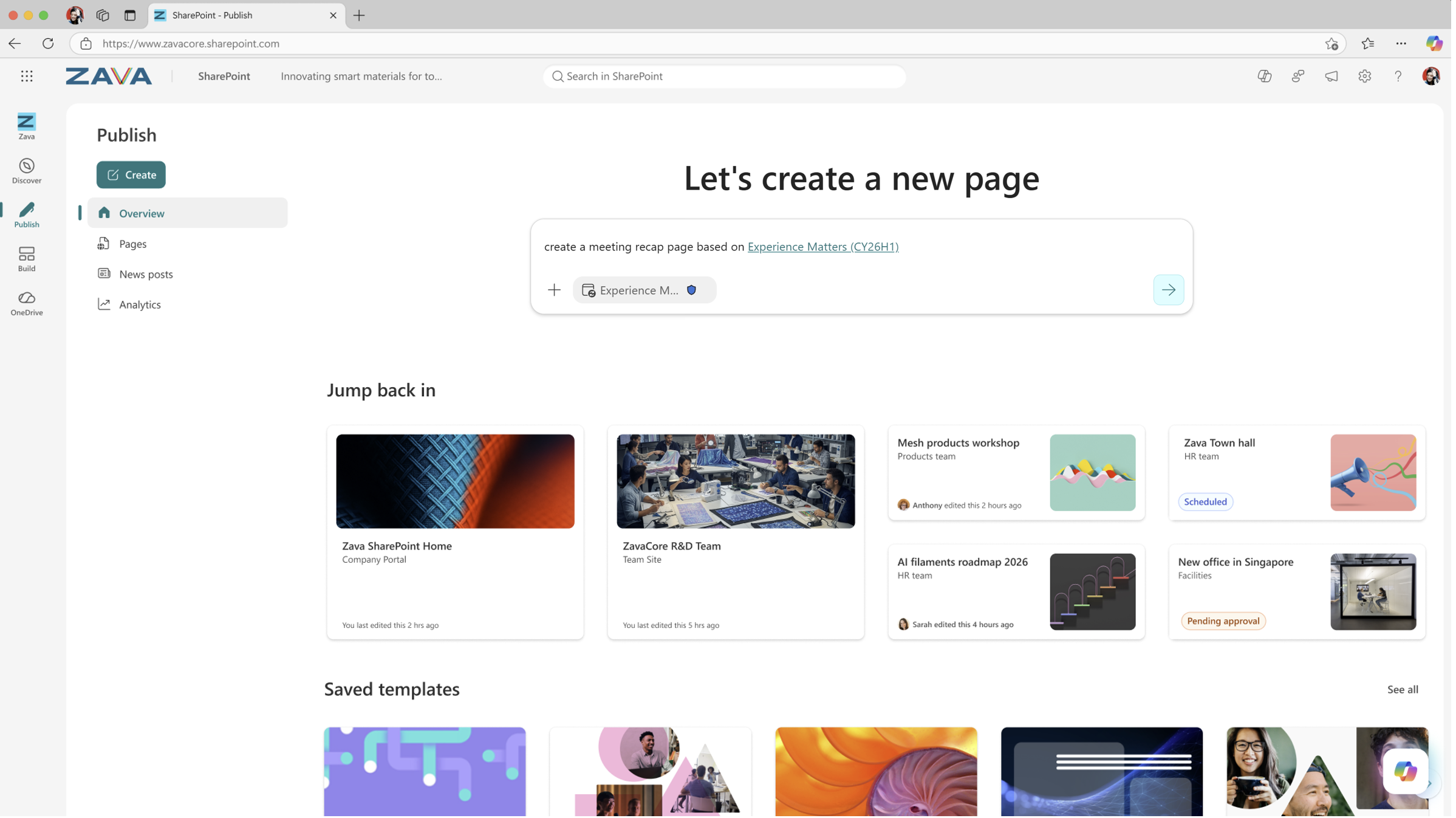 >
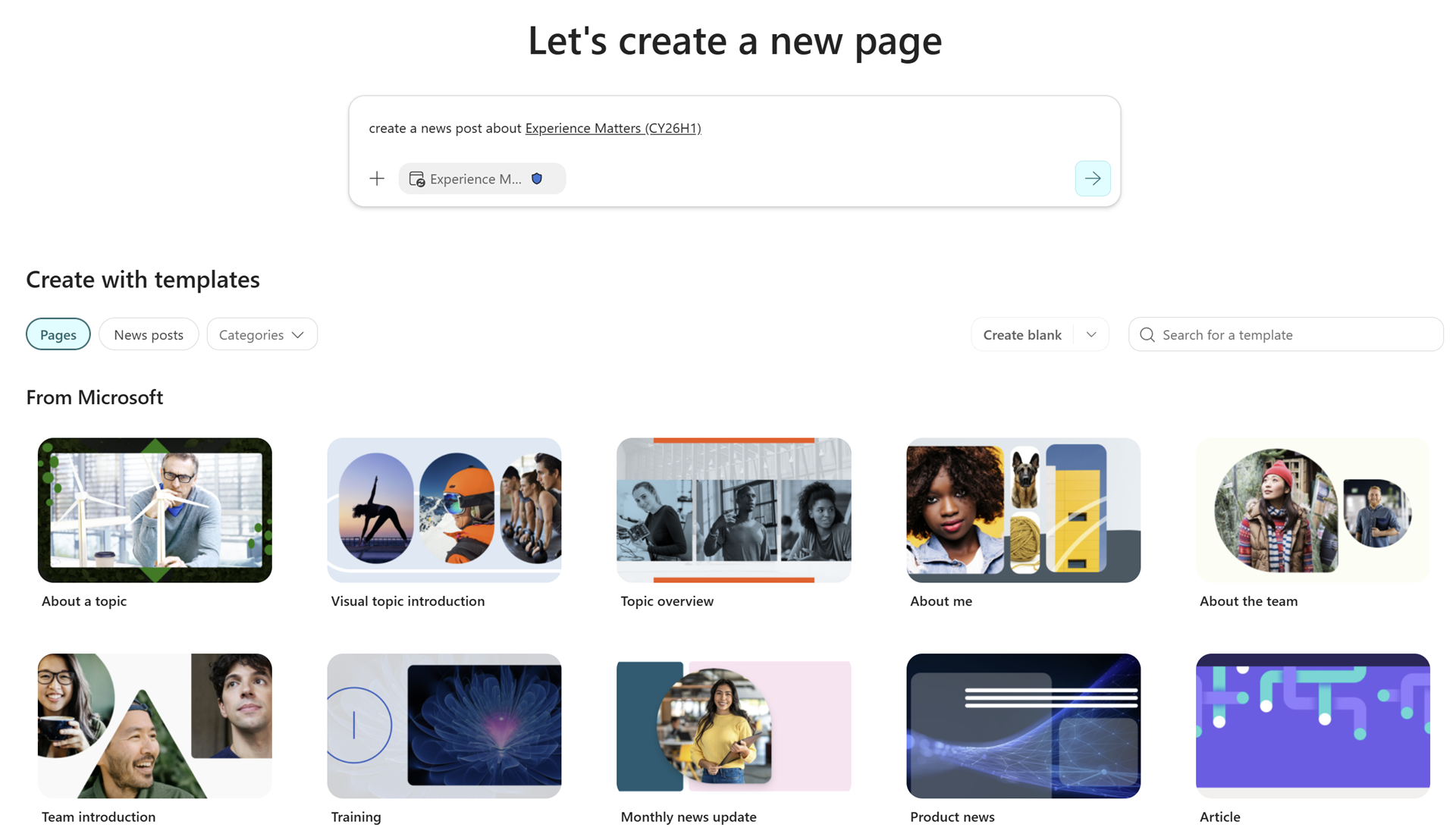
2. Start from the Site Template Gallery
- A new prompt box will appear at the top of the SharePoint Site Template Gallery.
- From this experience, authors can:
- Enter a prompt to describe the content they want to create
- Select grounding files to provide additional context
- Choose whether to create a Page or a News Post using the pivot control
- Copilot will generate a visually engaging draft that authors can continue refining directly within the page editor using the Copilot panel.
- The experience is enabled by default for eligible users, respects existing SharePoint permissions, and maintains full editing and customization flexibility.
[Action Required / Recommendations:]
No admin action is required. Consider notifying SharePoint authors and updating internal documentation as appropriate.
Learn more: Authoring with AI in SharePoint: An overview | Microsoft Support (will be updated before rollout)
[Compliance considerations:]
| Compliance question | Explanation |
| Does the change introduce or significantly modify AI/ML capabilities that interact with customer data? | Copilot in SharePoint expands generative AI-assisted content creation using prompts and optional grounding files within SharePoint pages and news posts. |
| Does the change provide end users a new way of interacting with generative AI? | Users can now invoke Copilot prompts from the Site Template Gallery. |
More information
Details
Platforms
- Web
Services
- M365 Copilot
- SharePoint
Category
- Plan for change
Microsoft tags
- Feature Update
- User Adoption